
It’s Thursday, and three tasks you expected your virtual assistant to finish are still open.
A client report is late. The prospect list hasn’t been updated. Tomorrow’s scheduled content is waiting for a final check. Meanwhile, you’ve already sent over another set of requests for next week.
Your first instinct might be to schedule more check-ins, ask your VA to work faster, or quietly take over the unfinished tasks yourself.
But is your virtual assistant missing deadlines because of a performance problem, or because the work no longer fits the hours and scope you agreed on?
Those are different situations, and they need different solutions.
Before changing your VA’s responsibilities or increasing their hours, you need to identify what’s causing the delays, bring the current backlog under control, and agree on what can realistically be completed.
Is Your VA Overloaded, or Is Something Else Causing the Delays?
Late work doesn’t automatically mean your VA is overloaded. It also doesn’t automatically mean they’re underperforming.
Four different problems can produce similar symptoms:
Capacity: The work requires more time than the available hours allow. Your VA may complete individual tasks correctly, but the queue keeps growing.
Clarity: Instructions, priorities, or expected outcomes aren’t sufficiently defined. Your VA spends time interpreting requests, asking questions, or correcting avoidable misunderstandings.
Dependency: Work cannot move forward without your approval, missing information, access, or another person’s response.
Skill or role fit: The responsibility requires experience or judgment that doesn’t match the VA’s current capabilities.
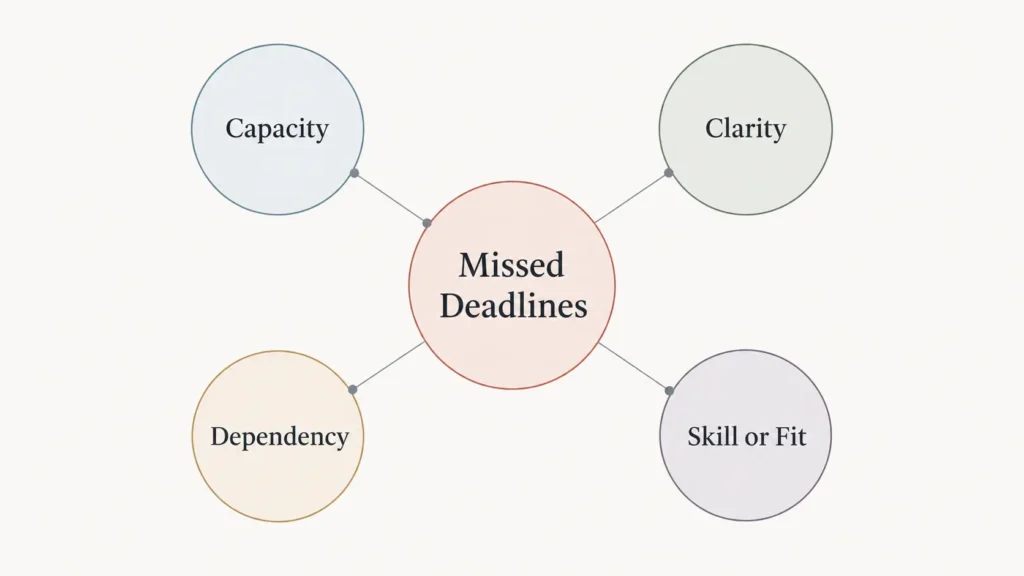
The distinction matters because adding more hours won’t necessarily fix missing approvals or unclear instructions.
If instructions are causing repeated confusion, start by making the task requirements clearer.
If assignments are waiting on your decisions, a weekly VA report that identifies blockers and next owners can help show where progress is getting stuck.
And if work repeatedly falls below an agreed standard even when the workload is manageable, consider a fair virtual assistant performance review rather than assuming every issue comes from overload.
Signs that point toward a capacity problem
Look at what happens across several assignments, not just one late task.
Capacity is worth investigating when:
Completed work is generally accurate, but unfinished tasks continue accumulating.
New requests regularly arrive before existing assignments are completed.
The estimated work exceeds the support hours you’ve agreed to.
Urgent tasks repeatedly push previously scheduled work into the following week.
Your VA has already flagged that certain deadlines cannot fit within the available time.
None of these signs proves capacity is the only problem. However, together they provide a good reason to compare the actual workload with the available hours.
Why Diagnosing Your VA’s Burnout Isn’t the Answer
When deadlines slip, it’s easy to describe your virtual assistant as exhausted, burned out, or overwhelmed.
But missed tasks and slower responses aren’t enough to establish what’s happening with someone’s health.
The World Health Organization defines burnout as an occupational phenomenon associated with chronic workplace stress that hasn’t been successfully managed. It isn’t classified as a medical condition.
As a client, you also have limited visibility into your VA’s wider working circumstances.
Many virtual assistants work independently and may serve more than one client. Depending on your agreement, you may be purchasing a defined number of service hours or specific deliverables rather than controlling the person’s entire working schedule.
Your responsibility is to address the work you’re assigning.
That means discussing realistic deadlines, available capacity, priorities, and any necessary changes to the agreed scope.
If responsibilities have expanded, review the scope and working terms in your VA agreement instead of assuming the extra work is automatically included.
Do the Capacity Math Before Changing the Plan
Suppose you have a virtual assistant on a 30-hour monthly arrangement.
That works out to roughly seven hours per week on average, although the actual distribution depends on your agreement and how the hours are scheduled.
Now suppose the work you’ve assigned requires approximately 45 hours this month.
The immediate problem is mathematical.
45 hours of requested work minus 30 available hours = a 15-hour capacity gap.
And that calculation hasn’t necessarily accounted for instructions, progress updates, questions, handovers, or unexpected exceptions.
Compare available hours with committed work
Use this basic calculation:
Available task hours = Remaining agreed support hours minus expected coordination time
Capacity gap = Estimated hours for committed tasks minus available task hours
For example:
Remaining support hours: 30
Estimated coordination and handover time: 2 hours
Hours available for task execution: 28
Estimated task workload: 45 hours
Uncovered workload: 17 hours
These figures are illustrative, not a standard workload allowance.
If your agreement measures hours differently, calculate using the actual terms and available capacity. Also distinguish work that needs attention this week from work that can reasonably wait until another period.
If you’re unsure how to estimate recurring task hours, my guide on calculating virtual assistant hours explains how to turn task frequency and handling time into a realistic support estimate.
Use time records to understand capacity, not judge effort
Where time tracking is part of your arrangement, compare estimated hours with actual time used on similar assignments.
That can reveal work that consistently takes longer than expected or additional tasks that have gradually become part of the workload.
But time spent isn’t the same as productivity.
A complicated research assignment may take longer than a routine spreadsheet update while still providing greater business value.
The purpose of reviewing hours here is to establish whether the requested work fits the purchased capacity, not to monitor every minute.
For the broader distinction, see how to track VA productivity without relying on hours alone.
Reset the Backlog in One Sitting
Once you’ve established that capacity may be the problem, the next priority is to stop treating the entire backlog as one enormous assignment.
You need to turn a list of unfinished work into a set of decisions.
Pause additional requests temporarily
Tell your VA you’re reviewing the current workload before introducing more tasks.
This doesn’t mean ignoring a genuine emergency. It means avoiding further routine additions while you’re deciding what should happen to the work already assigned.
Make it clear that the purpose is to establish a realistic plan, not to blame them for the backlog.
Put every open task in one place
Bring together unfinished assignments from your project board, email, chat messages, and any other place you’ve been sending instructions.
Include small requests that never became formal tasks.
A five-minute change can be easy to overlook, but repeated small changes can consume a meaningful portion of limited hours.
For each item, record the estimated time remaining, who is waiting on whom, and what would actually happen if it were completed later.
Give every item a decision
Every open item should receive one of four immediate decisions:
Do now: Keep work that has a meaningful near-term consequence if delayed.
Defer: Move work that still matters but can reasonably wait, and give it a new date.
Drop: Remove work that no longer justifies the time.
Take back: Return work to yourself or another suitable owner when it requires your authority, a specialist, or a different arrangement.
Prioritize based on consequences, not simply because someone labelled a task urgent.
A routine internal tidy-up and a customer commitment due tomorrow shouldn’t automatically carry the same weight.
Copyable Backlog Reset Table
Use this table with your VA to document the decisions. Copy it into a spreadsheet or your existing task system, then add one row for each unfinished assignment.
| Task | Requested by / added | Consequence if late | Hours remaining | Waiting on | Decision | New agreed date |
|---|---|---|---|---|---|---|
| Task 1 | High / Medium / Low | VA / Owner / Third party | Do now / Defer / Drop / Take back | |||
| Task 2 | High / Medium / Low | VA / Owner / Third party | Do now / Defer / Drop / Take back | |||
| Task 3 | High / Medium / Low | VA / Owner / Third party | Do now / Defer / Drop / Take back | |||
| Task 4 | High / Medium / Low | VA / Owner / Third party | Do now / Defer / Drop / Take back | |||
| Total hours still requested | ___ |
Below the table, record:
Available task hours for the period: ___
Estimated hours still assigned to the VA: ___
Remaining gap or spare capacity: ___
Person confirming the revised plan: ___
Date the revised plan was agreed: ___
Count only the work that remains assigned to the VA when comparing workload with capacity. Defer, drop, or transfer decisions should change that total.
For blocked tasks, record the person responsible for removing the blocker. Waiting on an owner or third party doesn’t necessarily mean the VA needs more execution hours.
Replace old deadlines with dates you can actually meet
After deciding what remains, review the estimated hours again.
If the remaining work still exceeds capacity, the reset isn’t finished.
Reduce the workload further, negotiate additional capacity, or agree on a different delivery arrangement.
Then confirm the revised task order and dates with your VA. Don’t simply move every unfinished item to Friday and recreate the same problem.
The result should be one current backlog with clear priorities, responsible owners, and realistic deadlines.
Worked Example: A 30-Hour Plan With 45 Hours of Tasks
Imagine a small marketing business that uses one virtual assistant for recurring administrative and content support.
This is a fictional illustration, not a Boost VA client case.
The owner originally arranged 30 support hours per month. Over time, extra requests were added without removing older responsibilities.
The current estimated workload looks like this:
| Assignment | Estimated hours | Reset decision |
|---|---|---|
| CRM record cleanup | 12 | Do now |
| Customer inbox and follow-ups | 10 | Do now |
| Approved blog uploads | 6 | Do now |
| Lead list refresh | 7 | Defer to next month’s agreed schedule |
| Old file archive cleanup | 5 | Drop |
| Sales presentation revisions | 5 | Owner takes back |
| Total | 45 |
Before the reset, 45 hours of task execution were competing for a 30-hour arrangement.
The owner and VA then review the actual consequences.
The CRM work supports an upcoming client delivery. Customer follow-ups need continued attention. Approved blog uploads already have scheduled dates.
Those three responsibilities remain.
The lead list refresh isn’t needed until a later campaign, so it receives a new delivery date in the next agreed work period.
The old archive cleanup no longer has a clear business purpose, so it’s removed.
The sales presentation requires decisions and revisions the owner wants to make personally, so that responsibility moves back to them.
The revised task workload is:
12 + 10 + 6 = 28 hours
If approximately two hours are needed for coordination and updates, the work now fits the 30-hour arrangement.
The owner still needs to confirm the distribution of those hours and the specific delivery dates. A task that takes four hours isn’t automatically feasible tomorrow simply because the monthly total fits.
However, the central problem has changed.
Instead of 45 hours of competing requests and several unreliable deadlines, the VA now has a smaller set of agreed responsibilities that can plausibly fit the available capacity.
In this example, the immediate solution wasn’t to buy more hours.
It was to stop asking the same person to complete more work than the agreement allowed.
Decide What Changes: Reduce Work, Re-Scope, or Add Capacity
Not every workload problem has the same answer.
Once the backlog is visible, choose the adjustment that matches the actual business need.
| Option | Choose this when | What needs to happen |
|---|---|---|
| Cut work | A task has little remaining value | Remove it from the active scope |
| Defer work | A task matters but can wait | Agree on a specific later date |
| Take work back or reassign it | The owner or another specialist is better suited | Transfer responsibility and remove it from the VA’s workload |
| Re-scope as a project | A bounded backlog has clear deliverables | Agree separately on the outcome, price, responsibilities, and deadline |
| Add capacity | Essential recurring work genuinely exceeds available hours | Discuss additional hours or an appropriately skilled second person |
When reducing the workload makes more sense
If the backlog contains low-value, duplicated, or outdated assignments, removing those tasks can solve the immediate pressure without increasing spending.
The same applies when a temporary campaign has ended or when the value of completing an old task no longer justifies the effort.
Don’t preserve work simply because someone already requested it.
When the responsibility should move elsewhere
Sometimes your VA has enough hours, but the work shouldn’t belong to them.
A task may require your direct approval, a decision only you can make, or expertise outside the agreed role.
You can still delegate the preparation while retaining the decision itself.
My guide on tasks that shouldn’t be delegated to a virtual assistant alone explains where those boundaries matter.
When a separate project fits better
Suppose your recurring work is manageable, but you’ve accumulated a one-time database cleanup, website content migration, or research assignment.
Increasing your permanent monthly hours just to clear a temporary backlog may not be the most suitable approach.
A separately scoped project can make more sense if you can define its deliverables, deadlines, and approval requirements.
When additional VA hours are justified
If you’ve removed unnecessary work, corrected obvious blockers, and the essential recurring responsibilities still exceed the agreed hours, additional capacity deserves consideration.
That might mean increasing the current support arrangement or separating a responsibility into another role.
For example, one VA may handle routine administration while a suitably skilled specialist takes responsibility for a separate technical project.
If you add another assistant, plan for the extra coordination involved. My guide to managing multiple virtual assistants covers ownership and handoffs once more than one person is involved.
The key is to buy capacity for work that genuinely needs to happen, not to compensate for a backlog nobody has prioritized.
How to Discuss the Reset Without Blaming Your VA
You don’t need to begin the conversation by saying your VA is overwhelmed or that their performance has declined.
Start with the work.
A useful message could be:
I’ve noticed several tasks carrying over, and I think we’ve added more work than the hours we originally agreed on. I want us to review everything currently open, decide what needs attention first, and move or remove anything that doesn’t fit. Can you help me confirm the remaining time estimates and flag any deadlines or dependencies I’ve overlooked?
That message does three things.
It explains what you’ve observed, identifies the change you want to make, and asks for information your VA can contribute.
Give your VA room to correct your assumptions. A task you estimated at one hour might involve several hours of checking, or an assignment marked late may have been waiting on a decision from you.
When the reset is complete, confirm the new scope, priorities, and dates in writing.
If your VA works independently for other clients, focus on the deliverables and availability you’ve mutually agreed rather than attempting to control their entire working schedule.
For routine communication after the immediate problem is resolved, the weekly virtual assistant check-in questions can help surface changing workloads before the next backlog develops.
Keep the Workload From Growing Beyond the Agreement Again
Once the backlog is under control, introduce one simple rule:
When a meaningful new task is added, either something else moves out or the capacity conversation happens first.
That doesn’t mean every small request requires a formal meeting.
It means new responsibilities shouldn’t quietly accumulate without any adjustment to the existing plan.
A useful arrangement makes room for reasonable changes while keeping the total workload visible.
This is particularly relevant during busy periods such as Q4, when additional campaign, customer support, reporting, and administrative work can arrive alongside normal responsibilities.
If delegated work begins slipping again, don’t immediately assume the solution is another check-in or a different VA.
Look at what has changed in the workload.
Sometimes you’ll need more help. Sometimes you’ll need to change the scope. And sometimes the best answer is simply to do less.
At Boost VA, I offer paid hourly virtual assistant support as well as separately scoped project work. If your backlog reset shows that essential work genuinely needs more capacity, or a defined project would be a better fit, you can discuss the hours or project scope with me before committing to a new arrangement.