
How to Delegate Google Business Profile Tasks to a Virtual Assistant
Your Google Business Profile can change even when you are busy doing something else. Holiday hours need updating, new reviews appear, photos become outdated, offers end, and Google may suggest changes based on information it finds from other sources.
If you want to delegate Google Business Profile tasks to a virtual assistant, you can do it without sharing your Google password or giving up control of important business decisions.
Google allows Business Profile owners to add managers who can handle day-to-day work such as editing information, responding to reviews, and managing posts. The owner still keeps control over user access and profile removal. The key is to give your VA the right access, an approved source of information, and clear rules for what can be published without checking with you first.
1. Verify the Profile Before Handing Off Management
Start with ownership and verification.
Google says an eligible business can add or claim a Business Profile at no charge. Verification is what gives the business control over how its information appears on Google Search and Maps.
If the profile is not yet verified, the owner should stay directly involved in that process. Google’s verification guidance says a third party that helps manage a profile can be added after verification.
Before inviting a VA, confirm that:
the correct business owns or controls the profile;
the business name, address or service area, phone number, website, and main hours are accurate;
the person granting access has authority to manage the profile;
any ownership dispute or duplicate-profile issue has been resolved.
A VA can help organize the information needed for setup, but ownership and verification should not become an informal handoff where nobody is sure who ultimately controls the profile.
2. Add the VA as a Manager Instead of Sharing Your Password
Don’t give a virtual assistant your personal Google login just so they can manage the profile.
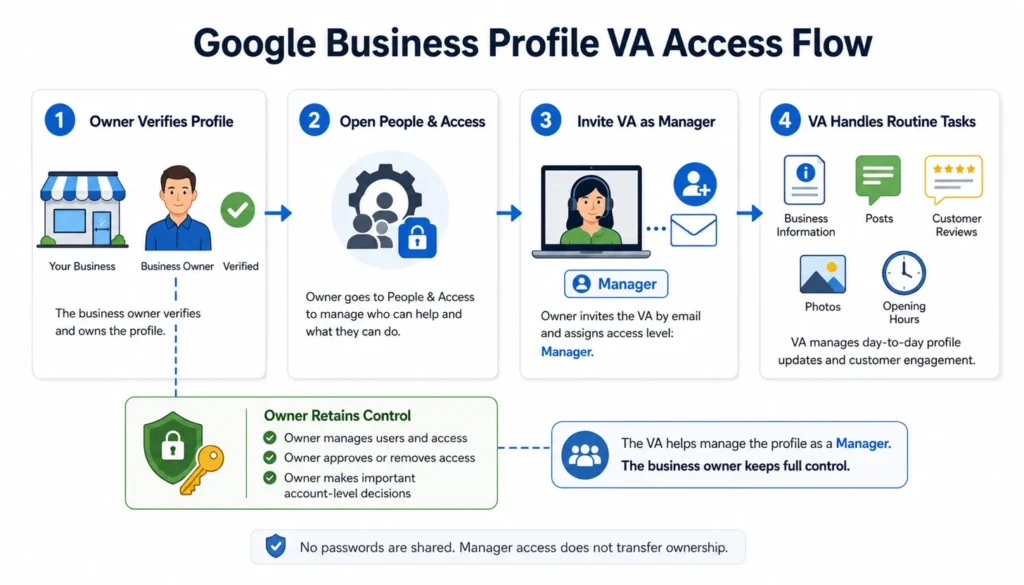
Google provides a proper access system for this. Its Business Profile owner and manager guidance explains that each person can use their own Google Account.
To add a VA:
Open your Business Profile.
Select More.
Open Business Profile settings.
Select People and access.
Choose Add and enter the VA’s email address.
Select Manager as the access level.
Send the invitation.
For routine support, Manager access is usually the sensible starting point. Managers can edit profile information, respond to reviews, and manage posts. They cannot add or remove users or remove the Business Profile.
That distinction matters. Your VA gets the access needed for recurring work, while you keep the account-level controls that should remain with the business owner.
3. Decide What the VA Can Publish Without Approval
Access is only one part of delegation. The next question is authority.
A virtual assistant should not have to ask you about every routine update, but they also should not make sensitive public changes based on guesswork.
A simple approval table can prevent that problem.
| Google Business Profile task | VA can usually handle | Owner approval should be required when |
|---|---|---|
| Regular hours | Updating from an approved business record | The source is unclear or the change is permanent and unexpected |
| Special or holiday hours | Publishing confirmed temporary hours | The business has not confirmed its schedule |
| Phone number or website | Updating from an approved source | Different official sources conflict |
| Business name, address, service area, or main category | Preparing the change and documenting the reason | Before publishing a material change |
| Posts | Publishing approved routine updates, events, or offers | The post introduces a new claim, price, promotion, or sensitive statement |
| Photos and videos | Uploading approved current media | Ownership, accuracy, or usage rights are uncertain |
| Review replies | Responding within an approved response policy | A complaint involves refunds, legal issues, safety, discrimination, threats, or another sensitive matter |
| Google-suggested updates | Checking them against the source of truth | Google’s suggested information conflicts with the business record |
| Performance reporting | Recording agreed metrics and trends | A major change needs strategic interpretation |
This is the same principle behind a broader delegation matrix: repeatable work can move to someone else when the expected result and escalation rules are clear, while high-judgment decisions stay with the right decision-maker.
4. Give the VA One Approved Source of Business Information
A Google Business Profile should not be updated from memory, an old email, or whichever directory appears first in search results.
Create a simple source-of-truth document the VA can check before making public changes.
For a single-location business, this can be one spreadsheet or shared document containing:
official business name;
address or approved service area;
main phone number;
website and important booking links;
regular hours;
confirmed special hours;
primary and secondary categories;
services;
approved business description;
current offers or promotions;
approved image folder;
notes about fields that require owner approval.
The goal is not to create a complicated local SEO system for one profile. It is to stop small inconsistencies from turning into public errors.
For agencies or businesses managing many locations, the same principle needs more structure. My multi-location SEO workflow explains how location data, approvals, profile updates, citations, pages, and QA can be coordinated at scale.
5. Build the Recurring Google Business Profile Workload
Once access and approval rules are clear, most of the VA’s work falls into a few repeatable areas.
Keep Core Business Information Accurate
Google lets verified businesses edit profile information such as address, hours, contact details, and photos.
Your VA can periodically compare the live profile with the approved business record and correct routine differences within the rules you have set.
Hours deserve special attention. Google provides separate special hours for holidays, events, and short temporary changes. A VA can prepare these in advance once the business confirms the schedule.
The important rule is simple: public business information should come from an approved source. If two sources disagree, the VA should flag the conflict instead of choosing one.
Publish Useful Posts When There Is Something Worth Sharing
Google Business Profile supports updates, offers, and event posts. A VA can turn an approved content calendar into ready-to-publish profile posts, add the correct media and links, and check whether the post becomes live.
Google currently says posts older than six months are archived unless a date range is set. That doesn’t mean every business must publish on a fixed weekly schedule.
A practical cadence depends on what the business actually has to say. A restaurant may have frequent specials. A professional service firm may post less often. The VA’s role is to keep the agreed publishing rhythm consistent without filling the profile with unnecessary updates.
There are also platform rules worth building into the SOP. For example, Google says posts that include a phone number in the description may be rejected. The safer workflow is to use the profile’s available action options rather than stuffing contact details into post copy.
Keep Photos Current and Realistic
A VA can also organize and upload approved photos of the storefront, team, products, services, completed work, or other business-specific subjects.
Google’s photo and video guidance recommends JPG or PNG images, a 720 by 720 pixel resolution, and photos that are clear, well lit, and not heavily altered. The minimum photo resolution is 250 by 250 pixels.
The VA should work from an approved media folder so there is no uncertainty about whether an image belongs to the business or can be published.
This is one area where I already use a repeatable content-production approach at Boost VA. My hands-on Google Business Profile work includes organizing multi-post local-business content and matching approved copy to fixed Canva templates with concise image text. The useful part of that system is not simply making graphics. It is keeping the location, offer, wording, image, and publishing instructions aligned before anything goes live.
Monitor Reviews and Use Clear Response Boundaries
Google allows verified businesses to read and reply to customer reviews. Replies appear publicly as the business, so the VA needs more than access. They need a response policy.
For routine reviews, that policy might explain:
the tone to use;
what information can be mentioned publicly;
when a reply is optional;
which complaints must be escalated;
who approves refunds, compensation, or other remedies;
what to do if a review appears to violate Google’s policies.
Google itself recommends keeping replies professional, clear, and useful. It also notes that you don’t need to publish a generic thank-you under every review.
For a serious complaint, the VA can collect the facts and draft a response, but the business owner or appropriate manager should decide what is actually published.
Review Google Updates Instead of Assuming the Profile Never Changes
Google may update a Business Profile using information from sources such as user reports and licensed content. Its guidance on Google updates explains that these changes can appear on Search, Maps, and other Google services.
That gives a VA another useful monitoring task.
When Google suggests or applies an update, the VA can compare it with the approved business record. If it matches, the update can be handled within the agreed rules. If it conflicts, the VA should record the issue and bring it back to the owner.
This is especially important for details such as hours, contact information, location data, and business status.
That accuracy matters beyond the profile itself. The same requirement runs through Google’s 2026 AI Search changes for small businesses: services, opening hours, contact details, and booking links all need one reliable source of truth.
Turn Performance Data Into a Short Monthly Report
A VA doesn’t need to become the local SEO strategist to help with reporting.
Google’s Business Profile performance report can include metrics such as views, searches, directions, calls, website clicks, and other interactions, depending on the business and feature availability.
A simple monthly VA report can record:
the agreed performance metrics;
review activity;
posts published;
photos added;
profile changes completed;
Google updates reviewed;
unresolved issues that need attention.
The VA can make the information easy to review. Strategic conclusions, ranking diagnosis, and decisions about changing the wider local SEO plan can remain with the business owner, agency lead, or specialist.
6. Use This Google Business Profile VA Task Checklist
The table below is a starting operating schedule, not a Google requirement. Adjust the frequency to your review volume, publishing activity, business changes, and internal approval process.
| Task | Suggested starting cadence | VA responsibility | Escalate when |
|---|---|---|---|
| Check reviews | Daily for high-volume profiles, otherwise a few times per week | Flag new reviews and reply within the approved policy | Complaint or response needs judgment |
| Check core profile information | Monthly and after any business change | Compare live information with the approved source | Any conflict appears |
| Prepare special hours | Before holidays, events, or temporary schedule changes | Enter confirmed hours and verify the live result | Schedule is not confirmed |
| Review Google updates | Weekly or when a notification appears | Compare the update with the source of truth | Google and business records disagree |
| Publish posts | Based on the approved content calendar | Prepare, publish, and confirm live status | Offer, claim, or wording needs approval |
| Add photos or videos | When approved new media is available | Upload compliant media and check status | Rights, accuracy, or relevance are uncertain |
| Check links and action buttons | Monthly and after a website or booking change | Test the destination and record problems | Destination is broken or business intent is unclear |
| Record performance | Monthly | Capture agreed Business Profile metrics and activity | A major change needs interpretation |
| Audit access | Quarterly or after a staffing change | Confirm the current user list with the owner | Unknown or former user still has access |
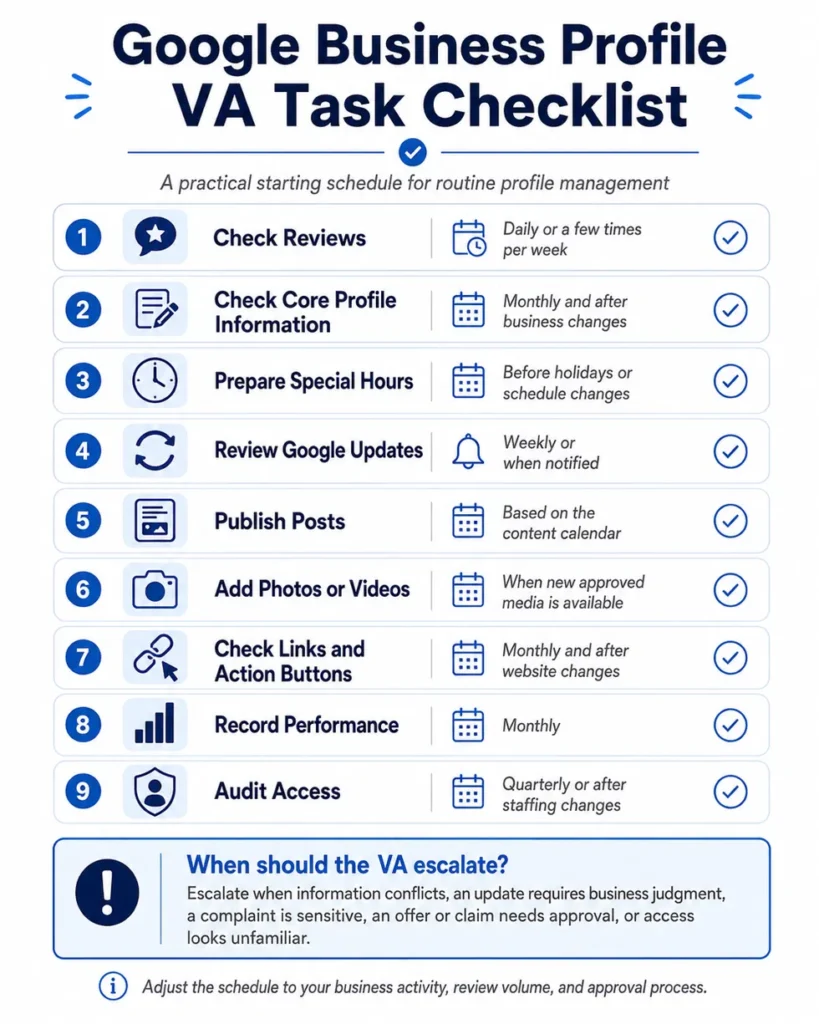
The checklist becomes more useful when each line also has an owner, a source, and a definition of “done.” For example, “update holiday hours” is not complete when the VA clicks Save. It is complete when the intended hours are visible on the live profile or the change is recorded as pending.
7. Know What Should Stay Outside a Routine VA Role
Google Business Profile management includes routine work, but not every problem is routine.
A general virtual assistant should not be expected to make specialist or high-risk decisions such as:
handling a profile suspension or appeal without qualified guidance;
making major name, address, category, or business-model changes without approval;
deciding legal, regulatory, or compliance-sensitive wording;
inventing services, offers, qualifications, or claims;
diagnosing complex local ranking problems;
resolving ownership disputes alone;
offering incentives for reviews or trying to manipulate review activity.
Google’s Business Profile guidelines require businesses to represent themselves accurately. Delegation should make the maintenance process more reliable, not create another place where assumptions enter the record.
Keep the Owner in Control, Not in Every Click
The best Google Business Profile delegation setup is not one where the owner disappears from the process. It is one where the owner keeps control of sensitive decisions while the VA handles the repeatable work.
Start with Manager access. Create one approved source of business information. Define what can be published without approval. Set an escalation rule for anything unusual. Then give the VA a practical cadence for updates, posts, photos, reviews, Google changes, and reporting.
That approach keeps the profile moving without requiring you to log in for every small task.
If recurring execution is the part slowing you down, learn more about ongoing and project-based support through Boost VA for practical content, local SEO, research, data, WordPress, and reporting workflows.