
Managing one virtual assistant can be fairly simple. You assign the work, the VA completes it, you review the result, and both of you know who is responsible for what.
Add a second or third VA and the problem changes.
Two people may assume the other person owns a task. One assistant may finish work that another person does not know is ready. Instructions can split across private messages, project boards, documents, and calls. Before long, the founder or manager becomes the person manually connecting every piece.
If you need to manage multiple virtual assistants, the solution is not more messages or more meetings. You need a small coordination layer that makes ownership, information, handoffs, and exceptions visible without requiring you to route every task yourself.
Wishup describes a 2026 “hybrid VA model” in which virtual assistants increasingly participate inside normal team workflows rather than operating completely separately. That is a VA provider’s view of the market rather than independent proof of how every business works, but it highlights an important operational point: once several remote assistants share the same workflows, coordination matters as much as delegation.
This guide is for businesses that already use several VAs or are preparing to add another. If you are still deciding whether additional VA capacity makes sense at all, start with my guide to scaling a business with virtual assistants first.
How to Manage Multiple Virtual Assistants Without Becoming the Bottleneck
With one VA, you can get away with being the central routing point.
You assign Task A. The VA completes it. You tell them what happens next.
That model becomes expensive in management time when several people are involved.
Imagine a simple marketing process:
one VA researches prospects;
another prepares or sends outreach;
another updates the CRM and reporting.
If every transition requires you to notice that the previous stage is finished, message the next person, copy over the relevant context, and explain the priority again, you have added capacity without removing much coordination from your own workload.
The better goal is to build the routing into the workflow.
Each VA should be able to answer five questions without chasing you:
What do I own?
Where is the current task?
Which instructions control the work?
What happens when my part is complete?
When does the manager need to get involved?
That is the foundation for everything that follows.
1. Give Each VA a Defined Lane
The first protection against overlap is clear responsibility.
Avila’s guidance on scaling VA support similarly recommends defining ownership areas instead of asking several assistants to do a little of everything.
The exact structure depends on your business, but function-based ownership is often easier to manage than a shared pile of unrelated tasks.
For example:
a research VA may own prospect research, competitor checks, and source collection;
an admin or operations VA may own CRM updates, scheduling, follow-ups, and recurring records;
a content VA may own content preparation and scheduling;
a WordPress-focused VA may own approved uploads, formatting, routine updates, and page checks.
The important distinction is between primary ownership and backup coverage.
If two VAs can perform the same task, that does not mean both should own it at the same time.
Give the recurring responsibility a primary owner. A second person can be the backup when the first is unavailable, when workload exceeds capacity, or when a defined handoff requires their involvement.
The same rule applies at task level: one task should normally have one active owner at a time.
That makes accountability much easier to see.
It also helps when roles overlap. You do not need to eliminate every shared skill. You need to eliminate uncertainty about who currently owns the outcome.
2. Run the Team From One Task System
Several VAs should not require several disconnected sources of truth.
Use one project-management environment as the operational record for delegated work.
That does not necessarily mean every assistant must see every project. One system can contain separate projects, boards, spaces, or filtered views. Sensitive client work may require stronger separation.
What matters is that the business has an agreed place where active work is recorded.
My broader guide to tools for managing a virtual assistant recommends giving actionable work a durable record rather than allowing important instructions to live only inside chat. That principle becomes even more important when several people depend on the same information.
A useful multi-VA task should show:
| Field | What it should answer |
|---|---|
| Outcome | What must actually be completed? |
| Primary owner | Who owns the task now? |
| Due or review date | When must something happen? |
| Status | Where is the task in the workflow? |
| Source links | Which files, instructions, or evidence control the work? |
| Next owner | Who receives it after the current stage? |
| Approval point | Does anybody need to approve the next action? |
If you use Trello or Notion, my VA task-board tutorial provides a starting structure.
There is one important multi-VA permission issue to remember. In Trello, normal members of a board can see the cards on that board. Assigning someone only to selected cards is not the same as hiding the other cards from them.
If one assistant should not see another client, project, or sensitive workload, separate the access rather than relying on card assignment for privacy.
The wider rule is simple: centralize coordination without unnecessarily centralizing access.
I also work inside structured multi-client agency workflows, and this principle matters there too. The task record needs to remain useful after the message that originally changed it has disappeared into the chat history.
3. Standardize the Work With Shared SOPs
When one VA performs a task, part of the process can sometimes live in that person’s memory.
That becomes risky when several assistants touch related work.
You do not want:
VA A’s version of the process.
VA B’s slightly different version.
Your latest correction sitting in a private message that only one of them saw.
Build one maintained procedure for each recurring task type instead.
A useful SOP should normally explain:
the expected outcome;
when the process starts;
required inputs and source material;
the main execution steps;
quality checks;
what counts as complete;
the handoff point;
which exceptions require escalation.
The goal is not to document every imaginable edge case before work can begin. It is to create a shared standard that can be improved as real exceptions appear.
Current Operations Coordinator guidance on SOP support makes the same broader point: recurring knowledge becomes more useful when it is moved from individual memory into maintained documentation.
When an existing VA already knows a process well, involve them in reviewing the documentation before another assistant begins using it. They may notice practical steps, exceptions, or quality checks that were never written down because the original process had become familiar.
Just make sure the final procedure belongs to the business, not to one person’s private notes.
One SOP per process is much easier to maintain than one version per VA.
4. Set Communication Rules Before the Group Chat Gets Noisy
Adding more people creates more possible conversations.
That does not mean every discussion should happen in the same place.
Decide what each communication channel is for before the team starts improvising.
| Situation | Best default | What should happen afterward |
|---|---|---|
| Routine team question | Shared team channel | Update the task if the answer changes execution |
| Task-specific clarification | Comment on the task | Keep the answer attached to the work |
| Urgent blocker | Agreed escalation route | Mark the task blocked and record the reason |
| Sensitive access or personnel issue | Private channel | Record only the operational action where appropriate |
| Team alignment issue | Short live discussion when useful | Put resulting decisions back into tasks or SOPs |
Chat is useful for discussion.
It should not become the only place where a deadline, approval, changed instruction, or final decision exists.
If somebody says in chat that a task is now due Friday instead of Thursday, update the task.
If a call changes the publishing process, update the SOP.
If a manager approves a different source or template, update the relevant record.
This prevents one VA from acting on yesterday’s instruction while another is working from today’s.
Time zones also matter, but do not create forced overlapping hours merely because the team is remote. Define overlap where the workflow genuinely benefits from real-time interaction. Stable work can often move asynchronously when ownership and handoffs are already clear.
5. Design Handoffs Into the Workflow
A handoff should be part of the process, not a message someone has to remember to send.
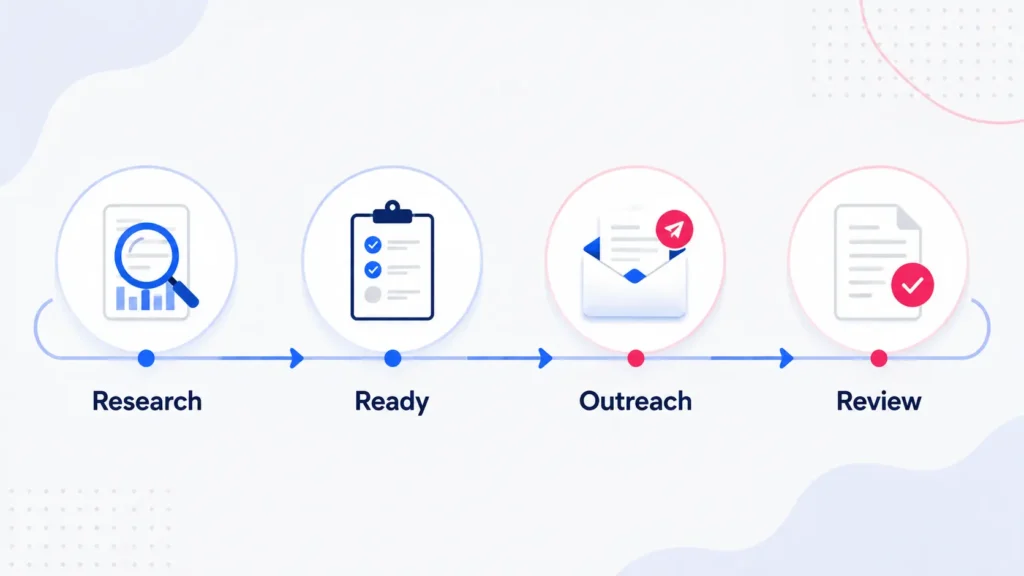
Suppose one VA researches prospects and another handles outreach.
The weak version looks like this:
Research finishes. You notice it. You review the sheet. You message the outreach VA. You explain which rows are ready. The outreach VA asks where the template is. You send another link.
The stronger version makes the transition explicit:
the research VA completes the qualification criteria;
the task or batch moves to a defined Ready for Outreach status;
the next owner is assigned;
the source sheet, notes, and approved outreach instructions remain linked;
the outreach VA begins from that status;
you enter only when approval, negotiation, or an exception genuinely requires you.
The same logic works for content production, WordPress publishing, reporting, customer support, research, data processing, or other workflows involving several people.
Your status names should describe meaningful transitions.
Examples might include:
Ready for Research
Ready for Review
Approved for Publishing
Ready for Outreach
Waiting on Client
Blocked
Done
Do not create fifteen statuses merely to make the board look sophisticated.
Create enough structure that the next person knows when responsibility has reached them.
For an agency-specific example of how work can move between preparation, production, approval, QA, and reporting, see the marketing agency VA workflow.
6. Review the Team by Exceptions, Not Constant Check-ins
Adding another VA should not automatically mean adding another recurring meeting.
If your task system already shows what is active and each person understands their lane, reporting should help you find exceptions rather than recreate the whole project board in another format.
A useful combined weekly view might show:
important outcomes completed;
work still active;
blocked items;
deadlines at risk;
handoffs waiting on another person;
decisions the manager needs to make;
the owner of the next action.
You can adapt the existing virtual assistant weekly report template for this purpose.
With several VAs, the useful change is to make ownership and the next action especially visible.
You also do not necessarily need a separate written report from every person if the team works inside the same reliable task system.
One consolidated summary may be more useful.
The objective is not to create reporting work. It is to let you look at the team and quickly answer:
What needs my attention?
What is moving normally without me?
That is a much healthier management rhythm than repeatedly asking each assistant for status.
7. Add a Lead VA Only When Coordination Itself Becomes Recurring Work
A lead VA can help, but it should solve a real coordination problem.
There is no fixed number of assistants at which you suddenly need another management layer.
Two VAs with clear roles and independent workstreams may require very little coordination.
A larger or more interconnected workflow may reach the point where someone needs to:
review the shared queue;
confirm ownership;
follow up on stalled handoffs;
check that routine SOPs are being followed;
consolidate the weekly status;
surface blockers before they reach the founder.
At that point, an experienced VA may be able to take on a coordination role.
That does not automatically mean giving them authority over strategy, budgets, personnel decisions, or specialist work.
Define the coordinator role as carefully as every other role.
A lead VA should reduce routine routing work. If you appoint one without specifying what they own, you may simply create another person who asks you what everyone else should do.
Build a Multi-VA Responsibility and Handoff Map
Before changing software or adding another meeting, map the recurring work itself.
Copy a table like this into your project documentation or spreadsheet and adapt it to your business:
| Workstream | Primary owner | Handoff trigger | Next owner | Manager needed for |
|---|---|---|---|---|
| Prospect research | Research VA | Qualification checks complete | Outreach VA | Changes to qualification criteria |
| Content preparation | Content VA | Draft and source pack ready | Reviewer or publishing VA | Final strategic/content approval |
| WordPress publishing | Publishing VA | Approved content received | Reviewer | Material layout or technical issue |
| CRM maintenance | Admin/Data VA | Exceptions identified | Relevant account owner | Ambiguous or sensitive records |
| Weekly reporting | Reporting/Ops VA | Current data and statuses collected | Manager | Decisions, risks, or reprioritization |
Add one row for every recurring workstream involving more than one person.
Then look for gaps.
If two people are listed as primary owner, choose one.
If the handoff trigger is vague, define it.
If every row says the manager is needed for routine movement, the workflow still depends too heavily on you.
If nobody knows what happens after the current owner finishes, define the next owner before the next batch begins.
That small map gives you something more useful than a generic organization chart. It shows how the work actually moves.
More VAs Should Reduce Routing, Not Create More of It
Managing several virtual assistants becomes much easier when the system answers the coordination questions before somebody has to ask them.
Give each VA a clear lane.
Keep active work in an agreed task system.
Maintain shared SOPs.
Use communication channels deliberately.
Build handoffs into statuses and ownership changes.
Review blockers and decisions instead of monitoring every action.
Add a coordination role only when coordination itself has become meaningful recurring work.
The result is not a completely hands-off team. Managers still need to set priorities, make judgment calls, review the right outputs, and improve the system when something repeatedly breaks.
But you should not have to act as the human notification system between every assistant.
If you already have a workflow and one execution lane still needs reliable support, I can work inside your existing tools, instructions, and SOPs through Boost VA. Tell me which recurring workstream needs an owner and how the process currently works.