Virtual Assistant Weekly Report Template: Excel & Google Sheets
By the end of a working week, the problem is often not that nothing was done. The problem is that the full picture is scattered.
One task is marked complete in a project board. Another was discussed in chat. A third looks late but is actually waiting for your approval. You may know that work is moving, but reviewing it still means piecing several updates together.
A virtual assistant weekly report template gives you one compact place to review the week without turning reporting into constant monitoring.
Download the template: Virtual Assistant Weekly Report Template (.xlsx)
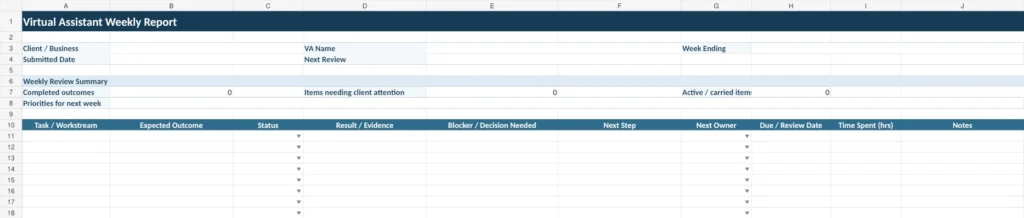
The file includes a reusable weekly report, a fictional example week, and a reference sheet for the status and ownership fields. You can use it in Excel or import the Excel file into Google Sheets.
What the Weekly VA Report Shows You
A useful weekly report should help you understand what happened, what still needs attention, and who is responsible for the next action.
The template includes these fields:
| Field | What It Shows |
|---|---|
| Task / Workstream | The area of work or responsibility |
| Expected Outcome | What successful completion should look like |
| Status | Whether the task is not started, in progress, waiting, blocked, done, or carried forward |
| Result / Evidence | What was completed and where the result can be reviewed |
| Blocker / Decision Needed | Anything preventing progress or requiring input |
| Next Step | The next action required |
| Next Owner | Whether the VA, client, third party, or both sides need to act |
| Due / Review Date | When the task should be completed or reviewed again |
| Time Spent | Optional time information where useful |
| Notes | Additional context that does not fit elsewhere |
You could create a simpler weekly task report with only Task, Status, Notes, and Next Step. But that often leaves important questions unanswered.
A task can be marked “done” without showing what was actually delivered. A task can be “waiting” without showing who needs to act. And a long notes column can hide an important client decision inside several sentences.
The extra structure makes the report easier to review quickly.
Start With the Expected Outcome
A task name tells you what someone is working on. The expected outcome tells you what completion actually means.
For example:
Task: Update CRM
is less useful than:
Expected outcome: Update the approved contact records and flag incomplete information.
That distinction matters because recurring VA work becomes easier to review when each task has a clear result.
The same principle applies when choosing tasks with a clear, reviewable result. If the expected output is unclear, the weekly report will usually be unclear too.
Connect “Done” to a Result
A completed task should ideally point to something you can review.
Depending on the work, that might be:
a completed spreadsheet
a published or updated URL
the number of records processed
a scheduled post
a document ready for approval
a short description of the final result
Not every task needs a link or a numerical measurement. The goal is simply to make completion reviewable.
Instead of:
Status: Done
you want enough context to understand what “done” means without starting another conversation.
Separate Blockers From Normal Notes
A blocker deserves more attention than an ordinary update.
Use the Blocker / Decision Needed field when work cannot continue because something is missing, such as:
client approval
a file or document
login access
an answer to a question
information from another person or vendor
That lets you scan the report for items that require action instead of reading every note line by line.
This is also consistent with common project status reporting practices. Both Asana’s status report guidance and Atlassian’s project status reporting guidance emphasize making progress, risks, blockers, and next actions visible.
Make the Next Owner Visible
A next step is much more useful when it also shows who owns it.
For example:
| Status | Blocker / Decision Needed | Next Step | Next Owner |
|---|---|---|---|
| Waiting | Final image approval needed | Approve one of two options | Client |
| In progress | None | Finish remaining prospect research | VA |
| Blocked | Vendor has not supplied access | Follow up for credentials | Third party |
| Done | None | Review result and set next priority | Shared |
This reduces the chance that a task stays open simply because everyone assumes someone else is handling it.
Clear ownership is especially useful in an execution workflow where evidence, ownership, and next actions need to remain clear.

Use the Report as a Weekly Review, Not a Running Diary
A weekly report should not become a record of every message, click, or small action your VA completed.
That creates more information without necessarily creating more clarity.
Instead, use the report as a review layer.
A practical review order is:
Check anything marked Blocked or Waiting.
Review items that need a client decision.
Confirm completed outcomes and evidence.
Check work being carried into the next week.
Agree on the next priorities and owners.
This can also become part of the review rhythm you establish when you set up the VA relationship and review process clearly.
The goal is not to supervise every activity. It is to make important work visible enough that both sides know what has happened and what should happen next.
Do You Need an Hours Column?
Not always.
Time spent can be useful when you are reviewing billing, workload, capacity, or a task that took significantly longer than expected.
But hours should not automatically become the main measure of productivity.
Two tasks that each take three hours can have very different value, complexity, or outcomes.
That is why the Time Spent field in this template is optional. Use it when it helps you make a practical decision. Leave it secondary when the result matters more than the number of hours recorded.
Is Weekly Reporting the Right Cadence?
Weekly reporting is a useful default for many recurring VA relationships, but it is not the right schedule for every type of work.
| Type of Work | Possible Review Rhythm |
|---|---|
| New or unfamiliar work | More frequent check-ins may help |
| Stable recurring work | A weekly review may be enough |
| Long-running, low-risk work | Less frequent reporting may be practical |
| Urgent or time-sensitive work | Review around milestones rather than waiting for the end of the week |
The reporting cadence should match the risk, complexity, and pace of the work.
You also do not need to replace your existing project-management system with a spreadsheet.
If detailed tasks already live in a project board, keep them there. The weekly report can simply summarize the outcomes, blockers, decisions, and next actions that matter most.
Keep the Report Short Enough to Maintain
A reporting system only works if people continue using it.
Your weekly VA report should make four questions easy to answer:
What happened?
What needs attention?
Who needs to act next?
What should happen next week?
If the report answers those questions clearly, it is doing its job.
At Boost VA, I support founders, agencies, and online businesses with recurring execution across research, data handling, WordPress, content operations, outreach, reporting, and administrative work.
If the responsibilities are already clear but recurring execution is still taking too much of your attention, you can explore ongoing virtual assistant support and decide whether retained support or a defined project is the better fit.