Imagine this example: your virtual assistant notices what looks like a duplicate software charge. Should they cancel the subscription, request a refund, flag it for you, or leave it alone until you reply?
The answer depends less on whether the task was “delegated” and more on the authority that came with it. A useful virtual assistant approval process sets that authority per action, so your VA knows what they can do alone, what they should report, what needs your sign-off, and what stays with you.
For a new or still-developing working relationship, money, external messages, deletions, account-access changes, and legal commitments should usually start at “prepare and wait” or “owner only” until you have agreed something more specific. The goal is not to make your VA ask about everything. It is to remove the questions that should already have an answer.
If you are still deciding which responsibilities to hand over in the first place, start with my tasks to delegate to a virtual assistant guide. This article starts one step later: once the work is delegated, how much authority comes with each action?
These are operational planning rules, not legal or financial advice. Regulated work, tax filings, legal advice, healthcare privacy obligations, and authority to bind the business may require separate professional or contractual arrangements.
Why delegated work still needs an approval process
Giving someone responsibility for a task does not automatically give them authority over every decision inside that task.
Inbox management is a useful example. You may delegate the daily inbox review, categorization, follow-ups, and routine saved replies. That does not necessarily mean your VA can promise a refund, change a price, accept a contractual term, or answer a sensitive complaint without approval.
The same distinction appears in MindTools’ delegation guidance, which recommends agreeing how much decision authority comes with a task, including whether the person has a set budget or can authorize incidental expenses. The owner or manager still remains accountable for the delegated responsibility.
This is also where a delegation matrix and an approval process do different jobs. The matrix helps you decide whether work should be kept, delegated, automated, or handed off with checkpoints. Approval rules define what the person may decide after the work has already been assigned.
The four-level VA authority ladder
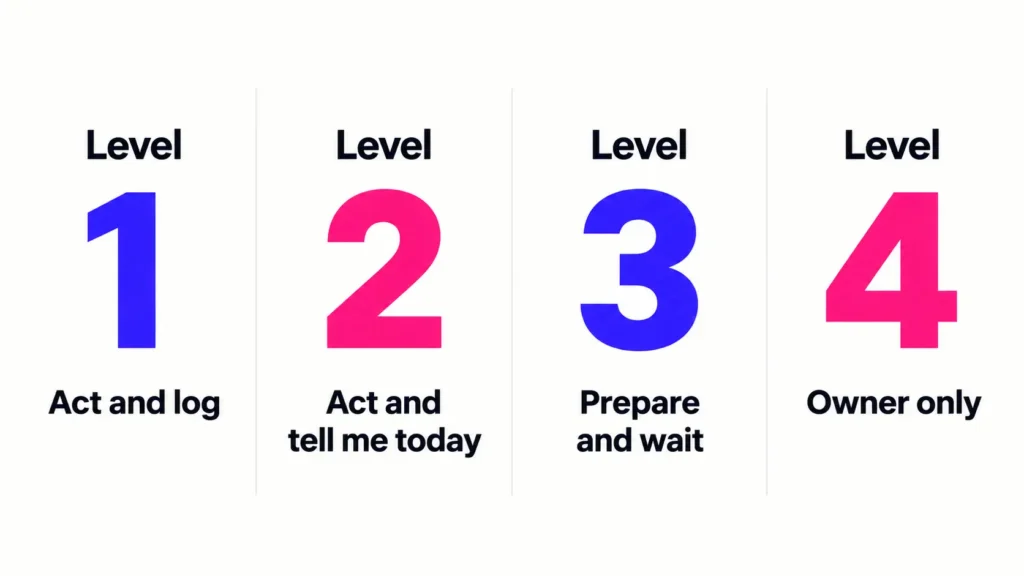
Use four levels for recurring actions:
- Act and log
- Act and tell me today
- Prepare and wait
- Owner only
This is a simplified owner-VA adaptation of the seven levels used in Management 3.0’s Delegation Poker, a framework associated with Jurgen Appelo’s Management 3.0 work. The original model moves from manager-controlled decisions through shared decision-making to full delegation. The four-level version below is an editorial simplification for small owner-VA relationships, not a research-validated standard.
Level 1: Act and log
Level 1 covers routine, reversible actions that already have a clear standard. Your VA completes the action without waiting, then records it in the normal reporting system.
Examples might include updating a CRM field from a verified source, formatting an already approved WordPress article, scheduling an approved post, or moving a completed task to the correct project status.
The important part is that “act” does not mean “use unlimited judgment.” The action is already inside a known process. If the facts change or an exception appears, the task can move up a level.
Logging can be as simple as adding the completed action to a weekly VA report or project tracker.
Level 2: Act and tell me today
Level 2 allows the VA to act within an agreed rule, but the owner needs to know promptly because the action may affect scheduling, customers, workflow, or a decision later that day.
Examples might include rescheduling a non-critical meeting within a pre-agreed window, correcting a live page when the fix is obvious and reversible, or responding to a routine customer issue using an approved policy that requires same-day visibility.
Notification is part of the authority level. “Tell me today” should therefore specify where that update goes and what information it needs to include.
Level 3: Prepare and wait
Level 3 is the safest default when an action touches money, external communication, deletions, access, unusual exceptions, or a decision that has not been made before.
Your VA can still move the work forward. They can draft the reply, prepare the payment, stage the WordPress change, collect the refund details, compare options, or identify which account permission needs changing. The final action waits for approval.
This level prevents a familiar bottleneck: the VA is not forced to stop at “What should I do?” They prepare the next useful step and make the owner’s decision smaller.
Level 4: Owner only
Level 4 covers decisions or actions where the VA may gather information but should not act on the owner’s behalf unless a separate, deliberate authority arrangement exists.
Examples include signing legal commitments, making major strategic decisions, changing core pricing, making sensitive personnel decisions, or taking unrestricted control of financial or account ownership.
The companion guide on tasks not to delegate to a virtual assistant alone covers those owner-retained categories in more detail. Here, the useful point is simpler: Level 4 should be explicit, not assumed.
Three questions that place any action on the ladder
When you are unsure which level fits an action, ask three questions.
Can it be undone easily?
Reversibility is the first test.
Fixing a typo in a draft is easy to undo. Permanently deleting CRM records is different. Publishing a public statement, sending a refund, changing a domain setting, or releasing a payment may also be difficult or costly to reverse.
The harder the action is to undo, the stronger the case for Level 3 or Level 4.
This is why a VA can often identify an issue without owning the final remedy. My guide to WordPress 404 errors uses the same distinction: finding a broken URL does not automatically determine whether the correct response is to restore, redirect, fix the source link, or leave the 404 in place.
Does it reach money, customers, the public, legal commitments, or account access?
External exposure raises the stakes because the action can affect people, money, reputation, rights, or security beyond the internal task list.
Routine internal preparation can often sit at Level 1 or 2. Sending a new customer promise, issuing a refund, changing payment details, deleting data, publishing a sensitive statement, or modifying administrator access usually deserves a higher starting level.
The same principle appears in content work. My AI content quality-control guide separates preparing content from approving what is ready to go public.
Have we done this before with an agreed standard?
Precedent changes the level.
Your VA may need approval the first three times a situation occurs. Once the correct response is documented, the same action may move from Level 3 to Level 2 or Level 1.
The opposite also applies. If a familiar task appears in a new country, new platform, new client context, or with an exception the SOP does not cover, the old authority level may no longer fit.
As a rule of thumb, the more an action is irreversible or externally exposed, and the less precedent you have for it, the higher it should sit on the ladder.
Common VA actions and a sensible starting level
These are starting defaults, not universal rules. Your business, contracts, industry, risk tolerance, systems, and the VA’s actual role may justify a different level.
| Action | Starting level | Why | When it could move |
|---|---|---|---|
| Schedule an approved meeting within agreed availability | Level 1: Act and log | Routine and reversible | Keep at Level 1 while the scheduling rules remain clear |
| Send a routine saved reply that matches an approved situation | Level 1: Act and log | The message and conditions are already approved | Move to Level 2 if same-day visibility becomes useful |
| Correct a CRM typo from a verified source | Level 1: Act and log | Low-risk data correction | Move up if the source conflicts with other records |
| Reschedule a routine appointment inside an agreed window | Level 2: Act and tell me today | It affects another person but follows a defined rule | Move to Level 1 if reporting later is sufficient |
| Publish a WordPress post that has already received final approval | Level 2: Act and tell me today | Public action, but content is already signed off | Move to Level 1 for a mature, tightly defined publishing workflow |
| Merge or permanently delete CRM records | Level 3: Prepare and wait | Data loss or suppression history may be hard to reverse | Move only after exact criteria and recovery rules are documented |
| Send a new outreach message to a new audience or offer | Level 3: Prepare and wait | External message can create promises or positioning issues | Move down for approved templates and clear targeting rules |
| Issue a customer refund | Level 3: Prepare and wait | Money and customer precedent are involved | Move to Level 2 for clearly defined cases within an agreed limit |
| Buy a tool or start a subscription | Level 3: Prepare and wait | Creates expenditure and potentially a recurring commitment | Move down only inside explicit purchasing limits |
| Prepare a vendor payment | Level 3: Prepare and wait | Administration can be delegated while release authority stays separate | Keep release approval with the authorized person unless deliberately changed |
| Grant, remove, or widen account access | Level 3 or 4 | Permission changes can expose systems or remove control | Move only when access rules and owner/admin responsibilities are explicit |
| Sign a contract or make a legal commitment | Level 4: Owner only | May bind the business or require qualified advice | Change only through a deliberate, legally appropriate authority arrangement |
Deletion is a good example of why the task name alone is not enough. The guide on whether to delete or archive old contacts shows that “clean the CRM” can contain several different decisions with different consequences.
Access works the same way. Giving someone the credentials needed to perform a task is different from giving them authority to change ownership, recovery settings, or other users’ permissions. Use the password and access-sharing guide for the access side of that handoff.
Money rules need limits, not vague permission
Money is where “use your judgment” becomes too loose.
Your approval rules should distinguish ordinary purchasing, reimbursable expenses, refunds, invoice preparation, payment release, subscriptions, and any platform where a change can increase ongoing spend.
Set both a per-transaction and monthly limit
One limit answers, “How much can this single action cost?” The other answers, “How much authority can accumulate across the month?”
Illustrative example only: a business might permit routine consumable purchases up to $50 each, capped at $150 in a month, while new subscriptions, refunds, vendor payments, or changes to recurring billing still require approval. Those numbers are examples, not recommended thresholds.
Your figures should reflect the actual cost structure and risk of the business.
Separate preparing a payment from releasing it
Preparing the information can save substantial admin time without giving away final payment authority.
Your VA might verify that the invoice matches the approved order, collect the supporting documents, enter the payment details, and flag anything unusual. The authorized person then reviews and releases the payment.
The same distinction works for expenses. A VA timesheet and expense log can record purchases, receipts, approval status, and the billing period so review is based on a visible record instead of memory.
Advertising provides another version of the same rule. In the guide to using a VA for Facebook ads, spending controls and owner or specialist authority are separated from the VA’s preparation, QA, monitoring, and reporting work.
Review spending authority instead of setting it once
Limits only help if somebody reviews how they are being used.
The Association of Certified Fraud Examiners’ 2026 occupational-fraud findings are general organizational research, not a statistic about virtual assistants. The study analyzed 2,402 occupational fraud cases across 143 countries and territories. Its key findings say more than half of the cases involved either missing internal controls or an override of existing controls, while management review was among the controls associated with stronger outcomes.
That evidence should not be used to imply that VAs are a fraud risk. The practical lesson is narrower: money authority deserves visible limits, records, and review regardless of who handles the administrative work.
Messages that speak for you need their own rules
External communication deserves a separate boundary because a short reply can create expectations that internal work cannot.
Approved templates are the easiest starting point. Your VA might be allowed to send a standard scheduling reply, order-status update, document request, or routine follow-up without approval when the facts match the saved response.
New statements need more caution. Pricing exceptions, refund negotiations, legal threats, sensitive complaints, press questions, public criticism, contract terms, or promises outside the normal policy should usually move to Level 3 or Level 4.
Your rules should also define escalation triggers. For example:
- complaint mentions legal action;
- customer requests an exception outside the published policy;
- message requires a new price, refund, discount, or credit;
- public response could affect reputation;
- sender is a high-value client or sensitive stakeholder;
- facts are disputed or incomplete.
For a more detailed inbox example, the customer support VA guide separates routine replies from messages that need approval or escalation.
When the situation is not covered, default to Level 3
Undefined situations are where authority rules earn their keep.
If the action is not covered by an SOP, previous decision, approved template, or written limit, default to Prepare and wait. Your VA should gather the facts, prepare the next step or options, explain what is unclear, and wait for the authorized person to decide.
That rule prevents two opposite problems. The VA does not guess just to keep the task moving, and the owner does not receive a vague “What should I do?” message with no preparation behind it.
Once the exception is resolved, decide whether it was genuinely one-off or should become a new rule.
Move authority up only for the action that earned it
Trust can grow while authority remains specific.
Management 3.0’s Delegation Poker guidance recommends reviewing decision areas and moving delegation levels as decision-making maturity grows. The useful part for an owner-VA relationship is to widen authority where the track record exists, rather than promoting every responsibility at once.
For example, six months of accurate routine inbox handling may justify broader authority for saved replies. It does not automatically justify broader authority over vendor payments or account permissions.
Review completed work, exceptions, and repeated questions before changing a level. The guide to reviewing a virtual assistant’s work can help separate one-off mistakes from process problems, while weekly VA check-in questions can surface decisions and boundaries that are still unclear.
Levels can also move down. New software, a new client, a busy launch period, an error, or a material change in the business may justify temporarily requiring more approval until the process is stable again.
Write your approval rules down
Spoken boundaries are easy to remember differently.
Keep the rules in the same place your VA already checks for working instructions, whether that is an SOP library, shared document, or project-management system. My guide to building an SOP library covers how to give process documents one maintained home.
For each recurring action, record:
- action or decision;
- authority level;
- any money, volume, or time limit;
- what must be reported and where;
- escalation triggers;
- who gives approval;
- expected response window;
- review date.
The finished policy should answer practical questions without requiring a new message every time: “Can I send this?”, “Can I buy this?”, “Can I delete this?”, “Can I publish this?”, and “What do I do when the rule does not fit?”
If you are documenting the broader process at the same time, the guide to writing SOPs for virtual assistant tasks shows how to include outcomes, decision rules, quality checks, and exceptions. During a new working relationship, the VA onboarding checklist also gives approval boundaries a place before the first assignment starts.
How approval points fit into Boost VA support
My virtual assistant services are structured around agreed execution, research, updates, recurring admin, and operational work, while clients retain overall strategy, key decisions and approvals, sensitive access and permissions, and final sign-off.
The four-level ladder in this article is a planning framework you can adapt, not a claim that every Boost VA engagement uses these exact labels. The useful principle is to agree the scope, access, updates, and escalation points before the work depends on them.
If recurring admin, research, data, WordPress, content, or outreach work is taking time away from higher-value decisions, tell me what you need help with. We can discuss the work you want handled and the approval points that should stay with you.
Authority should become clearer as the working relationship matures, not more assumed. Start with narrow rules, widen them deliberately where the track record supports it, and turn new exceptions into written guidance instead of solving the same question twice.