
10 Tasks to Delegate to a Virtual Assistant (Practical Checklist)
You decide that you need help, but then the handoff stalls.
Your inbox feels too personal. Your calendar looks too complicated. Your spreadsheets make sense only to you. Before long, you are still handling everything yourself while the virtual assistant waits for something useful to do.
The best tasks to delegate to a virtual assistant are usually not the biggest or most impressive tasks in the business. They are the recurring jobs that interrupt your day, follow a predictable process, and have a clear result.
This matters because routine coordination can consume far more time than it appears to. Asana reports that knowledge workers spend 60% of their time on “work about work”, including chasing updates, switching between tools, and handling repetitive coordination.
Delegation helps you remove some of that operational drag. It gives you more room for decisions, relationships, creative work, and the responsibilities that genuinely require your attention.
This checklist covers ten practical tasks you can begin handing off, along with examples of what your virtual assistant can handle and what you may still want to control.
Is the Task Ready to Be Delegated?
Before adding a task to your virtual assistant’s workload, ask four questions:
Does it happen repeatedly?
Daily, weekly, and monthly tasks are usually easier to document and improve.Can I describe the expected result?
“Keep the CRM updated by Friday” is clearer than “help me with sales.”Can someone complete it without making a major business decision?
A VA can prepare information and carry out an approved process without taking over your strategy.Can I check whether it was completed correctly?
There should be a visible result, such as an organized inbox, updated spreadsheet, scheduled post, or completed report.
A task does not need a perfect standard operating procedure before you delegate it. However, you should be able to explain the trigger, the required steps, the expected outcome, and the situations that must be escalated to you.
For a broader look at the value of handing off recurring work, see how business owners can buy back time with a virtual assistant.
10 Tasks to Delegate to a Virtual Assistant
1. Email Triage and Routine Inbox Management
A crowded inbox creates dozens of small decisions throughout the day. Even when each message takes only a minute, checking, sorting, forwarding, and remembering follow-ups can repeatedly break your concentration.
A virtual assistant can:
label and categorize incoming messages;
remove newsletters and obvious spam;
flag urgent or important conversations;
draft replies to routine questions;
track messages awaiting a response;
remind you when a follow-up is due;
archive completed conversations.
Create clear rules for what counts as urgent, which messages can receive a prepared response, and which senders should always be brought to your attention.
Where available, use a platform’s delegated-access feature instead of sharing your main password. For example, Gmail allows account owners to give delegates permission to read, send, and delete email without allowing them to change the account password.
Keep under your control: Sensitive negotiations, legal issues, major complaints, financial commitments, and personal conversations.
2. Calendar and Meeting Coordination
Scheduling is rarely just choosing an empty time slot. It can involve checking availability, managing time zones, leaving travel or preparation time, sending invitations, arranging links, and moving meetings when plans change.
A virtual assistant can:
schedule and reschedule meetings;
coordinate availability with other attendees;
send calendar invitations;
add meeting links and locations;
build preparation or travel buffers into your calendar;
send reminders;
collect agenda items;
resolve straightforward scheduling conflicts.
Give your assistant rules for preferred meeting hours, protected focus time, maximum meetings per day, required buffers, and which people receive priority.
Google Calendar lets owners control what another person can see and do, so you can select an appropriate level of access rather than making the calendar public.
Keep under your control: Deciding which opportunities deserve your time and making significant changes to your priorities.
3. Data Entry, CRM Updates, and Database Cleanup
Data work is easy to postpone because one update rarely feels urgent. The problem becomes visible later when contacts are duplicated, lead stages are outdated, important fields are empty, or reports no longer reflect what is happening.
A virtual assistant can:
add new contacts to your CRM;
update lead stages and activity notes;
clean duplicate entries;
standardize names, dates, and phone formats;
transfer information between approved systems;
validate required fields;
update spreadsheets;
identify missing or conflicting information;
prepare basic data summaries.
The handoff should specify which fields are mandatory, which source takes priority when information conflicts, and how uncertainty should be recorded.
This type of structured work fits naturally within Boost VA’s data handling and administrative support, particularly when the work follows a repeatable process.
Keep under your control: Deciding how the CRM should be structured, changing core definitions, and interpreting the data for business decisions.
4. Online Research and Structured Data Collection
Research often begins as a quick search and turns into an hour of opening tabs, comparing sources, copying details, and trying to remember where each fact came from.
A virtual assistant can:
research companies, products, competitors, or markets;
build prospect or supplier lists;
gather contact information from approved public sources;
compare tools or service options against defined criteria;
collect source URLs;
organize findings in a spreadsheet;
summarize recurring patterns;
flag incomplete, outdated, or conflicting information.
A useful research brief should explain the question, the inclusion criteria, the required fields, acceptable sources, and the format of the final deliverable.
The assistant’s job is not to force every result into the list. Good research support also involves recording uncertainty and excluding entries that do not meet the criteria.
Keep under your control: Drawing the final conclusion, selecting the business direction, and approving decisions based on the research.
5. WordPress Content Formatting and Publishing
Writing an article is only one part of publishing it. The draft may still need headings, links, images, metadata, formatting, previews, and final checks before it is ready.
A virtual assistant can:
upload an approved article;
apply the correct heading structure;
format paragraphs, bullets, and tables;
add internal and external links;
upload and compress approved images;
enter image titles and alt text;
add the excerpt, category, and tags;
enter supplied SEO metadata;
preview the page on desktop and mobile;
schedule an approved post;
report layout or plugin problems before publication.
WordPress uses roles and capabilities to control what users can do. Its official roles and capabilities documentation explains the difference between Administrator, Editor, Author, Contributor, and Subscriber access.
An assistant who only formats or uploads posts may not need full administrator access.
WordPress 7.1 changed parts of this workflow, including in-browser image handling and new responsive styling controls in the editor. The practical guide to what changed in WordPress 7.1 covers which features to test after updating.
Keep under your control: Final editorial approval, major website changes, plugin decisions, security settings, and technical work beyond the assistant’s confirmed ability.
6. Social Media Scheduling and Routine Monitoring
Staying visible online requires more than occasionally writing a post. Approved content must be formatted, loaded into the scheduling tool, checked, published at the right time, and monitored afterward.
A virtual assistant can:
format approved posts for each platform;
schedule content;
add approved images and links;
check that posts published correctly;
monitor routine comments and messages;
collect recurring questions from the audience;
prepare weekly engagement summaries;
flag comments that require a personal response.
You should provide approved content, brand guidelines, platform rules, and examples of responses the assistant may use.
A VA can keep the content process moving, but that does not mean handing over your entire public voice. The distinction is between routine execution and decisions that affect reputation.
Keep under your control: Sensitive public responses, crisis communication, controversial topics, final brand positioning, and unapproved claims.
7. Lead Sourcing and Outreach Preparation
Sales and outreach often slow down because the supporting work is incomplete. Someone still needs to find prospects, check whether they fit, gather the right details, update the CRM, and prepare the information needed for a relevant message.
A virtual assistant can:
find prospects based on defined criteria;
verify websites and contact details;
identify relevant roles or decision-makers;
record source URLs;
remove duplicate or unsuitable prospects;
update lead records;
prepare approved outreach lists;
draft basic personalization notes;
schedule approved follow-ups;
report replies and status changes.
Give your VA a precise definition of a qualified prospect. Include the required location, industry, company size, service relevance, exclusions, and verification steps.
Without those rules, the assistant may produce a large list that is technically complete but commercially unhelpful.
Keep under your control: Your offer, pricing, sales strategy, major relationship decisions, and high-value personal conversations.
8. Customer Support Triage and Routine Follow-Ups
Many customer messages ask the same questions: Where is my order? How do I access my account? When is the next available appointment? Did you receive my request?
A virtual assistant can:
categorize incoming support requests;
answer approved frequently asked questions;
send status updates;
route technical issues to the right person;
follow up on unresolved tickets;
schedule support calls;
maintain support records;
identify repeated complaints or questions;
escalate urgent cases.
Prepare response templates, escalation rules, expected response times, and a clear list of situations the assistant must not handle alone.
The goal is not to hide the business owner from customers. It is to resolve predictable requests faster while ensuring unusual or sensitive cases reach the right person.
Keep under your control: Refund exceptions, legal threats, serious complaints, confidential account issues, and promises outside the approved policy.
9. Receipt, Invoice, and Expense Record Preparation
Financial administration contains many repeatable tasks even when professional accounting decisions must remain with a qualified person.
A virtual assistant can:
collect and rename receipts;
organize documents by month or category;
enter transactions into an approved spreadsheet or system;
prepare invoices from approved information;
track whether invoices were sent;
record payments;
send approved payment reminders;
flag missing records;
prepare organized files for your accountant.
The IRS explains that business records should clearly show income and expenses and that supporting documents are needed for recorded transactions. Requirements differ by country, so the applicable local rules and professional guidance should always take priority.
Your assistant can organize the information, but should not guess how a transaction should be classified when the correct treatment is unclear.
Keep under your control: Tax decisions, final financial approvals, payroll decisions, account access that is not required, and work that needs an accountant or bookkeeper.
10. Project Tracking and Recurring Reports
Project information becomes unreliable when updates live across messages, spreadsheets, emails, and people’s memories.
A virtual assistant can:
update project boards;
collect status updates;
record completed and overdue tasks;
maintain deadlines and owner fields;
prepare weekly summaries;
organize source links and supporting documents;
track recurring deliverables;
highlight missing information;
flag blockers;
maintain reporting spreadsheets.
Define what the report should show, when it is due, where the information comes from, and which problems need immediate escalation.
A good update should help you understand what was completed, what is blocked, and what needs your decision. It should not simply repeat a long list of activity.
Keep under your control: Interpreting performance, changing priorities, resolving major blockers, and making decisions from the report.
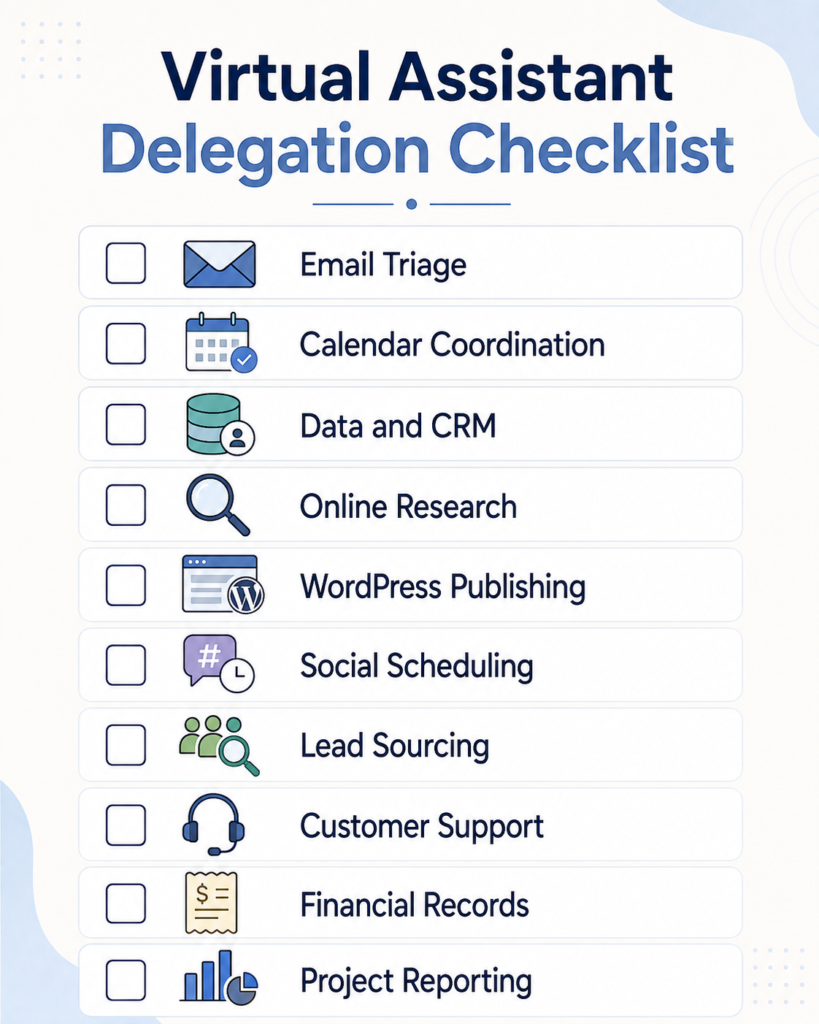
Virtual Assistant Delegation Checklist
Use this table to identify your best first handoffs.
| Check | Task | A Clear Handoff Outcome | First Instruction to Document |
|---|---|---|---|
| [ ] | Email triage | Important messages are flagged and routine messages are organized | What counts as urgent? |
| [ ] | Calendar coordination | Meetings are scheduled within your preferred hours and buffers | When may meetings be booked? |
| [ ] | Data and CRM updates | Required fields remain current, consistent, and complete | Which source takes priority? |
| [ ] | Research and data collection | Findings meet defined criteria and include source links | What should be included or excluded? |
| [ ] | WordPress publishing | Approved content is correctly formatted, checked, and scheduled | Which role and publishing steps apply? |
| [ ] | Social media scheduling | Approved content publishes correctly and responses are monitored | What may the VA post or answer? |
| [ ] | Lead sourcing | Prospects meet the qualification rules and are properly recorded | What defines a qualified lead? |
| [ ] | Customer support triage | Routine questions are resolved and exceptions are escalated | Which cases require escalation? |
| [ ] | Financial record preparation | Receipts, invoices, and payment records are organized | What may be recorded but not classified? |
| [ ] | Project tracking and reports | Status information is current and blockers are visible | What must the weekly report contain? |
Do not hand off all ten tasks at once.
Choose one or two that happen regularly, have an obvious result, and do not require constant judgment. Once the handoff works consistently, you can expand the assistant’s responsibility.
A Simple Way to Hand Off the First Task
Define the trigger
Explain when the work begins.
Examples include:
every weekday at 9:00 a.m.;
whenever a new lead enters the CRM;
after an article receives final approval;
every Friday before the weekly report.
Define the finished result
Show the assistant what “complete” means. A screenshot, completed example, short screen recording, or previously approved output can make the standard much clearer.
Set the boundaries
State what the assistant may decide, what requires approval, and what must be escalated immediately.
Access should also match the responsibility. The NIST principle of least privilege recommends limiting user access to the minimum needed to complete assigned work.
Use delegated accounts, separate user profiles, role-based access, and password-management tools where appropriate. Avoid giving unrestricted access simply because it is convenient.
Review the first few completed cycles
Check the work closely at the beginning. Correct unclear instructions, add missing exceptions, and update the process when the same question appears more than once.
Let the assistant own the routine
Once the process is working, resist the urge to take the task back whenever a small issue appears. Improve the instructions and allow the system to mature.
This is how delegation helps rather than creating another job for you. It also supports the broader goal of helping founders stay focused instead of repeatedly pulling them back into routine execution.
Tasks You May Want to Keep for Now
A virtual assistant can prepare information and support many processes, but some responsibilities still require your judgment or a qualified specialist.
Be cautious about immediately delegating:
final business strategy;
major hiring or dismissal decisions;
legal advice or legal commitments;
tax and accounting judgments;
large financial approvals;
confidential employee matters;
final crisis communication;
decisions that depend heavily on your personal relationships;
specialist technical work outside the VA’s confirmed ability.
This does not mean a VA cannot assist with the preparation. Your assistant may organize documents, collect information, schedule meetings, maintain records, and prepare drafts while you or the appropriate specialist makes the final decision.
The modern VA role already covers far more than basic calendar and email work. This overview of how virtual assistants support businesses today shows how the role has expanded across research, content, data, marketing, administration, and customer support.
Start With the Work That Keeps Coming Back
You do not need to delegate the most complicated part of your business first.
Start with the work that appears every week, interrupts your concentration, and follows a process you can explain. Choose one task from the checklist, define the expected result, set the boundaries, and review the first few completed cycles.
A strong handoff should leave you with fewer routine decisions, not more supervision.
At Boost VA, I support founders, agencies, and online businesses with recurring execution across research, data handling, content operations, WordPress, outreach, reporting, and administrative work.
Tell me which recurring tasks are taking up your time, and we can discuss whether ongoing support or a defined project is the better fit.