Consider this fictional example.
A small online business decides to clean up its contact database before the next marketing campaign. Someone selects 2,000 old contacts and deletes them. The list looks much tidier.
But the deleted records include people who had unsubscribed.
A few months later, an old spreadsheet is imported into a system that no longer has those suppression records. One of the people who opted out receives another promotional email.
The original cleanup created a new problem.
That is why deciding whether to delete or archive old contacts isn’t simply about removing names from a database. An inactive customer, a bounced email address, and someone who explicitly asked you to stop contacting them may need completely different treatment.
Before your next cleanup, you need to know what each record’s status means, what your software does when you remove it, and which decisions should remain with the business owner.
Four outcomes for an old contact record
An old contact does not automatically belong in the recycling bin.
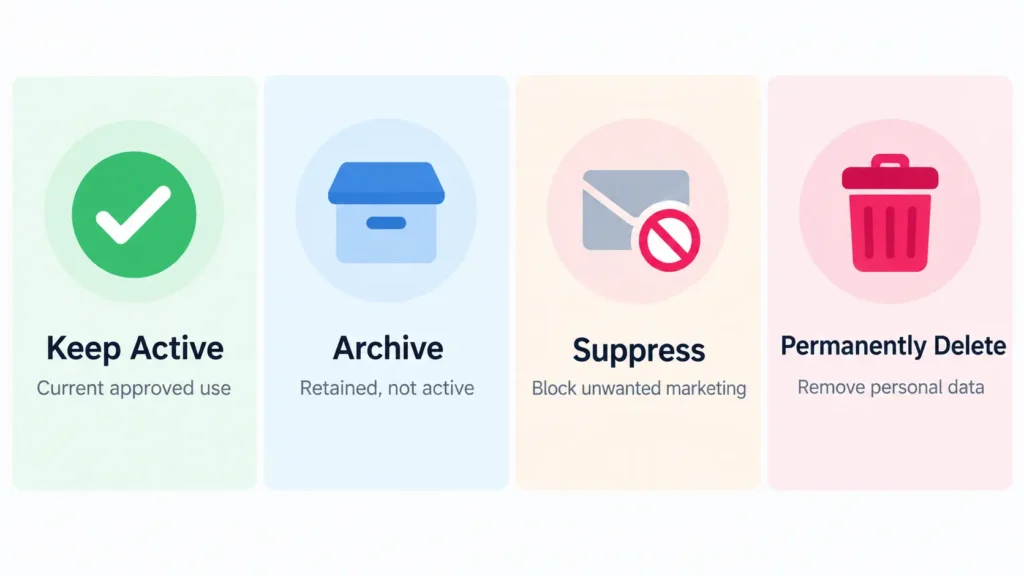
Depending on the situation, you may need to keep the record active, archive it, suppress it from marketing, or permanently delete it.
| Outcome | What it means | Can the person receive marketing? | Is the information retained? |
|---|---|---|---|
| Keep active | The record remains available for an approved business purpose. | Only when the person is eligible to receive it. | Yes |
| Archive | Remove the record from routine active use while retaining information for a justified purpose. | Not while archived in systems such as Mailchimp. | Yes, until the applicable retention period ends. |
| Suppress | Retain the minimum information needed to prevent unwanted future marketing. | No, for the marketing covered by the opt-out. | Usually a limited suppression record. |
| Permanently delete | Remove personal information through the platform’s permanent deletion process. | No marketing from the deleted record. | Not in the deleted record, subject to the actual scope of deletion. |
These are different outcomes, not interchangeable names for the same action.
For example, Mailchimp’s contact documentation explains that archived contacts retain their information but cannot receive marketing while archived. Permanent deletion removes personal information from the audience and cannot be undone.
HubSpot handles deletion differently. According to its CRM record deletion documentation, an ordinarily deleted record can be restored within 90 days, while a contact permanently deleted for privacy-law compliance cannot be restored.
So before selecting a bulk action, check exactly what that action means in your own platform.
Unsubscribed contacts: suppress them instead of simply deleting them
Suppression is the most important distinction in this guide.
When someone unsubscribes from promotional emails, you might assume the respectful thing is to remove every trace of their email address.
But deleting the record can remove the information your business needs to prevent another marketing email.
The UK’s Information Commissioner’s Office (ICO) advises using a suppression or do-not-contact list when someone objects to direct marketing, rather than simply deleting their details.
The reason is practical: the suppression list helps prevent that person from being contacted again by mistake.
Imagine an old customer list being imported for a new campaign. Without a reliable suppression check, previously unsubscribed addresses might return to an active audience. Whether that happens depends on the platform and its import controls, but the risk is worth preventing.
A sensible suppression process should:
Record the opt-out in the relevant marketing system.
Prevent future promotional sends covered by the opt-out.
Check imports against suppression records before activating contacts.
Restrict suppression information to what is needed for that purpose.
Preserve the person’s marketing preference across connected tools where necessary.
Suppression isn’t permission to keep using someone’s information for marketing. Its purpose is to prevent the unwanted marketing.
An unsubscribe is also not automatically the same as a request to erase all personal data. If someone makes an erasure request, it needs a separate review.
Once audience eligibility is settled, the routine campaign preparation can follow an approved process. My guide to email marketing tasks a virtual assistant can handle covers that wider handoff.
Bounced and cleaned email addresses: archive them with a reason
A bounced email address presents a different problem.
The recipient may never have asked to unsubscribe. The address may simply be invalid, outdated, misspelled, or temporarily undeliverable.
In Mailchimp, a cleaned contact is an address that has hard-bounced or repeatedly soft-bounced and is considered invalid.
Importantly, Mailchimp doesn’t recommend treating cleaned addresses as an ordinary deletion batch.
Its guidance on cleaned contacts recommends archiving them rather than deleting them, so the business retains information that helps avoid sending to those addresses again.
For a Mailchimp list, that could mean:
Identify contacts with the cleaned status.
Confirm whether any addresses need investigation, such as an apparent typo.
Archive the appropriate cleaned contacts without treating them as eligible for new marketing.
Retain the status or reason needed to prevent another failed send.
Review whether the retained information is still necessary under your retention rules.
Remember that Mailchimp already prevents cleaned contacts from receiving email campaigns. Don’t override that protection simply because an address looks familiar.
Other platforms may use different bounce-handling rules and status labels. Check the actual tool rather than assuming every system behaves like Mailchimp.
This is a contact-management issue, not a reason to judge campaign performance from open rates alone. For the reporting side, see which newsletter metrics are more useful when open rates mislead.
Inactive contacts and former customers: how long should you keep them?
An inactive subscriber is not necessarily an invalid contact.
Someone might have stopped opening newsletters while remaining a legitimate customer. Another person may have completed a purchase years ago but still have an account, invoice history, warranty issue, or unresolved complaint.
These situations deserve a review rather than automatic deletion.
A business should ask:
Why was this information collected?
Is that original purpose still relevant?
Is there another valid reason to keep some of the information?
Does a legal or contractual requirement affect retention?
Could less information, or anonymised information, serve the remaining purpose?
When should this decision be reviewed again?
The ICO’s storage-limitation guidance explains that the UK GDPR does not prescribe one fixed retention period for all personal data. Organisations must justify how long information is needed and periodically review it.
That also means archiving isn’t permission to keep personal data forever.
For an inactive but otherwise legitimate contact, archiving with a defined review trigger may be appropriate while a valid retention purpose remains. Once there is no longer a reason to keep identifiable information, deletion or proper anonymisation may be necessary.
Former customers may require a more selective approach. For instance, a business might still need certain transaction details for accounting or to respond to a dispute, without retaining the person’s entire marketing profile.
The answer is not necessarily to keep everything or delete everything. It may be to separate the information that is still necessary from information that no longer serves a valid purpose.
A note for small businesses
You don’t necessarily need a complicated data-governance manual to make reasonable retention decisions.
The ICO notes that some small organisations handling occasional, low-risk processing may not need a formally documented retention policy. However, they must still review the personal data they hold and delete or anonymise information they no longer need.
A simple record-outcome rules table can help you apply those decisions consistently.
The ICO currently marks its storage-limitation guidance as under review following changes introduced by the Data (Use and Access) Act, so businesses subject to UK requirements should check the latest guidance when setting or revising retention rules.
Deletion requests: treat permanent removal as a separate decision
Now consider a different situation.
A customer contacts your business and asks for their personal information to be deleted.
That is not an ordinary inactive-contact cleanup task.
Privacy laws can give individuals rights to request erasure or deletion of personal information. Those rights can also have exceptions, depending on the applicable law and why the business holds the data.
For example, the California Privacy Protection Agency’s FAQ explains that qualifying consumer requests to delete personal information can be subject to exceptions, including circumstances where a business is legally required to retain information.
For businesses subject to the relevant CCPA requirements, the agency also describes a 10-business-day deadline to confirm receipt of a deletion request and a 45-calendar-day period to respond, with a possible extension when properly notified.
These are not universal deadlines for businesses everywhere.
A privacy-related deletion request should be escalated to the business owner or the person responsible for privacy compliance. They should determine how to verify and respond to the request, which records and connected systems are affected, and whether any exception permits or requires limited retention.
Only after that review should the approved removal process be carried out.
This matters because some platform actions cannot be reversed.
Mailchimp’s deletion documentation states that permanently deleting a contact removes their personal information from the audience and cannot be undone.
HubSpot also distinguishes ordinary restorable deletion from permanent privacy-related deletion.
Deleting an entry in your email platform may not address copies in a CRM, connected integrations, exports, or other systems. Any retained information, including suppression records or backup data, must be handled according to the applicable requirements.
This article provides general operational information, not legal advice. For actual privacy requests or retention obligations, follow the law applicable to your business and seek qualified advice when necessary.
Before any bulk action: export, segment and record the decision
Even if your contact categories are clear, carrying out a bulk action incorrectly can affect far more records than intended.
Mailchimp specifically advises businesses to export their audience before performing bulk actions.
That is sensible for routine list maintenance, but an export creates another copy of personal information. It must be protected, access-controlled, and retained or disposed of under the appropriate rules. For an erasure request, do not create or retain an unnecessary backup of the data being removed.
Before an approved routine cleanup, use three safeguards.
Export appropriately. Confirm whether an export is necessary, which fields are needed, where the file will be stored securely, and when it should be removed.
Segment precisely. Separate unsubscribed, cleaned, inactive, former-customer, and privacy-request records. Check a small sample before applying a bulk action, and confirm that any filters select the intended records.
Log the action. Record the date, platform, category, record count, approved outcome, person responsible, and exceptions requiring review. Avoid duplicating sensitive information in the log itself.
If you’re also dealing with duplicate CRM records, use the separate guide on CRM cleanup rules before merging records. A record that needs merging presents a different decision from a person who has opted out of marketing or requested erasure.
Who decides and who does the work?
The business owner needs to establish the rules. A virtual assistant can help apply them.
That distinction makes contact cleanup safer and easier to review.
For example, an appropriately authorised VA can prepare separate contact segments, identify records matching agreed criteria, prepare permitted exports, apply approved archive or suppression actions, record what changed, and flag exceptions.
But the VA should not independently invent retention periods, interpret a privacy-law exception, or permanently delete sensitive records without the required approval.
The instructions might be as simple as:
Archive contacts already marked as cleaned in the email platform, using the approved segment. Do not change their subscription status, permanently delete records, or make changes to other contact categories. Flag anything that does not match the agreed rules.
That is much safer than saying, “Clean out everyone we don’t need.”
Turn the agreed decisions into a clear SOP for your virtual assistant, including what to do when a record fits more than one category.
Also limit access to the required responsibilities. Bulk deletion permissions, for example, should not automatically be granted merely because someone handles routine contact updates.
Your record-outcome rules table
Use this table as a starting point for deciding what happens to each category of record.
The outcomes are suggestions, not legal requirements. Replace the review triggers with periods or events justified for your own business, confirm the exact behaviour in your software, and have the appropriate person approve the rules before work begins.
| Record situation | Suggested outcome | Reversible in your tool? | Who decides? | Who executes? | Review trigger/date | Notes |
|---|---|---|---|---|---|---|
| Unsubscribed or opted out | Suppress from the relevant marketing | Not a routine reversal; eligibility needs review | Owner / marketing or privacy lead | VA under approved rules | On each relevant import or preference change | Keep only appropriate suppression information |
| Hard-bounced or cleaned | Retain cleaned status; archive where appropriate | Often, depending on platform | Owner sets rule | VA | When status changes or retention is reviewed | Do not reactivate automatically |
| Inactive subscriber | Archive if retention remains justified | Often | Owner / marketing lead | VA | Approved inactivity threshold and review date | Inactivity does not equal consent withdrawal or an erasure request |
| Former customer | Retain necessary records; remove information no longer needed | Depends on action | Owner with relevant specialist | VA for approved actions | End of applicable business or legal retention need | Separate transaction history from unnecessary marketing information |
| Duplicate after approved merge | Remove redundant record only under approved merge rules | Platform-dependent | CRM owner | Authorised VA | After merge verification | Check retained history and associations first |
| Verified deletion request | Permanently delete applicable information after checks | Usually no | Owner / privacy lead | Authorised operator following instructions | Request deadline and completion review | Check exceptions, connected systems and retained copies |
| Confirmed test or spam entry | Delete when no justified purpose remains | Platform-dependent | Owner sets rule | VA | At routine data review | Verify the entry is not a legitimate customer or enquiry |
You can copy the table into your working document or adapt it inside your CRM procedures.
For each approved cleanup batch, the person performing the work should be able to identify the applicable rule without guessing.
Where records fall into conflicting categories, such as someone who is both a former customer and an unsubscribed marketing contact, review the purposes separately. Keeping necessary transaction information does not make the person eligible for promotional messages.
After execution, the owner can spot-check the changes against the agreed rules, focusing especially on exceptions and any irreversible actions.
A smaller contact list isn’t the goal
The cleanest database isn’t necessarily the one with the fewest names.
It’s the one where the records have appropriate statuses, a justified purpose, and a clear rule for what happens next.
An unsubscribe should not quietly become a new marketing contact. A bounced address should not be treated as an ordinary active subscriber. An old customer record should not remain indefinitely without a reason. And a genuine deletion request deserves more care than clicking a bulk-delete button.
Start by agreeing on the outcomes, then let the rules guide the cleanup.
If your business needs help organising contact segments, preparing permitted exports, maintaining cleanup records, or applying approved CRM and email-platform rules, my Data Management support at Boost VA covers that kind of backend execution. You can get in touch through the homepage to discuss the work and what should remain under your approval.