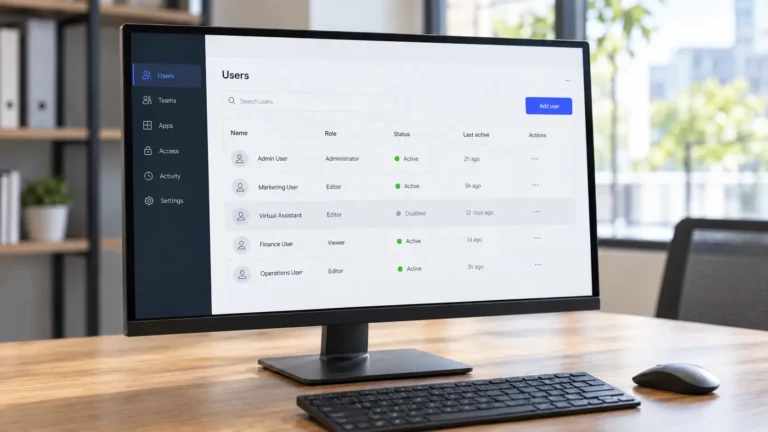
Your virtual assistant sends back a completed spreadsheet, a batch of social posts, or an updated WordPress page. The work is marked done, but you still need to decide whether it is ready to use.
You could accept it without checking. Or you could go through everything, quietly correct the mistakes, and end up doing part of the job yourself.
Neither is a particularly useful long-term approach.
Knowing how to review a virtual assistant’s work means having a clear standard, checking the parts that matter, and giving feedback that prevents the same mistakes from returning.
The goal isn’t to inspect every detail forever. It’s to know what finished work should look like, how closely each task needs reviewing, and when you can confidently sign it off.
Here’s a practical way to do that, including a reusable VA Deliverable Review Card.
Start With What “Done” Was Supposed to Mean
Before checking a deliverable, go back to the original task instructions.
A VA might produce a neat spreadsheet with 100 contact records, but that doesn’t necessarily mean the assignment was completed correctly. Perhaps you requested only US companies, required a verified website for every entry, and specifically excluded agencies.
If those requirements weren’t met, the number of completed rows isn’t enough.
Your original brief should tell you:
Expected outcome: What result was the task supposed to produce?
Scope: Which items, pages, records, or activities were included or excluded?
Required format: Was the result supposed to be a spreadsheet, document, published page, or another specific deliverable?
Destination: Where should the completed work be saved, published, or shared?
Deadline and approval: When was it due, and was the VA authorized to complete the final action?
These are your acceptance criteria.
The American Society for Quality’s explanation of quality control describes it in terms of fulfilling defined quality requirements. That principle applies here: you need a standard before you can fairly judge whether the work meets it.
If the expected outcome was never written down, your review may reveal a briefing problem rather than an execution mistake.
For example, if you only requested “a list of potential customers,” it would be unfair to reject the completed list because it doesn’t include company revenue figures you never requested.
Clarify the missing requirement, agree on the revised scope, and use it for the next review.
For future assignments, my guide to giving clear instructions to a virtual assistant explains how to define the expected result and decision boundaries before work begins.
Decide How Closely to Check
Not every completed task deserves the same amount of inspection.
A routine internal file rename and a customer-facing email campaign carry different consequences if something goes wrong.
A useful rule of thumb is to match your review effort to the risk of an error, the familiarity of the task, and the reliability of previous results.
Full check: New or high-risk work
Use a full check when the task is unfamiliar, the instructions have changed, or a mistake could have significant consequences.
Examples include:
A first-time lead research assignment with unfamiliar qualification rules.
A WordPress change affecting an important business page.
Customer-facing content that has not received final approval.
Financial records, sensitive information, or changes involving important access permissions.
A full check means inspecting every relevant requirement and all critical items. For a large deliverable, that may include sampling ordinary records while checking every high-risk field or decision.
Some responsibilities still require approval from the business owner or a qualified professional, regardless of how carefully the VA completed the preparation. The guide on tasks not to delegate to a virtual assistant alone explains those boundaries.
Spot check: Reliable recurring work
Suppose your VA updates a familiar prospecting spreadsheet every week, using an agreed template and established qualification rules.
If previous batches have consistently met the requirements, you may not need to inspect every row.
Instead, you could:
Select records from different parts of the completed batch.
Compare sampled values against their original sources.
Check fields that have caused problems previously.
Examine any exceptions or uncertainties the VA flagged.
If the samples reveal a problem that may affect the wider batch, expand the review before accepting it.
A spot check is a practical management choice, not a guarantee that unchecked entries are correct.
Outcome check: Low-risk routine work
For a straightforward task with a reliable history, confirming that the expected result exists and works may be sufficient.
For example, if your VA organized approved documents into an agreed folder, you might verify the destination, folder structure, and access rather than reopen every file.
This lighter approach should remain limited to tasks where an overlooked error would have little impact.
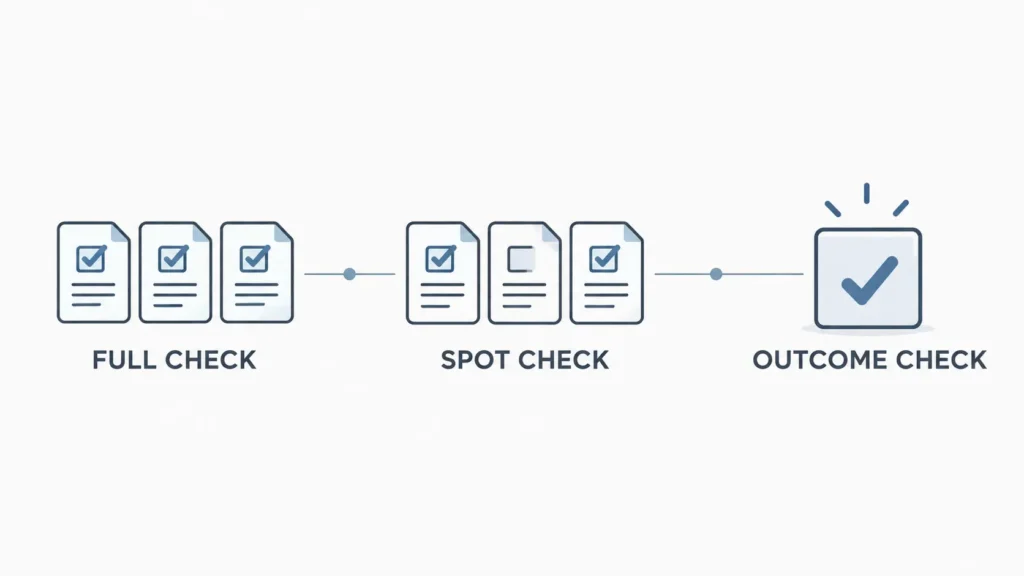
When should the review become lighter?
Start with closer inspection when a task is new.
As repeated deliveries meet the agreed standard without significant corrections, consider moving to spot checks. For simple, low-risk tasks, an outcome check may eventually be enough.
Move back to a deeper review when:
A meaningful error gets through.
The VA starts using a new tool or template.
The task requirements change.
A recurring problem appears.
The potential consequence of an error increases.
There is no universal number of successful tasks that makes inspection unnecessary.
Five Checks Every Deliverable Should Pass
Whether you are reviewing a spreadsheet, research document, scheduled post, or website update, start with these five checks.
1. Were the instructions followed?
Compare the completed work with the agreed scope and requirements.
Check whether the VA used the correct source material, followed the requested process, respected exclusions, and stayed within the authority you provided.
Work can be accurate in isolation while still being the wrong work for the assignment.
2. Is the information accurate?
Look at details that could make the result misleading or unusable.
Depending on the task, that might mean checking names, email addresses, dates, numbers, product details, calculations, or statements against their original sources.
Don’t confuse information that looks complete with information that has been verified.
3. Is anything missing?
Confirm that all required items are present.
A research list might contain correct information but still omit required columns. A published article might look finished while missing a section that was part of the approved brief.
Accuracy and completeness are separate questions. The UK Government Data Quality Framework makes the same distinction when discussing the quality of structured data.
4. Does it follow the required format?
Check whether the result can be used in its intended destination without unnecessary reformatting.
Look at file type, naming conventions, document styles, spreadsheet columns, required templates, and the agreed storage location.
Formatting isn’t merely cosmetic when another person or system depends on a particular structure.
5. Is it ready to use?
This is your final practical check.
Open the links. Confirm the file permissions. Check that the completed page displays correctly or that a scheduled item is actually in the expected state.
Also establish whether anything is still waiting for approval.
A task can be fully prepared and correctly marked “Ready for approval” without being authorized for publication or delivery.
The result and its status should be visible in the evidence your VA includes in a weekly report, rather than existing only in a message saying “done.”
Before reviewing, also ask your VA to flag any uncertain information, missing sources, or decisions they couldn’t make independently. Those items often deserve your attention first.
Add-On Checks by Type of Work
The five core checks provide a starting point. Different deliverables need different additional checks.
Choose the relevant group below rather than turning every assignment into the same enormous checklist.
Written Content, Emails, and Social Posts
For written work, review:
Spelling, grammar, and words that spell-check may miss.
Whether the writing makes sense when read aloud and suits the intended audience.
Brand voice, approved terminology, and any required messaging.
Important claims, quotations, numbers, and dates against reliable sources.
Links to confirm they open the intended pages.
Platform requirements, formatting, length limits, and approval status.
Purdue OWL’s proofreading guidance recommends using a list of common errors and reading aloud to catch problems that are easy to miss during ordinary reading.
If the work was drafted using AI, apply the more specific checks in my AI Content Quality Control guide, especially for source accuracy, unsupported claims, originality, and publication readiness.
Spreadsheets, CRM Updates, and Data Entry
Structured data needs more than a quick visual inspection.
Check:
Accuracy: Compare selected rows with the original records.
Completeness: Confirm required fields and records are present.
Uniqueness: Look for duplicates where unique records are required.
Consistency and validity: Check dates, phone numbers, naming conventions, and permitted values.
Timeliness: Confirm time-sensitive information is current enough for its intended use.
Integrity: Test relevant formulas and filters, and check that information outside the agreed scope was not overwritten.
These checks reflect the six quality dimensions described in the UK Government Data Quality Framework: completeness, uniqueness, consistency, timeliness, validity, and accuracy.
For CRM changes, be especially careful with actions that alter or combine existing records. My guide to CRM cleanup rules before merging records covers those approval and data-preservation decisions.
Research and Lead Lists
A completed research spreadsheet isn’t necessarily useful just because it contains plenty of results.
Review:
Whether each entry matches the targeting criteria in the brief.
Whether the important sources are recorded and accessible.
A sample of entries against the original websites or references.
Duplicate companies, contacts, or previously rejected prospects.
The research date, particularly when information changes frequently.
For example, a list of 50 businesses might contain 50 real companies but still fail the brief if half operate outside your target market.
The value comes from qualified, traceable information, not simply the number of rows.
If you’re defining the assignment itself, see these examples of research deliverables a virtual assistant can prepare.
WordPress and Website Updates
Website work should be checked where visitors will actually see it.
Review:
The updated page on desktop and mobile.
Whether images, buttons, and links display and function correctly.
The correct draft, published, or scheduled status.
SEO title, meta description, and other fields when they were included in the assignment.
Whether unrelated page elements or settings changed unexpectedly.
Don’t assume that a successful save inside WordPress means the live result is correct.
If the assignment involves publishing an article, the blog publishing workflow provides more detail about handoffs, approvals, and the final steps before content goes live.
Inbox, Calendar, and Admin Tasks
Administrative work often involves details that seem minor until something goes to the wrong person or happens at the wrong time.
Check:
Meeting dates, time zones, participants, and calendar invitations.
Whether messages were sent only when authorization was given.
Folder, label, and filing rules.
Document names, storage locations, and sharing permissions.
Open requests or exceptions that still require a decision.
For remote teams, use the actual agreed time zone rather than assuming that a meeting time is understood by everyone. My guide to working with a VA in a different time zone explains how to establish clear handoff and scheduling rules.
The VA Deliverable Review Card
You don’t need a different approval system for every type of VA task.
Use the card below as a reusable starting point. Copy it into a document, task template, or shared spreadsheet, then add the checks relevant to the work being delivered.
VA Deliverable Review Card
| Field | Details |
|---|---|
| Task / deliverable | [Task name and link] |
| Date received | [Date] |
| Reviewer | [Name] |
| Original brief / SOP | [Link] |
| Review depth | Full / Spot / Outcome |
| Work type | Content / Data / Research / WordPress / Admin / Other |
Core acceptance checks
| Review item | Status: Pass / Fix / N/A | Notes or evidence |
|---|---|---|
| Instructions and scope followed | [Status] | |
| Important information is accurate | [Status] | |
| All required work is complete | [Status] | |
| Format and destination are correct | [Status] | |
| Deliverable is ready to use or approve | [Status] |
Task-specific checks
| Additional requirement | Status: Pass / Fix / N/A | Notes or evidence |
|---|---|---|
| [Relevant check 1] | [Status] | |
| [Relevant check 2] | [Status] | |
| [Relevant check 3] | [Status] | |
| [Relevant check 4] | [Status] |
Final review decision: Accept / Return with fixes / Fix the brief or SOP
Required correction or process update: [Specific change, owner, and deadline]
Next review depth: Full / Spot / Outcome
How to use the three outcomes
Pass: The requirement has been met. No further correction is needed for that item.
Fix: The result doesn’t meet an agreed requirement. Record exactly what needs changing and return it to the person responsible for the correction.
N/A: That check genuinely doesn’t apply to the deliverable. Don’t use N/A to hide an incomplete requirement.
Then make the final decision:
Accept when the deliverable meets the relevant requirements and any required approval has been obtained.
Return with fixes when an agreed requirement was missed or something must be corrected before use.
Fix the brief or SOP when the instructions themselves were missing, contradictory, or outdated. If the deliverable also needs correcting, record both actions.
For an outcome-only review, mark items you genuinely didn’t inspect as “Not checked” in your notes. Don’t record them as Pass simply because no problem was visible.
Example: Reviewing a weekly lead list
Imagine you requested a weekly list of 40 potential customers.
The agreed requirements were:
Businesses operating in the United States.
Companies matching your defined industry criteria.
One working company website per entry.
No duplicates from earlier approved lists.
A source link for the qualification information.
This is an illustrative example, not a Boost VA client result.
If the task has been completed reliably for several weeks, you might choose a spot check.
You open a selection of the submitted company websites, compare the information with the source, and check the list for duplicates.
Everything passes except two sampled entries that don’t match the required industry.
Rather than immediately rejecting every record or approving the entire list, you flag the two errors and examine whether the same misunderstanding affects the rest of the batch.
If it does, the appropriate decision is to return the affected work for correction and clarify the industry criteria before the next assignment.
The review card then serves two purposes: it records the acceptance decision and provides a reference for checking whether the correction worked.
You can also share the same card with your VA before handover.
A pre-handover self-check can help catch straightforward problems before the deliverable reaches you, although it doesn’t replace the level of independent review your task actually requires.
When the Same Mistake Comes Back, Fix the Cause
A correction solves the immediate problem. It doesn’t necessarily prevent the next occurrence.
Suppose your VA repeatedly leaves the source column blank in a research spreadsheet.
You could keep filling in those missing links yourself. You could also ask for the same correction every Friday.
But first, consider why it keeps happening.
Was the source field required in the original brief? Was it missing from the template? Did the SOP describe it as optional? Has the source location changed? Or does the VA need additional guidance on finding acceptable sources?
These situations require different responses.
The UK Government Data Quality Framework emphasizes addressing problems at their source rather than repeatedly treating their symptoms. The same principle is useful for delegated work.
Keep a short correction record
You don’t need a complicated incident-management system.
Record:
The task and date.
The error or missing requirement.
The likely cause, once discussed.
The correction or process change agreed.
Whether the same issue appears in the next comparable delivery.
Then match the action to the cause.
| Likely cause | Useful response |
|---|---|
| Unclear brief | Rewrite the expected outcome or acceptance criteria |
| Missing SOP instruction | Add the missing step or example |
| Changed tool or template | Update the instructions and check the new process |
| Workload or deadline pressure | Revisit priorities, capacity, or delivery dates |
| Skill gap | Provide training, a worked example, or reassign unsuitable work |
A repeated error doesn’t automatically prove carelessness.
Sometimes the work has changed, but the instructions haven’t. Sometimes the required decision was never clearly assigned. And sometimes the task genuinely needs skills beyond the current arrangement.
For recurring process problems, the guide on writing SOPs for virtual assistant tasks provides a useful starting point.
Once you’ve corrected the underlying cause and the improvement holds across subsequent deliveries, consider reducing the depth of review again.
The aim is to stop spending time catching a problem that the process could prevent.
Give Feedback Your VA Can Actually Use
Feedback works best when the person receiving it knows exactly what needs to change.
Compare these two messages:
“Please be more careful with the spreadsheet.”
And:
“Rows 18 and 27 are missing the company website. The task brief requires a working website for each entry. Please add the verified URLs and check the remaining rows for the same issue before sending the file back.”
The second message identifies the location, requirement, correction, and next action.
That makes it easier to respond without guessing.
When something needs fixing:
Point to the specific entry, page, field, or section.
Refer to the original requirement when one exists.
Show a corrected example if the expected result isn’t obvious.
Separate mistakes in the deliverable from changes you’re making to the brief.
Agree on when the corrected version should be returned.
You can discuss recurring patterns during regular check-ins, but there’s no need to turn every isolated correction into a broader judgment about the person.
That’s also why checking a deliverable and conducting a virtual assistant performance review should remain separate activities.
The deliverable review answers, “Is this piece of work ready?”
A performance review looks across multiple assignments to assess reliability, improvement, responsibilities, and overall working arrangements.
Review Less by Reviewing Well
The best outcome of a quality review isn’t a growing collection of checklists.
It’s a working relationship where expectations are clear, common problems are documented, and recurring tasks become easier to accept with confidence.
Start with the brief. Match the review to the risk. Check the details that affect whether the result can actually be used. When a mistake keeps returning, look for the cause rather than simply correcting another instance.
At Boost VA, I support founders and agencies with recurring execution across research, content, data, WordPress, and business operations. That includes working with established SOPs, adapting to new workflows, providing updates, and flagging issues that need attention.
If you’re looking for dependable support with recurring tasks and a clearer handoff process, explore my virtual assistant services and share the work you need help managing.