
How to Repurpose Content With a Virtual Assistant
You publish a useful blog post, promote it for a few days, and then move on to the next piece.
The article stays in your archive even though it may still contain several ideas that could become social posts, a short presentation, an email, or other useful content.
The problem is not always finding another topic to write about. Sometimes the real problem is finding the time to extract what you already have, adapt it properly, prepare the assets, get everything approved, schedule it, and keep track of what went live.
That is a practical place for virtual assistant support.
If the original content, audience, and brand direction are already approved, a VA can handle much of the repeatable production work around repurposing while you retain control of strategy, important editorial decisions, and final approval.
This guide walks through one example: how to repurpose content with a virtual assistant by turning an existing blog article into social posts, a short slide deck, email content, and an organized publishing plan.
The focus is repurposing content you already have, not outsourcing the creation of original content from scratch.
What Content Repurposing Actually Means
Content repurposing is more than copying a paragraph from your blog and pasting it onto another platform.
HubSpot Academy describes content repurposing as extending the value of existing content by adapting it to serve another purpose or format while keeping the underlying message.
That distinction matters.
A 1,500-word article should not become a 1,500-word LinkedIn post with a different introduction. A newsletter should not simply contain the first three paragraphs of the article. A presentation should not shrink complete blog paragraphs into six slides.
The useful idea stays consistent. The packaging changes.
Content Marketing Institute’s guidance on repurposing makes a similar point: successful repurposing adapts content for different formats, audiences, hooks, and channels instead of treating redistribution as copy and paste.
That is also why repurposing works well as a delegated production process. Once the important message and boundaries are clear, many of the remaining tasks become structured execution.
Start With Content That Is Actually Worth Reusing
Not every old article deserves another round of distribution.
Before handing anything to a VA, choose a source asset that still has something useful to say.
A stronger candidate will usually be:
accurate enough to use today;
relevant to an audience you still want to reach;
built around several standalone ideas or lessons;
connected to a current service, product, campaign, or objective;
detailed enough to support more than one smaller asset.
If you have useful performance data, that can also help you prioritize. An article that continues to attract relevant traffic, engagement, enquiries, or positive feedback may deserve more attention than something that never connected with the intended audience.
HubSpot also recommends looking at existing content performance when deciding what to repurpose in its guide to repurposing content.
Before reusing an older piece, check the dates, statistics, screenshots, links, examples, offers, and recommendations inside it. Repurposing outdated information simply distributes the problem to more places.
A Simple Way to Repurpose Content With a Virtual Assistant
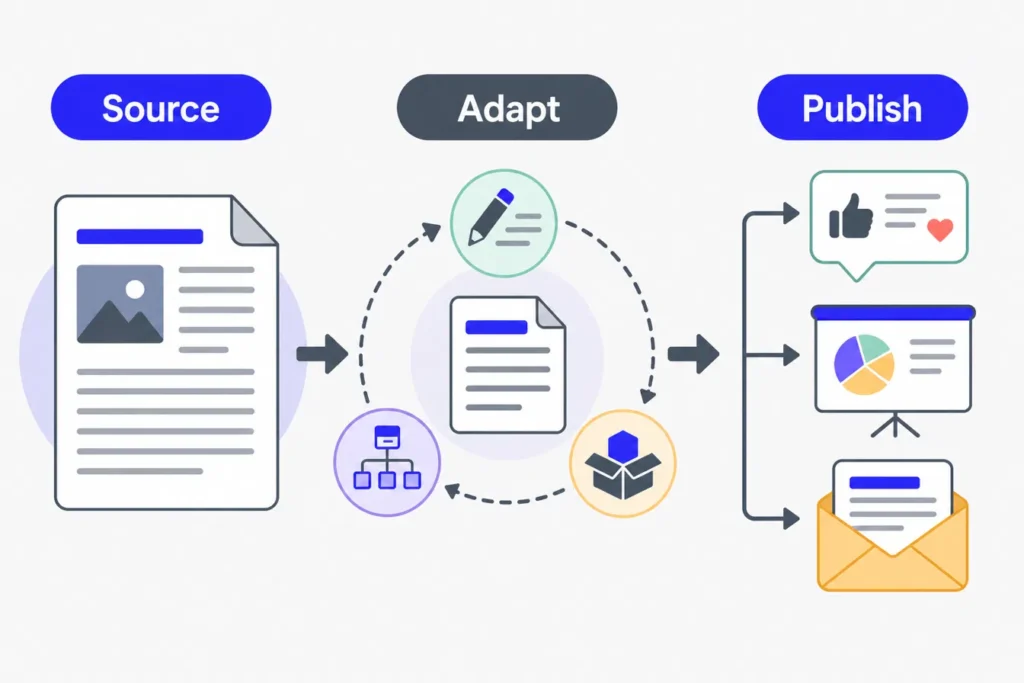
Imagine you have an evergreen blog article that explains several useful lessons around one topic.
It is already published and approved. You do not need another original article about the same thing.
Instead, you want to create this small repurposing package from it:
Four social media posts based on different lessons from the article.
One six-slide presentation or document carousel.
One short email newsletter that brings readers back to the original article.
A record of every new asset, its approval status, scheduled date, and eventual live URL.
That gives the VA a defined production job instead of the vague instruction, “Repurpose this article.”
Step 1: Give the VA a Clear Source Brief
Start with the original article and enough context to prevent guesswork.
The brief should identify:
the final source article or URL;
the audience;
the purpose of the repurposed content;
the channels you want to use;
the current call to action;
brand or formatting guidance;
anything that must not be changed;
who approves the final assets;
expected delivery or publishing dates.
This does not need to become a complicated document.
The goal is to establish what is fixed and what can be adapted.
For example, you might allow your VA to rewrite a hook, shorten a paragraph, reorganize a list, or change the format while requiring approval before any statistics, claims, pricing, offers, or important conclusions are changed.
That same principle applies to other marketing work. My guide on working with a marketing virtual assistant explains why context, assets, constraints, and approval boundaries make a handoff much more useful than a task name alone.
Step 2: Pull Out the Reusable Ideas
Before creating individual posts or designs, the VA can build a simple source map.
For one blog article, that might include:
the central message;
three to seven standalone takeaways;
useful examples already contained in the article;
quotations or statistics that can still be verified;
important source links;
the current CTA;
sections that should not be separated from their original context.
This creates a small library of approved material to work from.
It also reduces the chance of the VA repeatedly reading the whole article and making a different interpretation every time another asset is needed.
If AI is used to help summarize the source or draft variations, it should remain an assistant to the process. The resulting copy still needs to be checked against the approved article, source material, brand voice, and publishing rules.
Step 3: Turn Individual Ideas Into Social Posts
Now the VA can adapt separate ideas for the channels you actually use.
Instead of squeezing the whole article into one social post, give each post one job.
One post might explain the article’s main problem. Another could focus on one practical lesson. A third might turn a short list into a visual carousel. A fourth could use a useful quotation or takeaway and link readers back to the complete article.
The wording should change with the format.
A professional network post may need more context and explanation. A shorter platform may work better with one concise takeaway. A visual post may need a short headline and only enough copy to support the graphic.
A design tool such as Canva can help the VA apply existing brand templates to quote graphics, carousels, or simple visual summaries.
The key is not producing as many posts as possible. It is giving each useful idea an appropriate format instead of repeating the same text four times.
Step 4: Convert the Main Structure Into a Short Slide Deck
A well-structured article often already contains the bones of a presentation.
The VA can take the strongest parts and reduce them to a short sequence such as:
The problem.
Why it matters.
First key lesson.
Second key lesson.
Third key lesson.
A practical next step.
The slides should be rewritten for presentation use.
That means shorter copy, one main idea per slide, readable visuals, and enough context for someone to understand the sequence without facing a wall of text.
The VA can work from an approved presentation template or brand guide and prepare the deck for review.
The finished file might later be used as a document post, presentation, downloadable PDF, or another visual asset that suits your existing marketing channels.
Step 5: Turn the Same Article Into an Email
The email version needs another adaptation.
Instead of reproducing the article, the VA can prepare a short newsletter that gives subscribers a reason to care and then directs them to the complete piece.
A simple structure might be:
a subject line based on the main problem;
a short opening;
two or three useful takeaways;
one clear reason to read the full article;
one CTA linking to the source.
This works especially well when the article contains more detail than belongs in an email.
The email becomes a useful introduction to the idea rather than a duplicate copy of the article.
Step 6: Schedule, Publish, and Record the Outputs
Repurposing creates more assets, which also creates more things to manage.
Someone needs to know:
what is still being drafted;
what is waiting for approval;
what has been approved;
where each item is scheduled;
which assets have gone live;
the final URLs;
whether anything needs another update later.
A VA can maintain that record as part of the same workflow.
For social campaigns, the Boost VA social media content calendar template provides fields for copy, creative, approval status, scheduling, live URLs, reporting, and repurposing plans.
Before publishing, the VA can also complete routine checks such as confirming links, formatting, images, approved wording, CTA destinations, and the correct source attribution where required.
What the VA Should Not Decide Without Approval
Repurposing becomes risky when adaptation quietly turns into a new editorial strategy.
A general VA should not be expected to make every judgment simply because they have access to the source content.
Depending on your workflow, approval should normally be required before the VA:
changes an important factual claim;
replaces or invents statistics;
introduces an example that was not in the approved material;
changes the offer or positioning;
makes a substantial change to the article’s conclusion;
publishes sensitive material without the required review;
turns specialist advice into a new recommendation;
decides that an outdated source is still safe to reuse.
This is the same execution-versus-decision distinction covered in my guide to marketing tasks that can be outsourced to a virtual assistant.
The VA can organize, extract, adapt, format, prepare, schedule, track, and flag problems.
The person responsible for the content should still control the message, important claims, and strategic decisions.
Content Repurposing Run Sheet
You can use this table as a starting point when handing over a repurposing project.
| Stage | What You Provide | VA Output | Approval Point |
|---|---|---|---|
| Source audit | Final article, current links, audience, CTA | Source reviewed and outdated items flagged | Confirm the source is still suitable |
| Idea extraction | Approved article and source material | Central message plus reusable takeaways | Check interpretation and sensitive claims |
| Social content | Target channels, voice guidance, existing templates | Channel-ready drafts and required graphics | Approve copy and visuals |
| Slide deck | Brand assets or presentation template | Short presentation based on core lessons | Approve messaging and design |
| Audience, email purpose, CTA | Subject line and short newsletter draft | Approve final email copy | |
| Scheduling | Approved content, dates, platform access | Scheduled publishing queue | Final approval according to your process |
| Tracking | Calendar or reporting sheet | Statuses, live URLs, notes, issues | Review results and decide what to reuse again |
A good run sheet answers three questions for every output:
What is the VA allowed to change?
What must remain consistent with the source?
What requires approval before publication?
Once those answers are clear, the same process can be reused for the next article rather than rebuilt from zero.
How to Judge Whether Repurposing Is Worth the Effort
More assets do not automatically mean better marketing.
The useful question is whether repurposing helps you get more relevant distribution and value from content that was already worth creating.
You might track:
how many useful assets came from each source piece;
how much production work no longer needs to be done personally;
whether planned posts actually get published;
traffic returning to the original content;
engagement with the repurposed assets;
email clicks;
enquiries or conversions when they can be attributed reliably;
which formats are worth repeating.
Do not assume that turning one article into ten posts means its ROI increased tenfold.
Quality, audience fit, distribution, timing, and the original idea still matter.
The practical advantage is that you are not beginning every asset with an empty page. The core information already exists, so the effort can move toward adaptation, packaging, publishing, and distribution.
When Content Repurposing Is a Good VA Task
Content repurposing is particularly suitable for delegation when:
you already publish useful long-form content;
the source material has been approved;
you use several channels regularly;
you have brand examples or templates;
the work happens repeatedly;
your approval process is clear;
the bottleneck is production rather than strategy.
It becomes less suitable when the source itself is weak, outdated, unclear, or requires substantial specialist rewriting before it can be reused.
A VA can help you get more mileage from a good content asset. The VA cannot fix a weak underlying idea simply by putting it into more formats.
Turn Existing Content Into a Repeatable Publishing Asset
A useful article should not have to do all of its work on the day you publish it.
It can become the starting point for smaller, channel-specific assets long after the original draft is finished.
The practical approach is simple: choose a worthwhile source, define what can change, extract the strongest ideas, adapt them for each format, approve them, publish them, and keep a record of what happened.
Once that process is repeatable, a virtual assistant can take ownership of much of the production around it.
At Boost VA, I support founders, agencies, and online businesses with recurring execution across social media operations, WordPress, marketing support, research, data handling, and related backend work. If repurposing and publishing useful content keeps falling behind because the production work is taking too much time, you can explore ongoing or project-based virtual assistant support.