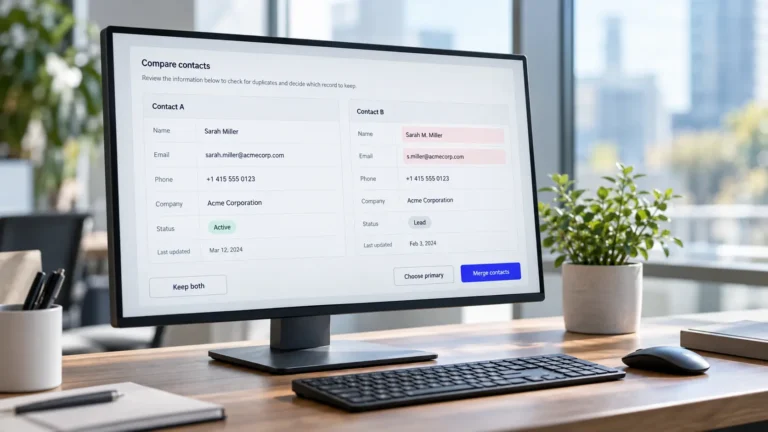
Imagine opening your CRM and finding two contact records for Jordan Alvarez.
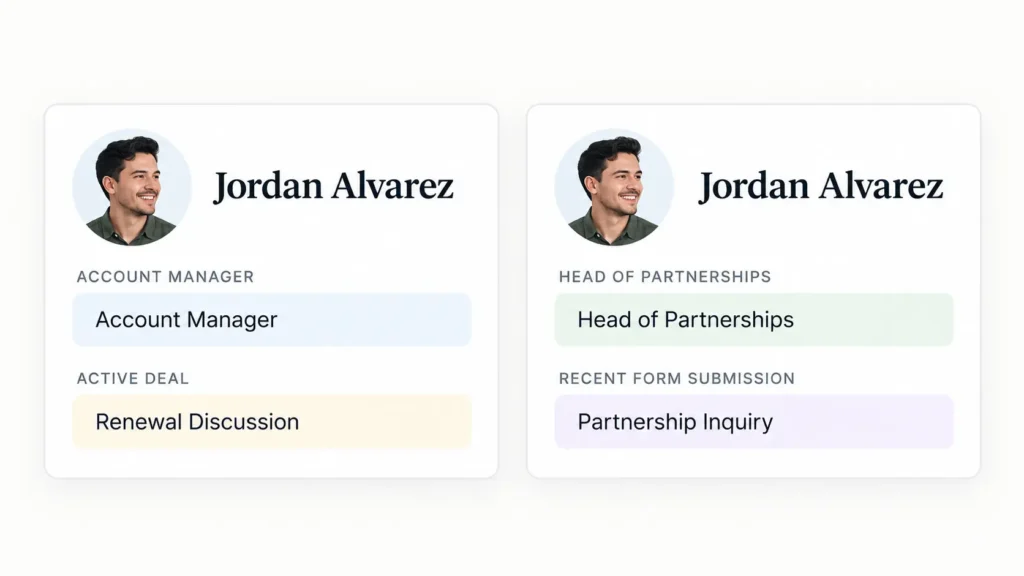
One uses Jordan’s current work email. The other contains the older email address, several meeting notes, and a deal your sales team has been working on for months.
Both look like the same person. You want your virtual assistant to clean up the duplicates, but which record should they keep? What happens to the deal history? And what if the records belong to two different people?
That is where CRM cleanup becomes more than an ordinary data-entry task.
A virtual assistant can help identify duplicate records, standardize information, investigate inconsistencies, and maintain an organized database. However, the rules for changing or combining records should be established before that work begins.
For example, HubSpot’s merge documentation confirms that merged records cannot be unmerged. Its merge process also involves decisions about which record and property values should survive.
The goal is not simply to reduce your contact count. It is to make your CRM more reliable without accidentally losing valuable information.
Here are six CRM cleanup rules to establish before handing the work to a virtual assistant, followed by a practical rules sheet you can adapt to your own business.
Why CRM Cleanup Goes Wrong Without Clear Rules
A CRM can contain thousands of records that appear straightforward until someone starts making changes.
Two contacts might share a name but work at different companies. An outdated-looking email address might belong to someone who still has an active account. A record that has not been updated for a year might contain important deal history.
Without clear instructions, the person doing the cleanup must make assumptions about what the business considers correct.
Consider these situations:
Two records have matching names but different company details.
The newest record has an updated phone number, but the older record contains important sales activity.
A contact has left their company, although historical transactions still need to remain accessible.
Two records have conflicting marketing or communication preferences.
A CRM flags a potential duplicate, but the available evidence does not establish that both records belong to the same person.
These aren’t problems that should be resolved by choosing whichever record looks more complete.
The safer approach is to establish what your VA can update, what evidence is acceptable, and which decisions require your review.
This follows the same principle behind giving clear instructions to a virtual assistant: define what a correct result looks like before expecting someone to deliver it.
For CRM cleanup, that principle becomes especially important when changes cannot be reversed through a simple undo action.
Rule 1: Take a Snapshot Before Anything Changes
Before your VA starts correcting records or preparing merges, preserve a dated reference copy of the information being reviewed.
Depending on your CRM and permissions, this could involve exporting the relevant contacts, companies, and selected properties into a secure file.
For a contact cleanup, the export might include:
Record ID and contact name
Company and job title
Email addresses and phone numbers
Record owner and lifecycle status
Creation and last-modified dates
Relevant consent or communication-status fields
Important identifiers needed to reconnect the exported data with the CRM
Store the snapshot in an approved location and give it a clear date.
For example:
crm-contacts-pre-cleanup-2026-10-13.csv
If a cleanup introduces an unexpected change, the export gives you a reference for checking the original values.
However, a CSV backup is not the same as an undo button. Reimporting contact properties may not reconstruct every association, historical activity, automation state, or original record relationship.
The purpose is to preserve evidence and support recovery planning, not to promise that every CRM merge can be reversed.
Your VA can prepare and organize the export if their access allows it. You or your CRM administrator should confirm that the snapshot includes the information your business would actually need.
If the export is reviewed in a shared spreadsheet, the same precautions covered in spreadsheet collaboration best practices can help prevent accidental changes to the reference copy.
Rule 2: Define What Counts as a Duplicate
A duplicate is not simply a contact with the same name.
For example, two people named Michael Brown may work at different companies. Two records with the same company phone number might represent different employees. Even a shared email address, such as info@example.com, may not identify one individual.
Before cleanup begins, decide what evidence is sufficient to classify records as duplicates.
A useful starting rule might be:
Likely duplicate: Matching work email address, or a combination of matching name, company, and independently confirmed contact details.
Needs review: Matching name or telephone number, but conflicting employer, ownership, or activity details.
Not automatically a duplicate: Shared inboxes, family members, different contacts at the same company, or records that merely have similar names.
Your exact criteria will depend on how your organization stores customer information.
How HubSpot identifies possible duplicates
According to HubSpot’s duplicates manager documentation, its default comparison properties for contacts include first name, last name, email address, IP country, phone number, ZIP code, and company name.
These comparisons can identify records worth investigating. They do not remove the need to review whether a proposed merge is correct.
A VA can work through suspected duplicates, compare the relevant fields, document conflicting information, and flag uncertain cases.
The important distinction is between identifying potential duplicates and authorizing a merge.
That distinction is also useful when delegating lead generation, because newly researched contacts should be checked against existing records before they are added.
Rule 3: Decide Which Record and Values Should Survive
Finding a duplicate pair answers only the first question.
The next question is which information should remain after the records are combined.
Suppose one contact record was created three years ago and contains extensive sales activity. A second record was created last month with an updated email address and job title.
Choosing the newest record automatically might discard the preferred values or disrupt the way the CRM uses the older record.
Choosing the oldest record automatically could preserve outdated contact details.
Your CRM cleanup instructions should therefore explain:
Which record is preferred as the primary or master record.
Which fields should take priority when values conflict.
Whether important relationships, activities, and ownership need additional review.
What information must be checked before the merge.
Which conflicting values require approval rather than a guess.
These decisions should be made with the actual CRM’s behavior in mind.
How HubSpot Handles Merged Values
In HubSpot, the person performing a merge selects a primary and secondary record.
Generally, the primary record’s populated values take priority, while values from the secondary record may fill empty fields. HubSpot also allows selected values to be reviewed during the merge process.
For contacts, the primary email normally remains the primary email, while the secondary record’s email becomes an additional email address.
Activities and associations from both records are generally brought together, although specific properties have exceptions and automation behavior can change.
HubSpot also documents that the resulting record normally receives a new Record ID, with an exception for accounts enrolled in its primary-ID preservation beta.
This means the primary-record decision should consider more than which contact has the most recent information.
What Changes in Salesforce
Salesforce has its own merge behavior and record-handling rules.
Its contact merge considerations address details such as record creation information, relationships, and what happens to non-master records.
Salesforce’s Nonprofit Success Pack documentation also describes contact merging as irreversible and recommends backing up data beforehand.
The important lesson is that HubSpot and Salesforce should not be treated as interchangeable.
If you use another CRM, confirm its rules for record ownership, history, associations, deletion, and recovery before authorizing merges.
Worked Example: One Contact, Two Records
Let’s return to Jordan Alvarez.
The following is a fictional example showing how a business might evaluate two contact records before merging them.
| Field | Record A | Record B |
|---|---|---|
| Contact name | Jordan Alvarez | Jordan Alvarez |
| jordan@northstar.example | j.alvarez@northstar.example | |
| Company | Northstar Studio | Northstar Studio |
| Job title | Account Manager | Head of Partnerships |
| Contact owner | Maria | Unassigned |
| Activity | Meetings and active deal | Recent form submission |
| Last checked | 12 months ago | 2 weeks ago |
The records appear to belong to the same person, but the VA should not merge them based on appearance alone.
The business first confirms that the two email addresses belong to Jordan, that the current job title is Head of Partnerships, and that the existing owner and active deal should remain associated with the contact.
For this example, the business is using HubSpot and chooses Record A as the primary record because of its established relationships.
It then selects the approved values during the merge review.
Illustrative result after the approved merge:
| Field | Intended result |
|---|---|
| Contact | Jordan Alvarez |
| Primary email | jordan@northstar.example |
| Additional email | j.alvarez@northstar.example |
| Company | Northstar Studio |
| Job title | Head of Partnerships |
| Contact owner | Maria |
| Activity | Both records’ relevant activities retained |
| Active deal | Association reviewed and confirmed |
This is an intended outcome, not a guarantee that every CRM automatically combines records in exactly this way. The operator still needs to check platform-specific merge results, property exceptions, and associations.
The VA’s role is to prepare an accurate comparison and carry out only the actions permitted by the cleanup rules.
The business should approve conflicts that could affect active deals, customer identity, compliance information, or other important relationships.
Rule 4: Flag or Archive Stale Records Instead of Automatically Deleting Them
Not every outdated record is useless.
Someone may have left a company, changed email addresses, or stopped engaging with your business. That does not necessarily mean all historical information about the contact should disappear.
A useful distinction is:
Update: Correct information when there is a reliable source for the change.
Flag: Mark a record as uncertain, outdated, or requiring review.
Archive or deactivate: Remove it from routine operational use when your CRM supports an appropriate non-destructive method.
Delete: Remove the record under an approved retention or deletion rule.
Archiving is not the same as deleting. It is also not a substitute for following applicable data-retention obligations.
The UK Information Commissioner’s Office guidance on accuracy explains why personal information should be accurate and kept up to date where necessary. It also recognizes that a historical record can remain accurate when its historical context is clear.
For example, a former employee’s old job title may remain useful in the notes describing a meeting from two years ago. It should not necessarily remain the person’s current job title.
Your VA could flag the current contact details for correction while preserving the historical context.
Before anyone deletes a record, the business should consider its retention policy, relevant legal obligations, customer relationships, and the CRM’s available deletion or archival features.
This is one reason permanent deletion belongs among the decisions not to delegate without appropriate oversight.
Rule 5: Approve Where Updated Contact Information Can Come From
A CRM cleanup can become unreliable when someone fills missing fields using whatever appears in a search result.
Imagine your VA discovers three different telephone numbers for the same contact.
One appears in an old email signature, another on a company website, and a third in a third-party directory.
Which one should replace the number in your CRM?
Without an approved source policy, the answer depends on guesswork.
Instead, establish a source order.
For example, your business might prefer:
Information supplied directly by the contact through an approved communication channel.
Recent correspondence or forms submitted to your business.
The organization’s official website or another authorized first-party source.
Approved third-party data sources, where permitted and genuinely necessary.
The order can change according to the field and your business requirements.
A contact’s current email address, for example, may be supported by a recent direct reply, while their company’s legal name may be best checked against an official business source.
Record where the updated value came from and when it was checked.
This supports traceability and avoids making the same uncertain correction repeatedly.
What About LinkedIn?
LinkedIn may help identify a possible change in a person’s role or employer, but it should not automatically become a source for copying profile information into your database.
LinkedIn’s User Agreement places restrictions on scraping, copying, and using information obtained from its services.
A safer cleanup instruction is to flag a possible role change for review rather than copy profile details or attempt unauthorized enrichment.
The same source-tracking principle applies to other research tasks a virtual assistant can support.
Also ensure your collection, storage, updating, and deletion practices comply with the privacy rules applicable to your business. This article is operational guidance, not legal advice.
Rule 6: Decide Who Can Merge Records and How Changes Are Logged
Your VA may need permission to edit contact information, but that does not automatically mean they need unrestricted merge or deletion capabilities.
Start by separating routine corrections from actions that change record structure or ownership.
For example, the VA might be allowed to:
Correct approved formatting inconsistencies.
Update a field when the source and replacement value are clear.
Identify and document suspected duplicate pairs.
Prepare proposed merge decisions for review.
Mark uncertain records with an approved status.
Maintain a change log.
Actual merge permissions can remain with the owner or a CRM administrator until the process has been tested and responsibility has been agreed.
Check Your CRM’s Permission Model
In HubSpot, access to the duplicates manager depends on subscription and permission settings.
As documented in its duplicate-management guide, the tool requires appropriate Data quality tools access and relevant edit permissions, or Super Admin access.
Its separate record-merge documentation identifies Merge records or Super Admin permissions for merging records.
Those requirements should not be confused with ordinary contact-edit access.
If your company uses Salesforce or another platform, have your CRM administrator confirm the corresponding capabilities.
Use individual user accounts and only the access necessary for the assignment. My guide on sharing access safely with a virtual assistant covers the wider credential-handling considerations.
Maintain a Record of Important Changes
A simple cleanup log can explain what was changed and why.
| Date | Record ID | Action | Source or reason | Performed by | Status |
|---|---|---|---|---|---|
| Oct 13 | 1048 | Job title corrected | Confirmed email reply | VA | Complete |
| Oct 13 | 1281 / 1372 | Possible duplicate | Matching email and company | VA | Review needed |
| Oct 13 | 1420 | Marked for review | Contact reportedly left company | VA | Pending confirmation |
The log should record enough information to support review without unnecessarily duplicating sensitive contact data.
Your CRM may already maintain parts of this history. Use those native features where appropriate instead of creating an unnecessary parallel system.
The objective is to make significant changes traceable, especially when several people work in the same database.
Your CRM Cleanup Rules Sheet
Before assigning your first cleanup batch, complete the following sheet.
You can copy it into a document, your SOP library, or a shared project brief.
CRM CLEANUP RULES SHEET
| Decision | Your agreed rule |
|---|---|
| CRM platform and scope | [Platform, objects, records or segment included] |
| Snapshot | [Export date, fields and secure storage location] |
| Duplicate definition | [Required matching fields or evidence] |
| Uncertain matches | [How to flag and who reviews them] |
| Primary record selection | [Criteria for choosing the record to retain] |
| Conflicting values | [Field priorities and who approves exceptions] |
| Archiving and deletion | [Status rules, retention policy and approver] |
| Approved update sources | [Allowed sources and evidence requirements] |
| Merge authority | [Named role or person allowed to merge] |
| Trial batch | [Number of proposed merges to review before expanding] |
| Change log | [Location and required columns] |
| Completion check | [Who reviews results and what must be confirmed] |
Example trial-batch rule:
“Review the first 20 proposed duplicate pairs before any merges are performed. Approve only confirmed matches. Escalate conflicting ownership, active deals, consent information, or unclear identity. Expand the batch only after reviewing the results.”
Twenty is an illustrative starting number, not a platform requirement. Choose a smaller or larger batch based on the complexity and risk of your records.
Before using the sheet, confirm that it matches your CRM’s actual features, permission settings, and your organization’s policies.
A complete sheet should allow a VA to explain not just what they changed, but why the change followed an agreed rule.
What a Clean CRM Handoff Looks Like
Return to the two Jordan Alvarez records from the introduction.
With no rules, the instruction might simply be:
“Merge these duplicates and update the contact information.”
With the completed cleanup sheet, the assignment becomes much more specific.
The VA first confirms the identity match using permitted sources, compares the records, checks the existing relationships, and records the conflicting values.
The owner or authorized CRM user then reviews the proposed primary record and values. Only after approval does the merge happen.
Finally, the merged record is checked for its expected contact details, activities, and important associations, and the action is documented.
The outcome is not simply one record instead of two. It is a more reliable record with a traceable reason for every important decision.
That is the standard worth aiming for when delegating CRM cleanup.
At Boost VA, my Data Management support includes CRM cleanup, duplicate checks, structured data updates, validation, and ongoing database maintenance.
If your CRM needs attention, you can share the platform you use, the approximate number of records involved, and the cleanup problems you are seeing. I can help organize the repeatable work around your approved rules, while keeping important record decisions under your control.