Your November and December booking calendar may be filling up, but the same small team is still handling arrivals, housekeeping questions, guest messages, and everything happening online.
For an independent hotel, inn, B&B, or vacation rental, that online work can become difficult to keep up with. Listing descriptions need checking, calendars need attention, and reviews still arrive when everyone is busy with guests.
Staffing pressure is part of the picture. In the American Hotel & Lodging Association’s March 2026 survey, more than half of the 246 hoteliers surveyed reported that their properties were somewhat or severely understaffed.
Not every task needs another person physically at the property, though.
Some of that administrative work can be handled by a human remote virtual assistant, rather than an AI chatbot or an additional front-desk employee.
The following seven hotel virtual assistant tasks are organized around the guest’s journey, from finding your property and making a reservation to leaving a review. Each includes the work a VA could handle, the access involved, and what should remain with you.
1. Keep Your OTA Listings Accurate and Ready for Guests
Your property might appear on Booking.com, Expedia, Airbnb, and your own website. But do all those listings describe the same experience?
Perhaps your Booking.com listing mentions free parking while your website says parking is limited. Or your Airbnb description still includes an amenity that is no longer available.
Those differences can create unnecessary questions and disappointed expectations.
A virtual assistant can periodically compare your listings against an approved property information sheet. That includes checking:
Room descriptions, amenities, and property photos.
Check-in and checkout information.
Parking, accessibility, and pet policies.
Holiday arrangements and seasonal restrictions.
Booking links and other published information.
The VA can record discrepancies, prepare corrected descriptions, and publish updates that fall within their assigned permissions.
Booking.com provides Extranet account types and access permissions, so the property owner can manage access rather than relying on a shared administrator login.
Airbnb works differently. Its co-host permission levels determine whether someone can actually edit the listing, which makes the access decision important before assigning the task.
Access to give: An individual Booking.com Extranet user with appropriate permissions, or approved content files and a review process where direct editing access is too broad.
You keep: Pricing, rate parity, property policies, and approval of material listing changes.
If you have several recurring administrative jobs beyond lodging platforms, my broader task-delegation checklist offers other places to start.
2. Cross-Check Calendars and Availability Every Day
Imagine a guest books the last available room through one channel, but another platform still appears to offer the same dates.
The issue might be a delayed synchronization, a missing calendar block, or a manual update that wasn’t carried across.
Having someone check for discrepancies can help catch these problems earlier, although it cannot guarantee that double bookings will never happen.
For a small property using a property management system (PMS) or channel manager, a VA could compare the central reservation calendar with the availability shown on individual booking channels.
Their daily check might include:
New reservations and cancellations.
Rooms or units showing conflicting availability.
Dates blocked in one system but open in another.
Unusual gaps requiring the property manager’s attention.
The VA records the mismatch and flags it for correction. Changes to live inventory should follow specific instructions rather than guesswork.
Airbnb’s Permission Levels Matter Here
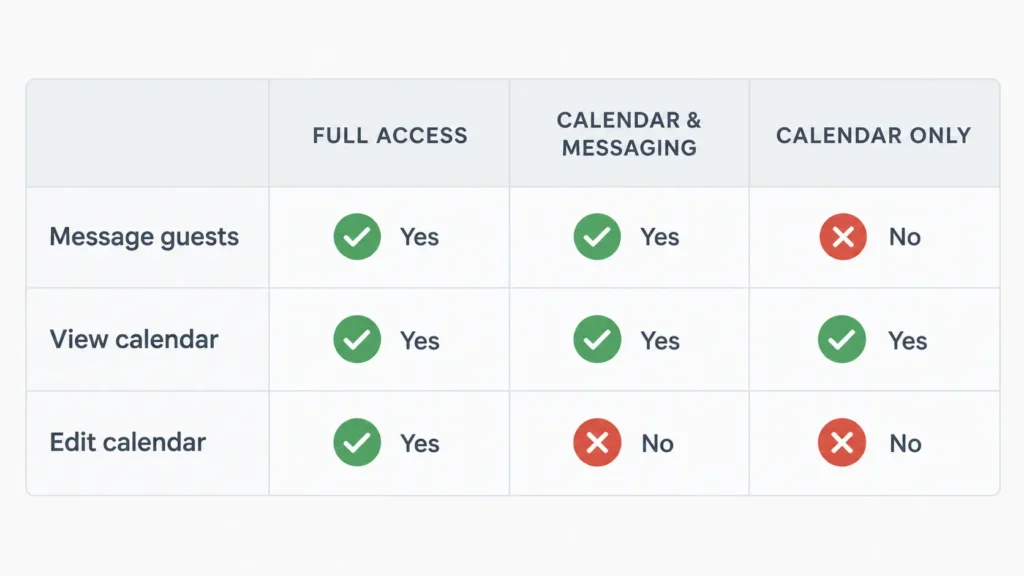
According to Airbnb’s co-host permissions guide, there are three access levels:
Full access: The co-host can manage the calendar and listing, including pricing and reservations.
Calendar and messaging access: The co-host can communicate with guests and view the calendar, but cannot edit it.
Calendar access: The co-host can view the calendar but cannot edit it or message guests.
This matters because giving someone permission to check availability is not the same as allowing them to change it.
Full access carries responsibilities beyond calendar editing. For an initial monitoring task, view-only access may be enough.
Access to give: Read-only PMS or channel-manager access where available, or Airbnb calendar access for monitoring. Consider broader access only when the task genuinely requires it.
You keep: Inventory overrides, rate changes, and decisions about conflicting or disputed reservations.
3. Prepare Booking and Pre-Arrival Messages
Guests regularly need information before they arrive.
Where should they park? What time does check-in begin? How do they collect their keys? Is the reception desk staffed late at night?
Those questions become more frequent when the information guests receive is incomplete or inconsistent.
Rather than writing the same answers repeatedly, a virtual assistant can maintain approved message templates and prepare or schedule pre-arrival communications through the property’s authorized messaging tools.
For example, the VA might:
Check that the arrival instructions match current property arrangements.
Prepare parking directions and access information.
Update messages when confirmed seasonal arrangements change.
Record early check-in or late-arrival requests for the on-site team.
Organize special requests into a clear note for the appropriate staff member.
The work should happen through the property’s established booking or messaging system, with scheduled messages used where the platform supports them.
Automated booking confirmations may already be handled by the reservation platform. The VA’s responsibility would be to maintain accurate supporting information, not send unnecessary duplicate confirmations.
Guest communications also have limits. Complaints, compensation requests, booking disputes, and unusual accommodation requests may need someone with direct knowledge of the property.
My article on customer support virtual assistants explains those decisions in greater detail.
Access to give: Authorized reservation-platform messaging access, approved templates, and the information necessary to answer routine inquiries.
You keep: Compensation, refunds, policy exceptions, and guest issues requiring management judgment.
A VA in another time zone may also be able to prepare or review messages outside your normal administrative hours, depending on the agreed schedule. That is different from promising continuous guest coverage. See my guide to working with a VA in a different time zone for the practical considerations.
4. Monitor Reviews and Draft Management Responses
Guest feedback does not stop arriving when your team gets busy.
Reviews on Google, Tripadvisor, and booking platforms can contain useful observations about cleanliness, service, amenities, and communication.
Some deserve a simple acknowledgment. Others need a closer look before anyone responds publicly.
A VA can monitor new reviews, organize recurring feedback themes, and draft suitable management responses using facts provided by the property.
For example, suppose a guest writes that the advertised airport transfer wasn’t available.
The VA shouldn’t assume the guest misunderstood the service or invent an explanation. Instead, they can check the approved transfer policy, ask the relevant staff member what happened, and prepare a factual response for management review.
Tripadvisor’s management response guidelines require relevant, professional responses that respect guest privacy. Responses should not include identifying personal details, irrelevant promotional material, or unsupported accusations.
Review collection requires care too.
The FTC’s Consumer Reviews and Testimonials Rule, effective October 21, 2024, prohibits certain deceptive practices involving fake reviews, sentiment-conditioned incentives, and review suppression.
A sensible VA task is to send neutral review requests to eligible guests according to the property’s approved process, without screening out dissatisfied guests or offering rewards in exchange for positive reviews.
Access to give: Approved review-monitoring access or access to draft responses. Publishing permissions should match the platform’s available roles and the property’s response policy.
You keep: Decisions involving disputed complaints, reputational risks, compensation, and statements about incidents the VA did not witness.
5. Keep Your Google Business Profile Current
Your Google Business Profile may be one of the first places someone checks before visiting your property.
They may want to confirm its location, visit the website, look at photos, or read recent reviews.
For a small hotel or B&B, outdated information can create confusion even when the actual accommodation is well managed.
A virtual assistant can support the recurring profile work by checking:
Contact information and booking links.
Approved photos of rooms, facilities, and shared spaces.
Published information against the property’s current details.
New reviews requiring attention.
Relevant seasonal updates or offers that management has approved.
Holiday arrangements deserve particular care. Some lodging businesses operate around the clock while reception or check-in services follow separate hours. The VA should use confirmed information rather than changing the profile to reflect an assumed schedule.
Google allows profile owners to invite a Manager through its Business Profile access system. Managers can edit profile information, respond to reviews, and manage posts, but they cannot add or remove users or delete the profile.
That makes Manager access suitable for many ongoing profile tasks without sharing the owner’s personal Google credentials.
Access to give: Google Business Profile Manager, using the VA’s own Google Account.
You keep: Ownership, material business information changes, unapproved promotions, and sensitive public responses.
For a more detailed breakdown of permissions and recurring work, see my Google Business Profile virtual assistant guide.
6. Organize Group, Event, and Holiday Booking Inquiries
Group bookings can involve more coordination than an individual reservation.
A small hotel might receive an inquiry about wedding accommodation, a family reunion, a company retreat, or rooms for an upcoming event.
For properties offering function rooms or event facilities, the same inquiry may involve catering, room arrangements, equipment, and several suppliers.
Not every lodging business provides these services, but where they exist, the administrative work can be suitable for remote assistance.
A VA could maintain an inquiry tracker containing the contact details, requested dates, approximate guest count, room requirements, and outstanding information.
They can then send approved follow-up questions, request vendor information, track responses, and prepare a concise summary for the owner or events manager.
For example, a wedding inquiry involving 12 rooms could be organized into one record showing the requested dates, available room categories, outstanding guest requirements, and the information management needs before making an offer.
The VA isn’t negotiating the group rate or committing the property to a contract.
Their job is to make sure the inquiry reaches the right decision-maker with the necessary information already organized.
Access to give: A limited-access CRM, shared inquiry tracker, approved email templates, and relevant vendor contacts.
You keep: Group pricing, contractual commitments, cancellation terms, and final booking acceptance.
If these inquiries sit in an existing CRM, accurate records matter. My CRM cleanup guide covers how to protect useful information when organizing business records.
7. Turn the Week’s Property Updates Into a Short Report
By the end of the week, information about the property may be scattered across booking platforms, staff messages, supplier emails, and spreadsheets.
One person knows about a delayed maintenance request. Another has the latest cancellation figures. The front desk has a list of upcoming arrivals.
Collecting those updates into one place can make the next week easier to prepare for.
A virtual assistant can produce a short weekly report using information from the PMS, booking platforms, and approved operational records.
The report might show:
Upcoming arrivals and departures.
Occupancy figures for an agreed period.
New bookings and cancellations.
New guest reviews and recurring feedback.
Open maintenance or supplier follow-ups.
Special requests awaiting a decision.
Tasks that need attention during the coming week.
The VA should identify where each number comes from and flag missing or inconsistent information.
For instance, if a weekly occupancy total doesn’t match the PMS report, the VA can flag the difference rather than quietly adjusting the figures.
This is reporting preparation, not revenue-management advice or supervision of housekeeping staff.
The goal is a useful account of what happened and what requires attention next.
Access to give: Read-only reporting access where supported, approved exports, and the shared reporting document.
You keep: Financial interpretation, staffing decisions, maintenance priorities, and operational changes based on the numbers.
You can adapt my virtual assistant weekly report template to capture the results, outstanding decisions, and next actions.
What a Remote VA Shouldn’t Handle at Your Property
Remote support has clear practical limits.
Someone working away from the property cannot physically respond to an emergency, inspect a room, supervise an on-site team, or confirm that a maintenance problem has been resolved without reliable information from staff.
Some responsibilities also involve authority that should remain with the property owner or qualified manager.
These include:
Guest safety and on-site emergencies: The designated on-site team needs to remain responsible for immediate action.
Rates and revenue decisions: A VA can prepare information, but management should authorize pricing changes.
Refunds and compensation: Financial remedies and disputes need authorized approval.
Payment information: Keep card details and payment processing within the property’s authorized payment systems rather than exchanging sensitive details through ordinary email or chat.
Staff supervision and property inspections: A VA can track updates, but cannot replace physical verification or an on-site supervisor.
The same distinction applies to account access.
Even where a platform permits a VA to perform a task, that doesn’t mean the assistant needs unrestricted administrative control. Use individual accounts, review permissions, and remove access when the arrangement ends.
My guides on tasks not to delegate alone and sharing access safely cover those wider considerations.
Quick Reference: Hotel VA Tasks, Platforms, and Access
Use this table to identify a realistic starting point for your property. Access options depend on the platform and the functions available under your subscription or account.
| Task | Where it happens | Access to give the VA | What you keep |
|---|---|---|---|
| OTA listing checks | Booking.com, Airbnb, other listing platforms | Restricted platform user or approved content workflow | Pricing, property policies, major edits |
| Calendar cross-checks | PMS, channel manager, OTA calendars | Read-only access where available; Airbnb calendar access for viewing | Inventory changes and overrides |
| Pre-arrival messages | Booking-platform messaging, approved email system | Authorized messaging access and templates | Refunds and guest exceptions |
| Review monitoring | Google, Tripadvisor, booking platforms | Monitoring or approved response access | Sensitive complaint decisions |
| Google Business Profile | Google Search and Maps | Manager role | Ownership and material changes |
| Group inquiries | Shared inbox, CRM, inquiry tracker | Limited CRM or inquiry access | Pricing and contracts |
| Weekly property report | PMS reports, spreadsheets, task records | Reporting access or approved exports | Business decisions and priorities |
For an Airbnb property, remember that editing the calendar or listing requires full co-host access. A narrower role may be more appropriate when the VA only needs to monitor information.
Start With Two Tasks Before the Holiday Rush
You don’t need to hand over all seven responsibilities at once.
Choose two tasks that repeatedly consume time, have clearly defined results, and can be checked without giving someone unrestricted access.
For example, you could begin with daily calendar cross-checks and review monitoring.
Run those tasks for two weeks before your busiest arrival period. At the end, look at whether discrepancies were documented, reviews were handled appropriately, and the owner received the information needed to make decisions.
If the arrangement works, you can expand it to listing upkeep, pre-arrival communications, or weekly reporting.
At Boost VA, my support includes administrative work, research, data management, content operations, and recurring reporting. If you would like to discuss a defined trial of work in those areas for your property, get in touch through Boost VA to review the scope and platform requirements. A three-day free trial is currently available.
The best starting point isn’t the longest task list. It’s the small set of online responsibilities your property can hand over clearly and review with confidence.