
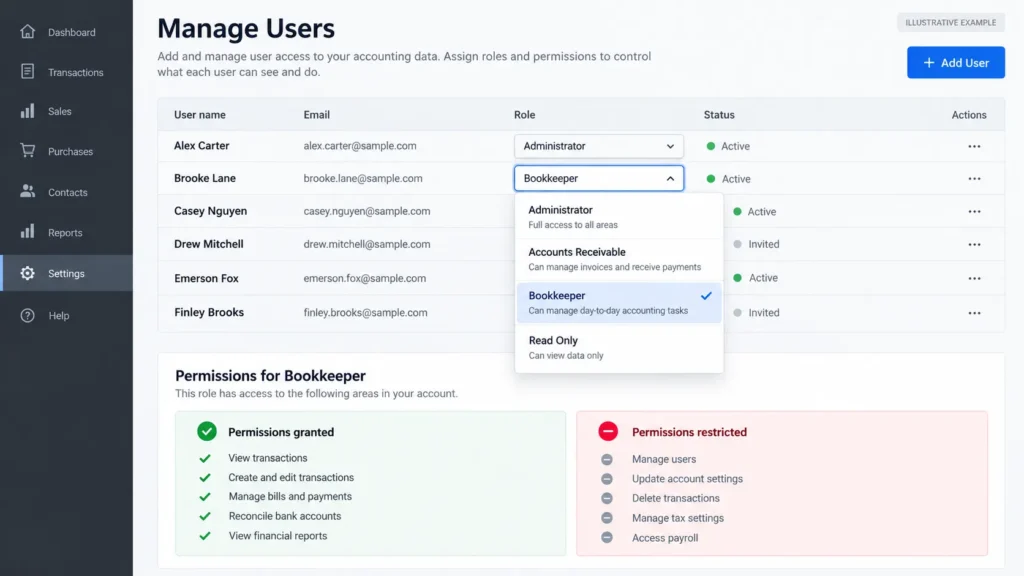
The “Bookkeeper” role in QuickBooks Online can pay bills and write checks, yet it cannot view the profit-and-loss report.
That might come as a surprise if you only wanted someone to prepare customer invoices or organize supplier bills.
When you give a virtual assistant access to QuickBooks, the important decision isn’t simply which tasks they will handle. It’s which user role you assign, because that role determines what the software actually lets them do.
Xero presents a similar decision, although its permissions are organized differently.
This guide compares the roles available for invoicing, payment tracking, bills, receipts, and bank transactions. The goal is to help you choose suitable access without handing over more financial control than the work requires.
Don’t Share Your Login: Add Your VA as a Named User
Your virtual assistant shouldn’t normally need your personal accounting-software login.
Both QuickBooks Online and Xero support individual user accounts with assigned permissions. This lets you control access without handing someone the credentials for your main account.
In QuickBooks Online, Intuit’s user-management instructions explain how to:
Open Settings and select Manage users.
Choose Add user.
Enter the person’s name and email address.
Select a role and review its permissions.
Send the invitation.
The number of available users and certain role options depend on your subscription.
Xero also supports inviting individual users and assigning roles. Its user-permissions guidance specifically recommends individual logins because shared credentials make it difficult to attribute changes to the correct person.
A named login is only the starting point, though.
If you give someone a role that can edit supplier details, make payments, or change accounting records, their separate login doesn’t remove those abilities.
The next decision is choosing what that individual login should actually allow.
For the wider account-security setup, including credential handling and MFA, see my guide on sharing account access safely with a virtual assistant.
Money Coming In: Invoices, Payment Tracking, and Reminders
Preparing an invoice is not the same as approving its contents, sending it to a customer, or recording a payment.
Those activities may sit together in an accounting-software role, even if your assistant only needs to perform one of them.
In QuickBooks Online
The Accounts receivable manager role is worth examining when the work involves customer invoices and payment records.
According to Intuit’s QuickBooks Online role descriptions, this role can:
Create and edit customer invoices.
Record payments received from customers.
Enter bank deposits.
View accounts receivable reports.
Create statements and manage customer records.
It cannot view bank registers or see the company’s overall income and expenses in certain account pages.
That makes it a more focused starting point than Standard all access for many invoice-related responsibilities.
However, the role is not limited to typing invoice details. It also includes customer-management functions, credit notes and refunds, and certain sales-tax and currency-related abilities.
If all your VA needs to do is prepare invoice information for your approval, you should consider whether that work can be completed outside QuickBooks before granting broader access.
In Xero
Xero offers a particularly useful distinction between drafting and approving transactions.
Its newer US role documentation includes Draft sales and purchases, which allows users to create draft invoices, bills, quotes, and purchase orders without approving them.
That creates a practical separation when you want an assistant to prepare transactions while another person checks them before approval.
But the name matters: this draft role covers both sales and purchases. It is not an invoice-only permission.
Xero also has a Sales role that can create, approve, and send invoices, as well as record payments received against them.
So if your VA needs to draft invoices but you want to handle final approval, Draft sales and purchases is the more appropriate option to investigate. If they need to send approved invoices or record payments directly, the Sales role provides additional capabilities, and those permissions should be deliberate.
Role labels can vary by region and software edition. Older Xero documentation uses terms such as “Invoice only – Only create drafts.” Check the exact options available in your organization.
For customer refund conversations that happen outside the accounting system, my customer-support delegation guide explains how to separate routine communication from decisions needing approval.
Money Going Out: Bills and Supplier Records
This is where accounting-software role names can become misleading.
In QuickBooks Online, the Bookkeeper role can enter supplier bills, pay bills, and write or print checks.
At the same time, Intuit says this role cannot approve bills or pay bills online through the relevant online payment functionality.
Those restrictions are important, but they don’t make the role equivalent to “enter bills only.”
Writing checks and recording bill payments are financial actions you might not want an administrative assistant handling independently.
The Accounts payable manager role goes further in another direction. It can enter and pay bills, write checks, and add, edit, or delete vendors.
For a VA whose assignment is simply collecting supplier invoices and entering approved information, that could provide substantially more authority than necessary.
Based on Intuit’s published preset role descriptions, there isn’t a straightforward bill-entry-only preset role across ordinary QuickBooks Online plans that removes all these additional abilities.
QuickBooks Online Advanced provides more flexible custom-role settings, which may help when the available preset roles are too broad.
In Xero, Draft sales and purchases allows preparation of draft supplier bills without approval authority.
By contrast, Xero’s Purchases and broader Sales and purchases roles include approval abilities and additional payment-related functionality.
Xero also has a separate Edit contact bank details permission.
For ordinary invoice preparation or recordkeeping, an assistant generally doesn’t need permission to change the bank account information associated with suppliers or other contacts.
Consider keeping that permission restricted to the business owner or the appropriate finance professional.
The same applies to actual payment authorization. Your assistant can prepare the information for review without necessarily becoming the person who releases money.
Receipts and Records: A Lower-Access Starting Point
Not every finance-admin responsibility requires access to accounting software.
Consider a business that receives receipts through email, supplier portals, and shared folders.
Before entering anything into QuickBooks or Xero, someone may need to:
Collect the receipts.
Rename files using a consistent format.
Sort them by supplier and date.
Check whether required information is present.
Identify missing or duplicate documents.
Make the organized records available to the accountant.
Those are document-handling responsibilities, not automatically accounting decisions.
The IRS explains that supporting business records include invoices, receipts, paid bills, deposit slips, and other transaction evidence.
For a US business, organizing these documents can make later bookkeeping and tax preparation easier.
A shared folder with appropriate permissions may be sufficient for the initial work. My article on spreadsheet collaboration and protected editing covers useful controls when records are maintained in spreadsheets.
If the VA needs to upload receipts directly into QuickBooks, check the permissions carefully.
Intuit documents receipt uploading and forwarding under its QuickBooks Online Advanced bookkeeping-access options, but those capabilities can come alongside broader access to transactions and banking-related functions.
Don’t assume receipt uploading is automatically a narrow, isolated permission.
For Xero, access to files and document functions also depends on the assigned role and available permissions.
Where a suitable restricted role isn’t available, it may be more sensible to keep document collection outside the accounting platform and let the owner or bookkeeper handle importing or recording the information.
This is also a good place to document the routine in a short SOP, including naming conventions, required fields, and what happens when a receipt is missing.
UK consideration: Making Tax Digital for Income Tax began applying from April 2026 to qualifying sole traders and landlords with income above £50,000 under the relevant tax-year rules. HMRC requires digital records and quarterly updates for businesses within scope. The second quarterly update deadline for the 2026–27 tax year is November 7, 2026. See HMRC’s current requirements. A VA may help organize documents, but that doesn’t make them responsible for tax submissions or compliance decisions.
The Bank Feed and Reconciliation: Decide Deliberately
Bank transactions bring another set of permissions into the picture.
A task that sounds straightforward, such as categorizing imported transactions, may require substantially wider access than preparing invoices.
QuickBooks Online
Intuit lists bank-feed categorization and account reconciliation under roles including Standard all access and In house accountant.
These roles also reach other areas of the accounting system.
Standard all access can view financial reports, manage accounts, make journal entries, and access other substantial functions. Depending on the setup and connected services, it may also include payroll-related capabilities.
In house accountant can reconcile accounts, make journal entries, view financial reports, and undo completed reconciliations, although it doesn’t include ordinary administrative or payroll-management privileges.
Neither should be treated as a small permission that only allows an assistant to categorize a few transactions.
For businesses using QuickBooks Online Advanced, custom user roles provide additional control over which features and actions a person can access.
Even then, the configured role should be checked against the actual task, because some bookkeeping options still include significant transaction-related powers.
Xero
Xero’s Standard role provides broad accounting access. Its newer role documentation describes Bank accounts as a permission available to Standard users by default, with access that includes bank transactions and reconciliation.
Cash coding is another option associated with Standard access.
The practical question is whether you genuinely need your VA working inside bank transactions, or whether the work should remain with your accountant or another suitably qualified person.
If the assignment is collecting missing receipts or preparing a list of transactions that need clarification, those supporting steps might not require reconciliation permission at all.
There is no benefit in granting a wide accounting role merely because the task has been described as “updating the books.”
What Stays With You and Your Accountant
Even with carefully chosen roles, it helps to define responsibilities before work begins.
For a general administrative VA arrangement, consider retaining the following with the business owner or an appropriate finance professional:
Payment authorization: Deciding whether money should be paid and approving or releasing payments.
Supplier bank-detail changes: Adding or changing the destination account for payments.
Payroll and tax work: Calculations, filings, compliance judgments, and associated authorization.
Accounting adjustments: Journal entries, correcting material accounting errors, and reversing completed reconciliations.
User management: Assigning higher permissions and controlling who can access sensitive financial information.
These are recommended working boundaries, not a claim that every business must operate identically.
The Association of Certified Fraud Examiners’ 2026 report found that more than half of the occupational fraud cases it examined involved missing internal controls or the override of existing controls.
That research concerns occupational fraud within organizations, not virtual assistants specifically. Still, it reinforces the value of review and appropriate separation of financial responsibilities.
There is also a professional-services distinction worth understanding.
In the UK, HMRC identifies professional bookkeeping as an accountancy service that may require anti-money-laundering supervision. Its concession for qualifying virtual assistants applies only when every specified condition is met.
A general administrative role shouldn’t automatically expand into professional bookkeeping simply because the assistant has access to accounting software.
It is worth putting confidentiality, access, and responsibility boundaries in writing before someone starts handling sensitive records.
QuickBooks and Xero: Role-by-Task Reference Table
The table below brings the key choices together.
These are starting points based on published role descriptions, not guarantees that a particular role exposes only the listed task. Check the permissions displayed in your subscription before inviting someone.
| Finance-admin task | QuickBooks Online role or approach | Xero role or approach | Additional access to consider | What you retain |
|---|---|---|---|---|
| Prepare customer invoices | Accounts receivable manager, or prepare details outside the software | Draft sales and purchases | QuickBooks AR includes customer changes, credits and refunds. Xero’s draft role covers bills and purchase orders too. | Review of amounts, terms, and exceptions |
| Record customer payments | Accounts receivable manager | Sales | QuickBooks AR includes bank deposits and customer-management functions. Xero Sales can approve and send invoices. | Verification against actual receipts and bank records |
| Enter supplier bills | Bookkeeper, or an appropriately configured Advanced custom role | Draft sales and purchases | QuickBooks Bookkeeper can pay bills and write checks. Xero drafts also cover sales documents. | Bill approval and payment authorization |
| Collect and organize receipts | Restricted external folder first; verify in-app permissions if necessary | Restricted external folder first; verify in-app permissions if necessary | Software receipt/file access may require wider permissions than document collection alone. | Accounting treatment and final records |
| Categorize bank transactions | Standard all access or In house accountant; examine Advanced custom roles | Standard with appropriate bank permissions; cash coding if needed | Access to bank records, reconciliations, reports, or accounting adjustments | Review of classification and unusual transactions |
| Reconcile accounts | In house accountant or Standard all access | Standard with bank-account access | Significant accounting access, including other transaction functions | Reconciliation review and sign-off |
Role reference reviewed October 11, 2026. QuickBooks and Xero permissions may differ by plan, region, software edition, and later product updates. Verify the exact role before assigning it.
The distinction between the platforms is useful.
QuickBooks Online offers several function-specific preset roles and more detailed customization through Advanced.
Xero uses a smaller set of broad role families with additional permissions, including a draft-only option that can be particularly useful when preparing transactions without approving them.
Neither platform removes the need to compare the entire role with the actual work.
A Five-Minute Check of Who Can Access Your Books Today
If you already have someone helping with administrative work, you don’t have to wait until the next hiring decision to review their access.
Open your accounting software’s user-management area and check:
Who has access? Look at named users, including previous assistants, contractors, and people whose responsibilities have changed.
Which role does each person have? Check the exact permissions instead of relying on the role name.
Does the role match their current work? Identify access to payments, bank details, reconciliation, reports, and user management that isn’t required.
Can anything be reduced or removed? Adjust permissions where appropriate and confirm that the person can still complete their approved responsibilities.
If an engagement has ended, follow the wider process for removing a virtual assistant’s access without losing business files.
The most useful outcome isn’t a perfect role name. It’s knowing what someone can do inside your financial systems and being comfortable with every permission they actually need.
At Boost VA, my administrative and data-management support includes document handling, structured data entry, validation, and organized reporting. Those services can support suitable recurring administrative work without replacing a qualified bookkeeper or accountant.
If you have a defined admin or document-handling workload and want help carrying it out under your chosen access rules, get in touch through Boost VA to discuss what needs doing.
This article provides general operational guidance, not accounting, tax, legal, or cybersecurity advice. Confirm financial responsibilities and access arrangements with your accountant or other appropriate professional. Software features and permissions can change.