How to Manage a Remote Virtual Assistant: Tools, Rules, and a Simple Collaboration Stack
The task is in your project board.
The latest instruction is in Slack.
The approved file is attached to an email.
The deadline was mentioned during a call.
The login was sent in a message three weeks ago.
You may have five perfectly good tools and still have a bad system for managing a remote virtual assistant.
The tools for managing a virtual assistant matter, but adding another app rarely fixes scattered information. What matters more is agreeing on what each tool is responsible for, where the current version of something lives, who updates it, and when a problem should be escalated.
For most businesses working with one VA or a small remote workflow, the goal isn’t to build the biggest possible software stack. It is to create a small collaboration system that both sides can actually follow.
Your VA Does Not Need More Apps: Your Work Needs Clear Homes
Remote work itself does not automatically tell you whether someone will perform well or badly.
A 2024 randomized study published in Nature followed 1,612 employees at a Chinese technology company. Employees working from home two days each week had similar performance grades while job satisfaction improved and quit rates fell.
That was a study of hybrid employees, not virtual assistants or Boost VA clients, so it should not be used to claim that remote VAs are more productive than employees.
The more useful lesson is simpler: location alone is a poor way to judge whether work will run smoothly. The way the work is organized still matters.
When information is scattered, a VA may have to search several places before answering basic questions:
What exactly am I responsible for?
Which instruction is current?
When is this due?
Which file should I use?
Does the client need to approve this?
Where should I report a blocker?
A useful operating principle is to give every important type of information one agreed home.
That does not mean you can only communicate in one app. It means there should be one place that wins when two locations disagree.
If you are still preparing accounts, responsibilities, first assignments, and initial communication rules, start with the virtual assistant onboarding process. The system below is mainly about what happens once regular work begins.
Give Every Type of VA Work One Home

You do not need the exact products below. If your business already has equivalent tools that work well, changing platforms may create more disruption than value.
The same question applies to the setup each person works from. My guide to productivity tools for remote workers covers the equipment and software side, from connectivity and workspace to task systems, file access, and security.
Choose the role first. Choose the product second.
Tasks and deadlines belong in a task system
Actionable work should have a durable record.
That might be Asana, ClickUp, Trello, Monday.com, another project-management system, or even a well-maintained spreadsheet for a very simple workflow.
The important part is what the task records.
Asana’s guidance on structuring work describes a useful baseline: who is doing what by when. In practice, a VA task will often benefit from five basic elements:
the expected outcome;
one clear owner;
a due date or review date;
the current status;
links to the instructions, files, or evidence needed to complete it.
Chat can support the task. It should not become the only place where the task exists.
If a deadline changes during a conversation, update the task.
If the expected result changes, update the task.
If an approval changes the next action, update the task.
That gives both sides a durable version of what is supposed to happen.
Quick questions belong in the communication channel
Slack, Microsoft Teams, email, and similar tools are useful for discussion, clarification, reminders, and short coordination.
They are less reliable as the only record of work that must still matter next Tuesday.
A useful rule is:
Discuss it in chat. Record execution-changing information where the work itself is managed.
For example, your VA may ask in Slack whether an article should publish on Thursday or Friday. Once you decide on Friday, the task deadline should also change.
Nobody should need to remember which message contained the final answer.
SOPs and reference information need a maintained knowledge home
Recurring instructions should be easy to find without searching an old conversation.
That knowledge home could be Notion, Google Docs, a company wiki, your project-management documentation area, or another system your business already maintains.
Notion is simply one example. Its sharing and permissions controls allow specific pages to be shared with external guests at different access levels.
Whatever tool you use, establish:
where the current procedure lives;
who maintains it;
how changes are marked;
which document takes priority when older instructions conflict with newer ones.
A procedure nobody knows is outdated can be worse than having no procedure at all.
Working files and deliverables need shared storage
Attachments quickly become messy when the same file moves through email, chat, downloads, and personal folders.
Use controlled shared storage as the main home for working files and deliverables.
Google Drive, Dropbox, SharePoint, or another suitable storage platform can fill that role. For example, Google Drive provides different sharing roles, allowing access to be limited according to what the person needs to do.
Decide on a simple folder and naming convention as well.
A VA should be able to answer:
Where is the current file?
without checking three message threads first.
Walkthroughs can be asynchronous when text is inefficient
Some instructions are much easier to show than explain.
A screen recording can work well when you need to demonstrate how to:
format a page;
update a recurring report;
navigate an internal system;
reproduce a repeatable process;
point out visual feedback.
Loom is one example, and its sharing controls can restrict recordings to specific viewers.
A recording should still connect back to the durable work system.
If a video explains how a recurring process works, link it from the relevant SOP or task instead of leaving the only copy buried in a message.
Credentials need secure, scoped access
Passwords should not be treated like ordinary project notes.
Where a platform supports separate users, roles, or delegated access, prefer that over handing someone your personal login.
For example, the process for delegating Google Business Profile work to a VA can use platform-level permissions rather than requiring the owner to share a personal Google password.
When a shared credential is genuinely necessary, use a suitable business password manager and limit access to what the VA needs.
1Password, for example, allows external guests to receive restricted access to a specific vault.
Account security still depends on more than the password manager itself. Both CISA and NIST recommend multifactor authentication as part of stronger account security.
Review access when responsibilities change and remove access that is no longer required.
The Tools Work Only When the Rules Are Explicit
Software creates places to work.
It does not automatically create a working agreement.
Gallup studied 2,877 U.S. hybrid workers and found that 48% said their team had not discussed a formal or informal plan for effective hybrid collaboration. Teams that continued discussing how they worked together also reported stronger collaboration and engagement.
Again, that is hybrid employee research rather than a VA study. The relevant principle is that distributed collaboration benefits from explicit expectations rather than assumptions.
For a client and VA, those expectations do not need to become a 20-page policy.
A few clear rules usually matter much more.
Agree on response windows and escalation
Not every message has the same urgency.
Clarify what normal communication looks like and what should happen when something cannot wait.
For example:
A routine question might remain in the normal communication channel.
A blocker affecting today’s deadline might require a direct message.
A genuine account or security issue may require immediate escalation.
The exact response times depend on your working arrangement, time zones, role, workload, and the importance of the work.
The rule matters more than copying someone else’s response-time target.
Define what done, blocked, and needs approval mean
Status labels should lead to action.
Done should mean the expected outcome is complete, not merely that time was spent on the task.
Blocked should mean something specific is preventing progress and the blocker has been explained.
Needs approval should mean the next step belongs to the client or another reviewer.
This is also where time tracking needs the right context.
Hours can be useful for billing, capacity planning, or understanding effort. They do not by themselves prove that the expected outcome was achieved.
For recurring work, a virtual assistant weekly report can provide a broader view of completed work, blockers, decisions, owners, and next actions without turning the relationship into constant monitoring.
Put important decisions back into the durable record
A useful remote-work habit is to treat chat and calls as places where decisions can happen, but not necessarily where those decisions should live forever.
GitLab’s remote-work documentation emphasizes accessible documentation and asynchronous working practices.
For a client and VA, that can translate into a simple rule:
If a conversation changes how the work will be executed, update the relevant task, SOP, file, or project record.
That prevents the next person, or your future self, from needing to reconstruct the decision later.
Choose Async or Live Communication on Purpose
Remote collaboration should not become a competition to eliminate meetings.
It should also not default to a meeting every time something needs to be explained.
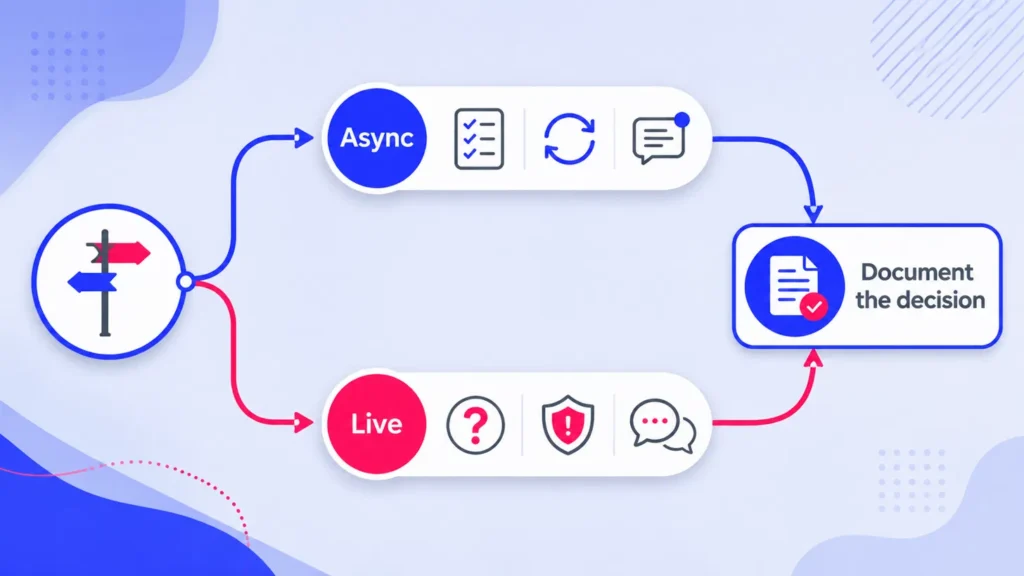
Atlassian’s distributed-team guidance recommends working agreements that make communication channels and synchronous versus asynchronous expectations explicit.
That approach works well for VA relationships too.
Use asynchronous communication for repeatable information
Async communication works well when the other person does not need to respond at the same moment.
Examples include:
routine progress updates;
completed-work evidence;
repeatable instructions;
non-urgent questions;
screen-recorded demonstrations;
review notes that can be handled later;
weekly status reporting.
Async communication also creates useful written or recorded context.
That can be especially valuable when the client and VA work across different schedules.
Use live conversation when interaction adds real value
A live call may make more sense when:
the problem is ambiguous and requires back-and-forth;
several decisions depend on each other;
an issue is sensitive;
a new workstream needs discussion;
feedback is difficult to explain in writing;
the conversation is partly about the working relationship rather than one task.
For marketing-specific work, the guide to working with a marketing virtual assistant goes deeper into context, authority, approvals, and review boundaries.
Whatever the topic, a useful live discussion should leave behind an actionable record when it changes the work.
Do You Need a Weekly Meeting With Your VA?
Not necessarily.
A weekly meeting can be useful when work is changing quickly, new responsibilities are being introduced, decisions are accumulating, or both sides are still learning how the workflow should operate.
Stable recurring work may need much less live discussion.
In that situation, a written update can show what was completed, what is active, what is blocked, and what needs a decision. A live call can then be reserved for the exceptions.
Gallup’s hybrid-work findings support regular reflection on how distributed teams collaborate, but they do not prove that every virtual assistant relationship needs a weekly call.
Choose the review rhythm based on the work.
If a weekly report answers the important questions and there are no unresolved issues, another meeting may not add much.
If the report exposes several decisions, unclear priorities, or repeated blockers, a short conversation may save far more time than another chain of messages.
Build Your VA Collaboration Stack in One Page
You can turn the entire system into one small operating map.
The purpose is not to create more documentation.
It is to make six questions easy to answer:
Where does this information belong?
Who maintains it?
What should not be stored there?
When is it updated?
What counts as a blocker?
What access is appropriate?
Use this VA Collaboration Stack Map as a starting point.
| Need | Chosen tool or system | What belongs here | What does not belong here | Owner or update rule | Escalation or access rule |
|---|---|---|---|---|---|
| Tasks and deadlines | Asana, ClickUp, Trello, or equivalent | Outcome, owner, due date, status, supporting links | Important instructions that exist only in chat | VA updates status at agreed checkpoints | Blocked or approval status triggers client action |
| Quick coordination | Slack, Teams, email, or equivalent | Questions, clarification, short coordination | The only copy of a deadline or final decision | Follow the agreed response window | Define a separate urgent escalation route |
| SOPs and reference | Notion, Docs, wiki, or equivalent | Current procedures, reference material, recurring rules | Temporary status chatter | Named owner maintains the current version | Share only the relevant pages or workspace |
| Files | Drive, SharePoint, Dropbox, or equivalent | Source files, deliverables, approved versions | Credentials | Use agreed folder and naming conventions | Apply role-appropriate permissions |
| Walkthroughs | Loom or equivalent | Demonstrations, visual feedback, explanations | Sensitive information unless sharing controls are appropriate | Link the recording from the relevant task or SOP | Restrict the audience where necessary |
| Credentials | Platform-native roles or a business password manager | Only the access required for the assigned responsibility | Passwords pasted into ordinary chat | Review access when responsibility changes | Use MFA and limit unnecessary access |
You can copy this table into a document, spreadsheet, or knowledge base and replace the examples with the systems your business already uses.
Do not change tools just to make the map look impressive.
The goal is clarity.
If both sides can point to the same place for tasks, conversations, instructions, files, walkthroughs, and access, management becomes easier to review and less dependent on memory.
The Best Stack Is the One You Can Both Follow
A complicated system that nobody follows is not better than a simple one.
Start with the tools your business already has.
Decide what each one is responsible for.
Remove unnecessary duplication.
Set a small number of rules for updates, blockers, approvals, and escalation.
Then review the setup after real work has passed through it.
If you keep copying the same information between three places, simplify.
If decisions continue disappearing in chat, strengthen the durable record.
If every routine update requires a call, move more of the workflow async.
If your VA regularly gets blocked because access is too limited, review whether the permissions still match the responsibility.
At Boost VA, I support ongoing and project-based execution inside client workflows rather than requiring businesses to adopt one fixed software stack. Once the responsibilities and operating system are clear, I can adapt to the tools and processes already supporting the work.
If you need reliable execution behind that system, explore virtual assistant support through Boost VA and bring the workflow you want help managing.