
Imagine opening your messages at 7:45 a.m. to find a note from your virtual assistant:
“I’m unwell today and won’t be available.”
Your VA usually handles customer enquiries, updates your CRM, prepares content, and keeps several recurring tasks moving. None of those responsibilities disappeared overnight, but the person managing them is unavailable.
A sick day shouldn’t automatically become a business emergency. The problem starts when you discover that nobody else knows which tasks are urgent, where the latest instructions live, or how to access the accounts needed to continue.
That’s what a virtual assistant backup plan is for. It doesn’t necessarily mean hiring a second VA. It means knowing what must continue, who can handle it temporarily, what can wait, and how to return everything to normal afterward.
This guide focuses on temporary absences, including holidays, sick days, and unexpected leave. If your working relationship has ended permanently, follow the separate guide to offboarding a virtual assistant without losing files.
Why One Absence Can Disrupt Several Parts of Your Business
Working with one reliable virtual assistant can simplify your daily operations. Instead of coordinating several people, you have someone familiar with your processes, tools, clients, and expectations.
That familiarity is valuable, but it can also create a dependency.
Suppose your VA normally manages three responsibilities:
Checks a shared customer inbox each morning.
Updates a lead-tracking spreadsheet after new enquiries arrive.
Prepares and schedules the following week’s social media posts.
If your assistant is unavailable for two days, those tasks don’t carry the same consequences.
Customer enquiries might need a response that day. Lead tracking could potentially wait until tomorrow if someone records the important information. Next week’s social posts might already be scheduled and need no attention.
The problem isn’t that your assistant is taking time off. It’s treating every responsibility as equally urgent or discovering that only one person can access the work.
A maintained SOP library for delegated tasks helps because someone else can find the current instructions. But documentation alone doesn’t assign temporary responsibility or decide what should happen during an absence.
Your coverage plan needs to answer those questions.
Three Types of VA Absence Need Different Responses
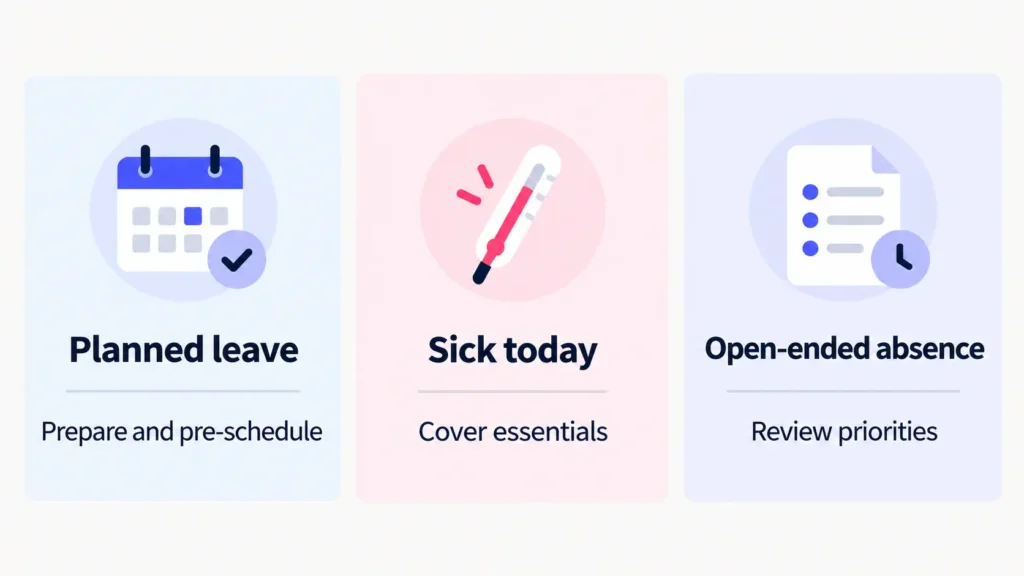
Not every absence gives you the same preparation time. A holiday booked two weeks ahead is different from a same-day sick message or an emergency with no clear return date.
Your response should reflect that difference.
Planned absence: prepare before the last working day
When your VA gives advance notice of a holiday or other planned leave, use that time to reduce the work that will need covering.
Before the absence begins:
Identify deadlines that fall during the unavailable period.
Complete or schedule suitable tasks ahead of time.
Agree which responsibilities the owner or another person will handle.
Confirm where unfinished work, files, and instructions can be found.
Arrange appropriate customer-facing messages where needed.
For example, if a newsletter is due on Thursday and your VA will be away from Wednesday, you might prepare the newsletter before Wednesday and retain final approval and sending responsibility yourself.
There’s little value in arranging temporary cover for work that can be completed safely before the absence.
Discuss availability and notification expectations early in the relationship. You can also document relevant terms alongside your virtual assistant contract.
The goal is clarity, not an expectation that your VA remains available throughout their time off.
Sudden absence: protect today’s essential work
A sick day or unexpected personal emergency doesn’t allow time for a detailed handover.
This is where a prepared plan becomes useful.
Start with the tasks that genuinely cannot wait until your VA returns.
For a small service business, that might mean checking new customer enquiries, confirming appointments, or addressing a scheduled payment issue.
Other tasks can move down the list.
If your assistant normally prepares a daily CRM report, perhaps the minimum requirement today is simply recording new enquiries and leaving the detailed reporting until later.
Avoid making a sick or unavailable VA responsible for explaining every procedure or providing passwords before the day can continue.
A workable backup arrangement should already identify the essential tasks, their instructions, and an authorized route to the necessary systems.
Open-ended absence: reassess instead of assuming a return date
An unexpected emergency can leave both the assistant and the business uncertain about when normal work will resume.
In that situation, one day’s temporary arrangement may not be enough.
Begin with essential work and a short review window. If the absence continues, reassess the workload, pending deadlines, and temporary responsibilities.
You might decide to postpone a low-priority research project while assigning time-sensitive customer communication to another authorized person.
Set a reasonable date to review whether the temporary arrangement remains workable. Keep communication respectful and consistent with the terms of your working relationship.
An open-ended absence isn’t automatically a resignation.
If the engagement eventually ends, the situation changes. At that point, use a formal offboarding process rather than continuing an indefinite temporary arrangement.
Build Your Virtual Assistant Backup Plan Around How Long Work Can Wait
The simplest way to decide what needs cover is to ask:
What happens if nobody completes this task until my VA returns?
Start with the work your assistant currently handles. Your task board, calendar, and VA weekly report can help identify active responsibilities, blockers, and upcoming deadlines.
Then sort the work into three categories.
| Coverage priority | Typical examples | Minimum action during the absence |
|---|---|---|
| Can’t wait | Urgent customer replies, confirmed appointments, time-sensitive payment issues, publishing deadlines | Assign a cover person to handle the essential action within the required timeframe. |
| Can wait a few days | Routine CRM cleanup, non-urgent follow-ups, ordinary research updates | Record incoming information or outstanding requests, then complete the work later. |
| Can wait until return | Optional documentation improvements, future content ideas, non-urgent database housekeeping | Pause the task and leave a clear note for the returning VA. |
These examples aren’t universal rules. A customer message that needs immediate attention in one business might reasonably wait until the following morning in another.
Use your real deadlines, customer commitments, and operational risks to make the decision.
Define the smallest useful version of each essential task
Temporary cover doesn’t have to reproduce your assistant’s entire normal workload.
Suppose your VA usually spends an hour processing enquiries, updating the CRM, assigning categories, preparing follow-up notes, and generating a summary.
During a short absence, you might only need someone to:
Check for new enquiries.
Respond to urgent requests using approved information.
Record anything that requires later action.
The more detailed cleanup and reporting can wait.
That smaller version of the task keeps important work moving without requiring the cover person to learn every part of your VA’s routine.
Also identify who can make decisions. Someone may be able to draft a customer response without having authority to approve a refund, change pricing, or make a financial commitment.
Those boundaries should remain clear even when coverage is temporary.
Make Sure You Can Access What You Need Without Your VA’s Password
A coverage plan is much less useful if the only person who can open an important account is unavailable.
Set up appropriate business-controlled access before an absence happens. This should be part of normal account ownership, not an attempt to obtain access through your assistant’s personal credentials.
The UK National Cyber Security Centre’s identity and access management guidance recommends defining who should have access, why they need it, and when that access should change.
For temporary VA coverage, that means making sure the owner and any approved cover person can reach the necessary systems through authorized accounts.
Inbox and calendar access
If someone needs to handle messages from a Gmail inbox, delegation may be an option.
According to Gmail’s official delegation instructions, an approved delegate can read, send, and delete email on behalf of the account owner without being able to change the account password.
On a computer, the account owner can manage this under Gmail Settings, See all settings, Accounts and Import, and Grant access to your account.
The setup must happen in advance. Gmail says a new delegate can take up to 24 hours to gain access, and work or school accounts may depend on administrator settings.
For calendar coverage, use the calendar application’s own sharing or delegation permissions. Gmail mailbox delegation doesn’t automatically grant the same rights over every connected service.
Test the arrangement before relying on it.
Password managers and shared business tools
Use named user accounts whenever the platform supports them. Where shared credentials are genuinely necessary, a business-controlled password manager can help limit how they are distributed.
For example, 1Password’s guest-sharing documentation explains how an invited guest can receive access to a single selected vault.
That can be useful for a temporary helper who needs a narrow set of business credentials rather than access to the entire password collection.
However, removing someone from a vault doesn’t guarantee they haven’t copied information they could previously view. Review or change exposed credentials when that risk matters.
Some password managers also provide emergency-access features, but they aren’t always suitable for everyday cover.
Bitwarden’s emergency-access documentation explains that trusted contacts can request access after being configured and confirmed. Automatic approval uses a waiting period of at least one day, unless the owner manually approves the request sooner.
Its emergency-access options also involve broader vault access than a narrowly scoped shared business account might require.
The practical lesson is to choose the right access mechanism before anyone is unexpectedly unavailable.
For a fuller explanation of permissions, MFA, and secure credential handling, see how to share passwords safely with a virtual assistant.
Temporary absence doesn’t automatically mean offboarding
When your VA is returning, the normal relationship continues.
You generally don’t need to delete their user accounts, transfer ownership of everything they worked on, or revoke all their permissions simply because they’re taking approved leave.
Depending on the system, the sensitivity of the data, and your business’s access policy, you may keep their existing access or temporarily suspend a particular permission.
That’s different from giving a temporary cover person permanent access.
Any special access granted for coverage should have a clear review or removal point.
If the assistant actually leaves the business, permanent access removal and ownership transfers belong in the offboarding process instead.
Who Should Cover the Work While Your VA Is Away?
Once you’ve identified the essential responsibilities, decide who can realistically handle them.
There are three common options.
You cover the essentials. This may be the easiest choice for a short absence in a business where only a few tasks need immediate attention.
For example, you could monitor the shared inbox and approve urgent requests while allowing research and routine data cleanup to wait.
An existing colleague covers specific responsibilities. This makes sense when someone already understands the business and has the necessary authority.
That colleague still needs clear instructions about what to handle, where to record the outcome, and when to escalate a decision.
A temporary assistant or other approved helper covers defined tasks. This can be useful when the absence is longer or the essential workload is too large for the owner.
Keep the assignment narrow. Supply the relevant SOPs, appropriate access, and clear limits on what the person may decide independently.
If you already have several assistants, the guide to managing multiple virtual assistants explains the distinction between primary task ownership and backup responsibility.
Don’t assume your VA provider includes backup coverage
Some providers have arrangements for covering absences, while others expect clients to make their own plans.
For example, the healthcare VA provider Vital Virtuals states in its FAQ that it doesn’t provide backup coverage and instead expects practices to arrange internal cover.
That’s one provider’s policy, not a rule for the industry.
If backup is important to you, ask your provider what happens during planned leave, sudden illness, and longer absences. Confirm which tasks would be covered, who would have access, and how quickly support could realistically begin.
For sensitive or regulated work, temporary cover may require additional account provisioning, contractual arrangements, or specialist review.
Hand the Work Back When Your VA Returns
Temporary cover shouldn’t end with everyone assuming things have returned to normal.
Your assistant may come back to find tasks completed by different people, changed deadlines, unanswered messages, and decisions they weren’t involved in.
A short handback prevents them from having to reconstruct everything.
Share what happened during the absence
Keep a simple record covering:
Work completed by the cover person.
Responsibilities that were postponed.
New requests or changed deadlines.
Decisions made by the owner.
Issues that still need attention.
A short message or a clear task-board update is usually enough. You don’t need a separate report for every small action.
If your VA resumes customer communication, identify the conversations someone else already handled so customers don’t receive duplicate replies.
Restore the normal responsibility and access arrangement
Confirm which tasks return to the original assistant and when.
Then remove temporary access that is no longer needed, including special mailbox delegation or guest permissions created for the cover person.
Gmail’s delegation instructions describe how an owner can remove a delegate through the Accounts and Import settings.
Review any credentials that were exposed outside a controlled sharing arrangement, and rotate them where appropriate.
Don’t automatically revoke the returning VA’s legitimate access as part of removing temporary cover.
Fix whatever made the absence harder than necessary
Perhaps the cover person couldn’t find the customer-response template. Maybe the current CRM procedure was stored in an old project folder. Or nobody knew who could approve a scheduled publication.
Those are useful observations.
Update the relevant instructions and address the missing access or decision rules.
You can use the next virtual assistant check-in to discuss what worked, what created confusion, and what would make the next absence easier to handle.
The goal is to improve the arrangement, not to turn an ordinary absence into a performance issue.
Your One-Page VA Coverage Card
You don’t need a complicated continuity manual to prepare for a few days without your assistant.
Use the following VA Coverage Card as a starting point. Copy it into a shared Google Doc, task-management system, or another business-controlled location.
The card should be accessible to the owner and any authorized person responsible for temporary coverage.
VA Coverage Card: Copyable Template
Business or team: [Name]
Primary VA: [Name or role]
Coverage plan owner: [Name]
Last reviewed: [Date]
1. Absence notification
Planned leave: [How and when notice should be given, according to the working agreement]
Unexpected absence: [Approved communication channel and contact person]
If the primary contact is unreachable: [Alternative authorized contact or escalation route]
2. Task priorities and minimum coverage
| Priority | Task | Minimum action while VA is away | Temporary owner | Instructions/location |
|---|---|---|---|---|
| Can’t wait | [Essential task] | [Minimum action and deadline] | [Name] | [SOP or task link] |
| Can’t wait | [Essential task] | [Minimum action and deadline] | [Name] | [SOP or task link] |
| Can wait a few days | [Task] | [Record or postpone] | [Name] | [Link] |
| Can wait until return | [Task] | [Pause and leave note] | [Name] | [Link] |
3. Fallback access
Shared inbox: [Authorized owner or delegate, setup location, and removal responsibility]
Calendar: [Business-controlled calendar and required permission]
Password manager: [Approved business vault or access arrangement]
Key project tools: [Named accounts or authorized access paths]
Access review: [Who checks and removes temporary access after coverage ends]
Never record raw passwords or recovery codes in this card.
4. Current work and instructions
SOP library: [Link]
Active task board: [Link]
Latest weekly report or task summary: [Link]
Upcoming commitments and deadlines: [Link]
5. Customer communication
Person responsible for urgent replies: [Name]
Approved holding response:
“Thanks for your message. We’ve received it and will follow up as soon as possible. If your request is urgent, please contact [approved alternative contact].”
Replace that wording with a realistic response commitment for your business. Don’t promise a deadline the cover person cannot meet.
6. Open-ended absence review
Next coverage review date: [Date]
Person responsible for the decision: [Name]
Point at which longer-term arrangements or contract terms must be reviewed: [Condition or date]
If the relationship ends, initiate the separate offboarding process rather than treating the absence as temporary indefinitely.
7. Return handback
Confirm which work was completed.
Identify postponed and unresolved tasks.
Share decisions made during the absence.
Restore ordinary task ownership.
Remove unnecessary temporary access.
Review exposed shared credentials where applicable.
Update any procedures that caused confusion.
Next planned coverage-card review: [Date or event]
Keep the Card Ready Before You Need It
Start with the handful of responsibilities that would cause real problems if nobody touched them for several days.
Confirm that another authorized person can find the instructions and access the required tools.
Review the card after an actual absence, when responsibilities change, or periodically if the workflow remains stable.
You can expand it later if the business becomes more complicated. For now, it only needs to answer the practical questions that matter during a gap.
Plan for the Gap Before It Happens
A virtual assistant taking a holiday, being unwell, or dealing with an unexpected emergency is a normal possibility in a working relationship.
It shouldn’t require every business process to stop, and it shouldn’t require the assistant to remain on call while they’re away.
The most useful preparation is straightforward: know which tasks cannot wait, assign a temporary owner, make access available through approved channels, and leave a clear record for the return.
You may find that most of your delegated work can wait a few days. That’s useful information too.
At Boost VA, I help founders and agencies organize and execute recurring work, including support with documenting repeatable processes. If your tasks are still difficult for someone else to pick up because the instructions are scattered or unclear, you can get in touch to discuss the workflow you want to organize.
A good coverage plan isn’t about replacing your assistant. It’s about keeping the business functional while allowing them to take the time away they need.