How to Onboard a Virtual Assistant: A Step-by-Step Process and Checklist
Your new virtual assistant starts on Monday.
You have plenty of work waiting, but their accounts haven’t been created. You haven’t chosen the first assignment. There is no written definition of what “done” looks like, and neither of you knows where questions should be raised.
The problem isn’t a shortage of tasks. The work simply hasn’t been converted into an onboarding process.
Learning how to onboard a virtual assistant means preparing the context, access, instructions, communication rules, and feedback they need to begin taking responsibility. It isn’t one orientation call, and it isn’t a handover of your entire backlog on the first day.
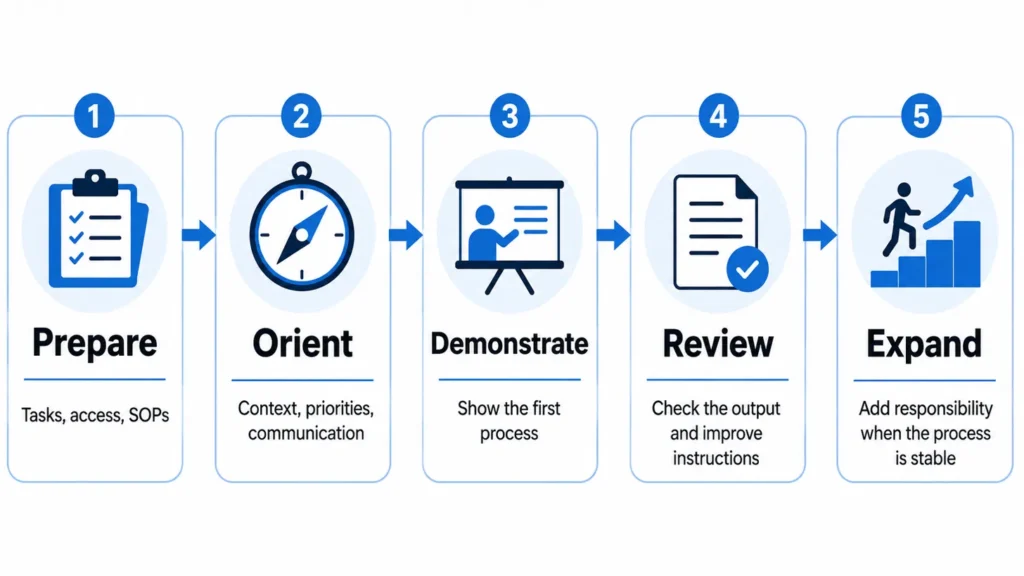
If you are still defining the role or selecting the right person, start by reviewing the common mistakes businesses make when hiring a virtual assistant. Once the person has been selected, the onboarding process can follow five broad stages:
Prepare → Orient → Demonstrate → Review → Expand
1. Define the First Responsibility Before the VA Starts
Don’t begin onboarding with a long, unorganized task list.
Choose one clear responsibility or a small group of closely related tasks that will help the VA understand how your business works.
A useful first responsibility will usually be:
Relevant to the work the VA is expected to handle regularly.
Clear enough to explain and observe.
Low enough in risk to review before anything is published or sent.
Supported by the information and access needed to complete it.
Valuable enough to produce a real business outcome.
For a simple administrative role, the first responsibility might be updating a CRM from an approved spreadsheet. For a content role, it could be preparing and formatting one WordPress draft without publishing it.
A complex recurring process may justify starting with only one task. The goal is not to keep the VA artificially busy. It is to give both of you a controlled way to test the instructions, communication, and review process.
For more ideas, use this guide to choose suitable tasks to delegate to a virtual assistant.
Define more than the task name
“Help with WordPress” is not a complete assignment.
The VA should understand:
Why the task matters.
What starts the task.
Which information or file is the source of truth.
What output is required.
What decisions they may make.
What requires your approval.
Who will review the result.
What should happen when information is missing.
Here is how that could look for a first WordPress assignment:
| Brief field | Example |
|---|---|
| Outcome | Prepare one approved article as a WordPress draft |
| Source of truth | Final article in the assigned Google Doc |
| Required work | Add headings, links, tables, image placeholders, excerpt, and metadata |
| Decision allowed | Correct simple formatting inconsistencies |
| Approval boundary | Do not publish, change the article’s meaning, or replace links |
| Definition of done | Draft saved, preview checked, links tested, and review requested |
| Escalation trigger | Missing image, broken source link, unclear heading level, or conflicting instructions |
| Reviewer | Named client or content manager |
This gives the VA something much clearer than “upload the article.”
2. Prepare Accounts, Permissions, and an Onboarding Hub
A VA cannot begin effectively when access requests are handled one at a time after the work has already started.
Prepare the essential accounts, folders, documents, and communication channels before the start date.
Use separate accounts where possible
Create a separate user account or invite the VA through the tool’s team or collaborator settings when that option is available.
Grant the access required for the current responsibility rather than opening every system immediately. This follows the principle of least privilege described in NIST’s access-rights guidance: access should match the person’s responsibilities and be reviewed when those responsibilities change.
For example, someone preparing WordPress drafts may need author or editor access. They don’t automatically need hosting, billing, domain, or administrator access.
An online store raises the same question in a sharper form, because one admin account can hold products, orders, customer information and payment settings. The guide to e-commerce virtual assistant tasks covers which store areas a VA actually needs.
Where a platform doesn’t support separate users, use the safest available sharing method, document what was shared, and avoid granting access that the task doesn’t require.
Maintain a simple access register:
| Tool | Account or user | Permission level | MFA enabled | Date granted | Review or removal date |
|---|---|---|---|---|---|
| WordPress | VA user account | Author | Yes | 3 August | Review after first month |
| Google Drive | Named email | Selected folders | Yes | 3 August | Review when scope changes |
| Project tool | Named account | Assigned project | Yes | 3 August | Review quarterly |
The same register will make future access reviews and offboarding easier.
Create one onboarding hub
Don’t scatter the role description, SOPs, examples, contact details, and meeting notes across several conversations.
Create one central folder, project, or document that contains:
A short overview of the business.
The VA’s role and current priorities.
Important products, services, or audiences.
Team contacts and responsibilities.
Working hours and time-zone expectations.
Communication rules.
SOPs and recorded walkthroughs.
Approved examples.
Required templates.
Access instructions.
The first assignment.
The next review date.
The hub does not need to become a large employee handbook. It should be a compact reference for the work the VA is expected to handle.
A system like Slack’s onboarding checklist template shows how welcome information, first-week work, training, relevant channels, and check-ins can be organized in one place.
3. Run a Kickoff That Ends with Clear Next Actions
The kickoff should help the VA understand the business and leave with a specific next assignment.
It should not become a long company history lesson with no clear action at the end.
Cover the information that affects the person’s work:
Business context: What does the business do, and who does it serve?
Role purpose: What recurring problem or workload is the VA expected to take responsibility for?
Current priority: What matters most during the first few days?
Tools and access: Which systems will be used, and what is each one for?
Working arrangements: What hours, overlap periods, deadlines, or time zones matter?
Communication: Where should tasks, updates, questions, and urgent issues go?
Approval limits: What can the VA complete independently, and what needs review?
First assignment: What should be completed first, and what does a successful result look like?
Questions: What remains unclear?
Next review: When will the first output be discussed?
Invite questions directly. An experienced VA may understand the general type of work while still needing to learn your naming rules, audience, workflow, approval process, or preferred output.
General skill, your internal process, and decision authority are three different things.
4. Train the First Task Using Demonstrate, Do, and Review
A written SOP can be useful, but it may not answer every question that becomes visible when someone performs the task for the first time.
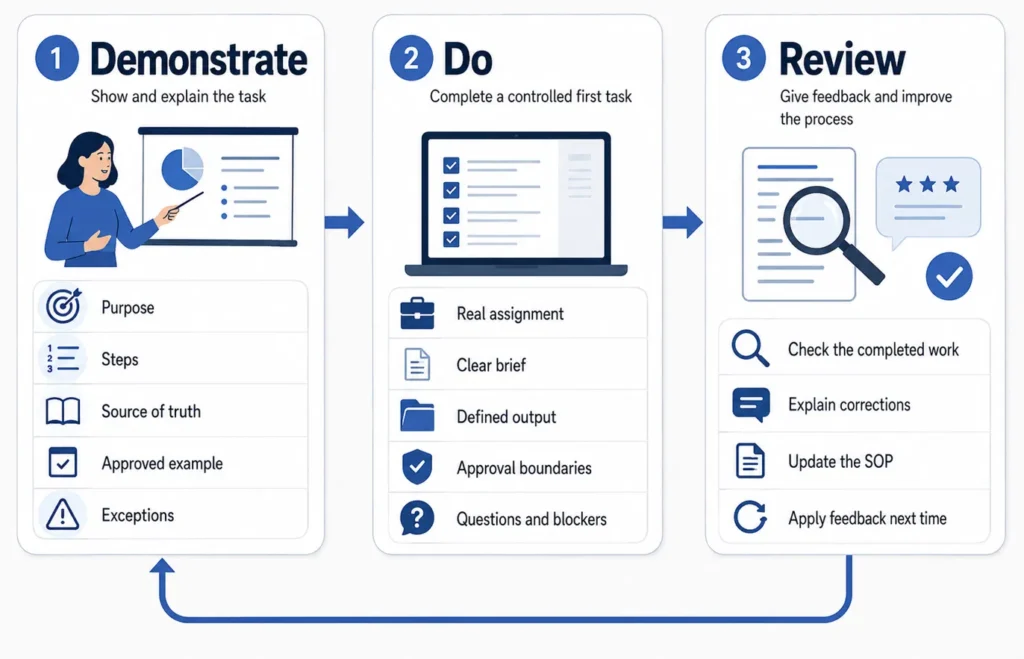
For multi-step or judgment-sensitive work, combine three forms of training:
Demonstrate → Do → Review
Demonstrate the process
Show the VA how the task is completed.
The walkthrough should explain:
The purpose of the task.
The trigger that starts it.
The source of truth.
The steps involved.
The expected output.
Common mistakes.
Important exceptions.
The reason behind any unusual rule.
Where the completed work should be stored.
When the VA should stop and ask for help.
A screen recording may be useful for a visual process, but it should be paired with a short written checklist. Written steps are easier to scan during future work, while a recording can show details that are difficult to explain in text.
An approved completed example can also prevent avoidable guesswork.
Let the VA complete a controlled version
After the demonstration, assign a real but reviewable version of the task.
For example, a VA helping with lead research could receive the following brief:
| Brief field | Example |
|---|---|
| Outcome | Research 10 potential companies that meet the approved criteria |
| Source of truth | The qualification rules in the project document |
| Required fields | Company, website, country, industry, contact, source URL, and review notes |
| Decision allowed | Exclude companies that clearly fail a mandatory requirement |
| Approval boundary | Do not contact prospects or change qualification rules |
| Definition of done | Every required field completed or marked unavailable with a note |
| Escalation trigger | Conflicting location data, unclear business model, or missing evidence |
| Reviewer | Project owner |
This controlled assignment tests more than research ability. It also reveals whether the brief, source hierarchy, spreadsheet structure, and review rules are clear.
Review the work and improve the instructions
Review the first output against the agreed result.
Specific feedback is more useful than saying the work is simply “good” or “wrong.”
Explain:
What was completed correctly.
What needs to change.
Why the change matters.
Whether the original instruction was clear.
Whether an example or exception should be added to the SOP.
What should happen on the next attempt.
A repeated question can indicate a missing rule or example in the documentation. Treat early questions and corrections as information that can improve the process, not only as a judgment of the person completing the task.
Remote onboarding also involves a normal learning period. GitLab’s remote-onboarding handbook explicitly notes that people shouldn’t be expected to reach full productivity on their first day.
5. Set Communication and Escalation Rules
“Keep me updated” can mean different things to different people.
Define what an update should contain, where it should be sent, and when it is required.
Give each communication channel a purpose
You don’t need every communication tool available. You need a predictable place for each type of information.
| Information | Possible location |
|---|---|
| Assigned work and deadlines | Project-management system |
| Quick clarification | Team chat |
| Formal decision or approval | Email or recorded project comment |
| SOP and source information | Shared documentation |
| Files and completed work | Approved shared folder |
| Urgent blocker | Agreed urgent channel |
The exact tools matter less than consistent use.
Upwork’s guidance for working successfully with freelancers also recommends defining communication channels, milestones, check-ins, and actionable feedback rather than relying on unclear expectations.
Define when to proceed, pause, or escalate
A simple decision rule can reduce both unnecessary interruptions and unauthorized decisions.
Proceed when:
The task falls within the agreed scope.
The instructions and source information are clear.
The action is reversible or already approved.
No sensitive exception is involved.
Pause when:
Required information is missing.
Two sources conflict.
The task falls outside the documented process.
The next step could create avoidable rework.
Escalate when:
A public message, payment, deletion, publication, or sensitive change requires approval.
There is a security, privacy, or access concern.
A client or customer complaint requires judgment.
An exception could materially affect cost, reputation, or delivery.
The VA is unsure who has decision authority.
A strong working relationship depends on questions being raised at the right time. The ability to communicate concerns, accept feedback, and adapt is also among the qualities that support a productive VA relationship.
6. Review Early Work Without Creating Permanent Micromanagement
New or high-risk work will usually require closer review than a stable recurring process.
That doesn’t mean every action needs permanent supervision.
Review intensity should reflect:
The risk of an incorrect result.
Whether the work is public or internal.
The person’s experience with your specific process.
The number of judgment calls involved.
Whether the action can be reversed.
The cost of correcting an error.
During the early stage, look for four types of progress.
Accuracy
Is the output complete and consistent with the brief?
Communication
Does the VA report blockers, ask useful questions, and provide updates through the agreed channel?
Process use
Are the correct templates, sources, naming rules, and storage locations being used?
Improvement
Are earlier corrections being applied, or are the same mistakes continuing without explanation?
Use these observations to improve the process and decide what happens next.
A simple review message can follow this structure:
What was completed correctly.
What needs adjustment.
Why the adjustment matters.
What should be added to the SOP.
What the VA should complete next.
When the next review will happen.
As the work becomes reliable, reduce unnecessary checking. The purpose of delegation is not to create a second version of the same workload where you still inspect every small action indefinitely.
7. Expand Responsibility When the Current Process Is Stable
Don’t expand the VA’s workload simply because a certain number of days has passed.
Use evidence from the work.
A responsibility may be ready to expand when the VA:
Completes the current task accurately across repeated cycles.
Uses the agreed system without repeated reminders.
Identifies missing information before proceeding.
Raises exceptions through the correct channel.
Understands what requires approval.
Applies feedback to future work.
Can explain the process and expected outcome clearly.
Has the capacity to take on additional work.
The next assignment should usually connect naturally to what has already been learned.
A VA who can prepare a WordPress draft accurately might next handle image uploading or final quality checks. Publishing authority can remain with the client until the process is stable and the approval boundary changes.
A VA handling lead research might next take responsibility for duplicate checks, source verification, or updating the reporting dashboard. Outreach does not have to be added at the same time.
Use the first month as a review point, not a deadline
A first-month review can help you decide whether to:
Maintain the current responsibilities.
Expand the role.
Improve the instructions.
Change the communication rhythm.
Adjust access.
Provide more training.
Rescope work that is not a good fit.
The VA doesn’t have to master every process by day 30.
A simple task with good documentation may stabilize quickly. A complex role involving several systems, clients, or approval levels may take longer.
The better question is not, “Has one month passed?”
It is, “Which responsibilities can now be completed reliably within the agreed process?”
Virtual Assistant Onboarding Launch Pack
Use the following four-part resource to prepare and review your onboarding process.
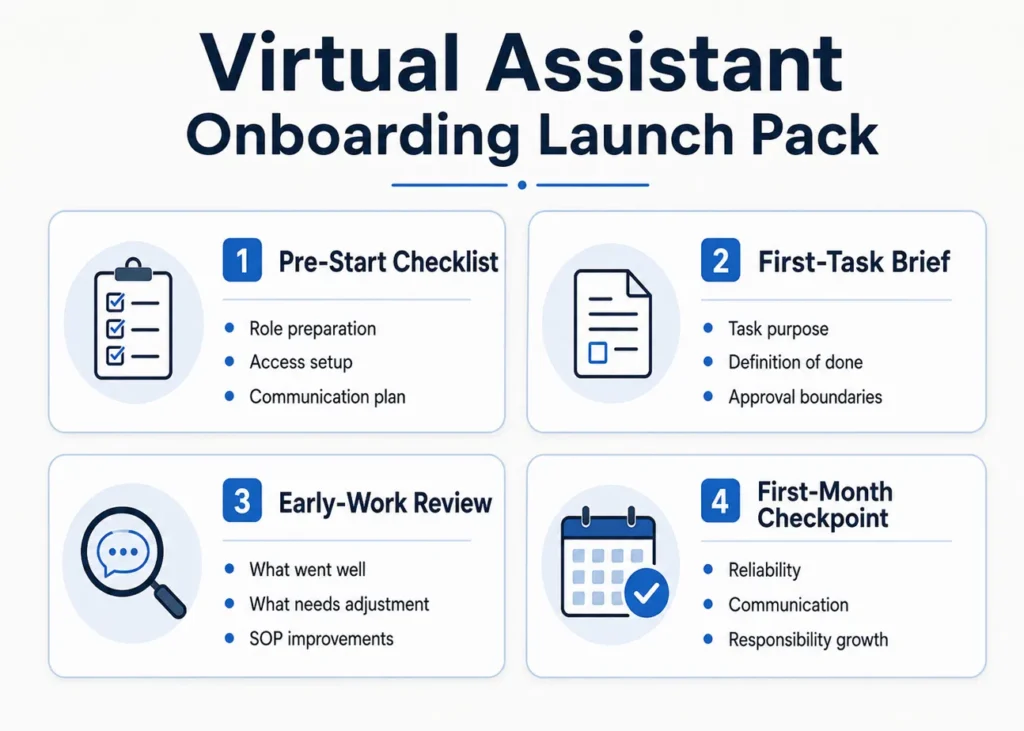
A. Pre-start checklist
Role and task preparation
Define the main outcome of the VA’s role.
Select the first responsibility.
Identify the source of truth for the task.
Write the definition of done.
Name the person who will review the first output.
Document important approval boundaries.
Prepare one approved example.
Collect or create the relevant SOP.
Access and systems
Create separate accounts where supported.
Grant only the permissions needed for the first responsibility.
Enable appropriate account security.
Record access granted.
Prepare the shared folder or project.
Test important links and invitations.
Set an access-review date.
Communication
Confirm working hours and time-zone expectations.
Choose the main task-management location.
Choose the channel for quick questions.
Define how urgent blockers should be reported.
Agree on the initial update rhythm.
Schedule the kickoff.
Schedule the first-output review.
B. First-task brief
| Field | Information to provide |
|---|---|
| Task name | A specific responsibility rather than a broad service area |
| Purpose | Why the task matters |
| Trigger | What starts the task |
| Inputs | Files, links, accounts, or information required |
| Source of truth | The approved location for current information |
| Steps | The working process |
| Required output | What must be produced |
| Definition of done | How completion will be judged |
| Deadline | When the result is expected |
| Decisions allowed | What the VA may decide independently |
| Approval required | What must be reviewed |
| Escalation conditions | Situations that should be raised |
| Completed example | A reference output |
| Reviewer | Person responsible for feedback |
C. Early-work review
After the first assignment, record:
What was accurate?
What was incomplete or incorrect?
Which questions were raised?
Which instructions were missing?
Did two sources conflict?
Does the SOP need another example?
Does access need to change?
What should be repeated on the next cycle?
What new responsibility, if any, should be introduced?
When will the next review happen?
D. First-month checkpoint
Review the working relationship across these areas:
| Review area | Questions |
|---|---|
| Reliability | Is the agreed work being completed when expected? |
| Accuracy | Is the output meeting the definition of done? |
| Communication | Are questions, updates, and blockers raised appropriately? |
| Process use | Are the agreed tools, sources, and templates being followed? |
| Improvement | Is feedback being applied to later work? |
| Authority | Are decisions staying within the agreed boundaries? |
| Workload | Is the current workload sustainable? |
| Access | Is each permission still needed and appropriate? |
| Documentation | Which SOPs or examples should be updated? |
| Next stage | Should the role be maintained, expanded, retrained, or rescoped? |
Start with One Clear Responsibility
Successful VA onboarding doesn’t require a huge manual, a complicated tool stack, or a promise that every task will be independent within 30 days.
It requires a clear starting responsibility, the right access, useful instructions, predictable communication, specific feedback, and a sensible way to expand the work.
The shift you are looking for is simple:
The VA is no longer waiting for scattered instructions. A defined responsibility is moving through an agreed system.
At Boost VA, I provide ongoing and project-based support for founders and agencies across practical backend, growth, and operational work. Start by identifying one to three responsibilities or one defined project outcome, then explore the virtual assistant support available through Boost VA.
Operational note: Employment classification, contractor agreements, tax, privacy, confidentiality, and security obligations vary by engagement and jurisdiction. This guide covers practical onboarding and is not legal, tax, or cybersecurity advice.