
12 WordPress Tasks to Outsource to a Virtual Assistant (Maintenance Checklist)
A WordPress website can appear to be running normally while small maintenance tasks quietly pile up. A plugin update is postponed. A contact form stops sending notifications. Old links begin returning errors. New articles sit in draft because nobody has time to format and publish them.
Many of these jobs do not require custom coding. They require someone to check the site regularly, follow an approved process, record what changed, and raise problems before they become larger.
This guide covers 12 practical WordPress tasks to outsource to a virtual assistant. It also explains what the VA can handle, what should be checked afterward, and when the work should be passed to a developer or another specialist.
Set the Access and Approval Rules First
Before assigning WordPress maintenance, decide exactly what your virtual assistant is permitted to change.
WordPress has different user roles and capabilities. An Editor can manage and publish content, while plugin, theme, and core updates normally require Administrator access on a standard single-site installation.
The VA should receive only the access needed for the assigned work. Someone responsible only for uploading articles may not need permission to install plugins, edit users, or change site-wide settings.
Your handoff should also define:
which changes can be made without approval;
whether updates should be tested on a staging site first;
when a fresh backup is required;
which pages and forms must be checked afterward;
how completed work should be documented;
which warnings must be escalated instead of handled independently.
A clear brief is especially important for website work. The difference between “maintain the site” and a defined WordPress responsibility is covered further in this guide to avoiding unclear virtual assistant assignments.
Which WordPress Tasks Can You Outsource to a Virtual Assistant?
1. Check and Apply Approved WordPress Updates
A virtual assistant can review the WordPress dashboard for available core, theme, plugin, and translation updates.
The task may include:
recording the current versions;
confirming that a recent backup exists;
reviewing available updates;
applying updates in an approved order;
clearing the site cache;
checking the homepage, important pages, and forms afterward;
documenting any errors or visual changes.
WordPress recommends keeping plugins updated because updates may improve security, performance, and code quality. Its plugin management guidance also recommends having a current backup before installing an update.
WordPress supports automatic updates for individual themes and plugins. However, automation does not remove the need for oversight. A VA can review the resulting email notifications, confirm that the site still works correctly, and report failed updates. WordPress also advises arranging regular backups before enabling automatic updates.
Escalate when: An update causes an error, breaks a layout, creates a compatibility warning, requires a licence decision, or affects custom functionality.
2. Verify That Backups Are Running
A backup is useful only when it includes the right information, completes successfully, and can be found when needed.
A virtual assistant can:
check whether scheduled backups completed;
confirm that both site files and the database are included;
verify the backup destination;
record the most recent successful backup;
remove expired backup files according to an approved retention policy;
report failed or incomplete backup jobs;
assist with an approved restore test on a staging site.
The official WordPress administration handbook recommends maintaining regularly timed snapshots of the full installation, including the database, in a trusted location. Its WordPress backup guidance also explains why several recent backup versions may be useful when a problem is discovered after it began.
The right backup frequency depends on how often the website changes. A busy ecommerce site may need much more frequent backups than a small brochure site that changes only a few times per year.
Escalate when: Backups repeatedly fail, storage is full, the database is missing, a live-site restoration is required, or there are signs that the available backups may already contain a problem.
3. Run Approved Security Checks
A VA can monitor routine security information without being responsible for advanced security work.
This may include:
running scans through an approved security plugin;
reviewing failed login notifications;
checking whether security definitions are current;
confirming that scheduled scans completed;
recording warnings and affected files;
checking whether administrator accounts are still recognized;
forwarding serious alerts to the owner or developer.
The purpose is not to ask the VA to diagnose or remove malware. The VA’s role is to make sure the checks occur, collect useful information, and escalate anything outside the approved procedure.
Escalate when: A scan reports malware, modified core files, suspicious administrator accounts, repeated lockouts, database changes, or an active attack.
4. Find Broken Links and 404 Errors
Links can stop working when an external website removes a page, an internal URL changes, or a link is entered incorrectly.
WordPress’s site maintenance documentation recommends checking internal and external links and reviewing reports of 404 errors. A WordPress outsourcing guide also identifies broken-link scans and comment moderation as recurring checks that help maintain a smoother user experience.
A VA can:
run an approved broken-link scan;
review reports from analytics or a link-checking tool;
correct obvious URL mistakes;
replace outdated external links with approved alternatives;
update internal links after a page URL changes;
record pages that may need redirects;
report links whose correct destination is unclear.
Removing or replacing a link is usually straightforward. Creating redirects requires more care because the new destination should match the purpose of the old page.
Escalate when: Many internal links fail at once, redirect chains appear, important pages have disappeared, or the correct replacement URL requires an SEO or content decision.
5. Test Contact Forms and Other Important Actions
A contact form may still appear correctly even when its notifications are no longer reaching the intended inbox.
A virtual assistant can test:
contact forms;
quote-request forms;
newsletter sign-ups;
booking forms;
file uploads;
confirmation pages;
notification emails;
simple checkout or enquiry steps;
connections to an approved CRM or mailing list.
Each test should use clearly identified sample information. The VA should confirm what appeared on the website, what arrived by email, and whether the submission reached the expected system.
For higher-risk actions, such as payments or account creation, provide a dedicated test procedure rather than asking the VA to experiment on the live site.
Escalate when: A form fails, notifications disappear, submissions are duplicated, integrations stop working, or fixing the issue would require code, DNS, email-server, or API changes.
6. Moderate Comments and Remove Spam
Unreviewed comments can leave the website cluttered with irrelevant promotions, suspicious links, and repeated spam.
A VA can:
review pending comments;
approve comments that meet your guidelines;
remove clear spam;
flag complaints or sensitive questions;
check whether legitimate comments were incorrectly filtered;
empty the spam and trash folders on an approved schedule;
record repeated spam patterns.
Provide examples of comments that may be approved and situations that require your response. The VA should not publish sensitive, abusive, legal, or reputation-related comments without clear guidance.
Escalate when: A comment contains a serious complaint, legal threat, personal information, security warning, or allegation requiring the business owner’s attention.
7. Upload, Format, and Schedule Content
Writing an article is only part of the publishing process. The draft may still need to be formatted, linked, illustrated, previewed, and scheduled.
A virtual assistant can:
upload an approved draft;
apply the correct heading structure;
format paragraphs, lists, and tables;
add approved internal and external links;
upload and compress images;
enter media titles and alt text;
select the approved category and tags;
add the excerpt;
enter supplied SEO metadata;
preview the page on desktop and mobile;
schedule or publish the approved post;
send the final URL for review.
These responsibilities are also included in Boost VA’s broader guide to formatting and publishing WordPress content.
The final editorial decision should remain with the person responsible for the content. A VA should not rewrite major sections, add unsupported claims, or publish without approval unless that authority has been clearly assigned.
Escalate when: The page builder behaves unexpectedly, formatting breaks, the supplied SEO information conflicts, an image licence is unclear, or a plugin error prevents publication.
8. Optimize Images and Organize the Media Library
Large image files can add unnecessary weight to a page. Poor filenames and missing media details also make the library harder to manage.
A VA can:
resize images to approved dimensions;
compress images before uploading;
convert approved files to WebP when appropriate;
use clear filenames;
add media titles and descriptions;
write accurate alt text based on what the image shows;
replace oversized files;
organize new uploads using the site’s naming rules;
identify obvious duplicates or unused files for review.
Alt text should describe the image’s relevant purpose. It should not be treated as a place to repeat the focus keyphrase unnaturally.
Deleting media requires caution because a file that appears unused in the library may still be referenced by a page builder, template, custom field, downloadable file, or external campaign.
Escalate when: It is unclear whether an image is still in use, bulk replacement is required, the media library has technical errors, or image delivery depends on server or CDN settings.
9. Maintain Approved SEO Plugin Fields
A virtual assistant can handle routine data entry and quality checks inside plugins such as Yoast SEO or Rank Math when the SEO direction has already been approved.
The work may include:
entering the supplied SEO title;
adding the meta description;
setting the approved focus keyphrase;
reviewing the slug;
checking the canonical field;
confirming whether the page should be indexed;
entering social titles and descriptions;
checking for missing image alt text;
reporting warnings after the content is uploaded.
A plugin’s coloured indicators are prompts, not a substitute for editorial judgment. The VA should not rewrite accurate sentences simply to make every indicator green.
SEO strategy, keyword selection, canonical decisions, redirect planning, and indexation changes should follow an approved brief or be reviewed by the person responsible for SEO.
Escalate when: The canonical points to another page, the page is unexpectedly set to noindex, schema conflicts appear, the requested keyphrase does not fit the article, or the plugin recommends a change that may affect meaning.
10. Run Performance and Uptime Checks
A virtual assistant can monitor whether a website is available and record basic performance changes.
A repeatable check may include:
reviewing uptime alerts;
running important pages through PageSpeed Insights;
recording mobile and desktop results;
checking for unusually slow pages;
clearing an approved cache;
confirming that image lazy loading is active;
reviewing the WordPress Site Health screen;
comparing results with the previous report;
documenting what changed before a slowdown appeared.
Performance scores can change between tests, so one result should not be treated as proof that a website is permanently fast or slow. The purpose of routine monitoring is to spot meaningful changes and provide useful information for further investigation.
Escalate when: The site goes offline, server errors appear, performance declines sharply, PHP warnings are shown, or fixing the problem requires hosting, database, code, CDN, or server configuration changes.
11. Review Users, Plugins, Themes, and Licences
Old accounts and unused software can remain in WordPress long after a project or working relationship ends.
A VA can prepare a periodic review showing:
current administrator and editor accounts;
users who may no longer require access;
plugins and themes that are active or inactive;
available updates;
expired or expiring licences;
plugins that appear abandoned or unsupported;
duplicated functionality;
tools whose purpose is unclear.
The VA should prepare the information rather than independently deleting users, plugins, or themes. Removing an apparently unused component can affect a page, integration, shortcode, form, tracking script, or background process.
Escalate when: An unknown administrator is found, a critical licence has expired, a plugin appears abandoned, two tools conflict, or the purpose of an account or plugin cannot be confirmed.
12. Prepare a WordPress Maintenance Report
Maintenance becomes easier to manage when every check does not disappear into email or memory.
A simple report can record:
date of the maintenance check;
backup status;
updates applied;
pages and forms tested;
security scan status;
broken links found and corrected;
performance results;
content published;
unresolved warnings;
work awaiting approval;
recommended next actions.
The report does not need to be complicated. Its purpose is to show what was completed, what changed, what failed, and what needs a decision.
This gives the owner or developer a useful history when a problem appears later. It also makes recurring maintenance easier to review without repeating the same questions each month.
Reusable WordPress Maintenance Schedule
The correct frequency depends on the site’s traffic, publishing activity, integrations, and business risk. Use this table as a starting point rather than a universal rule.
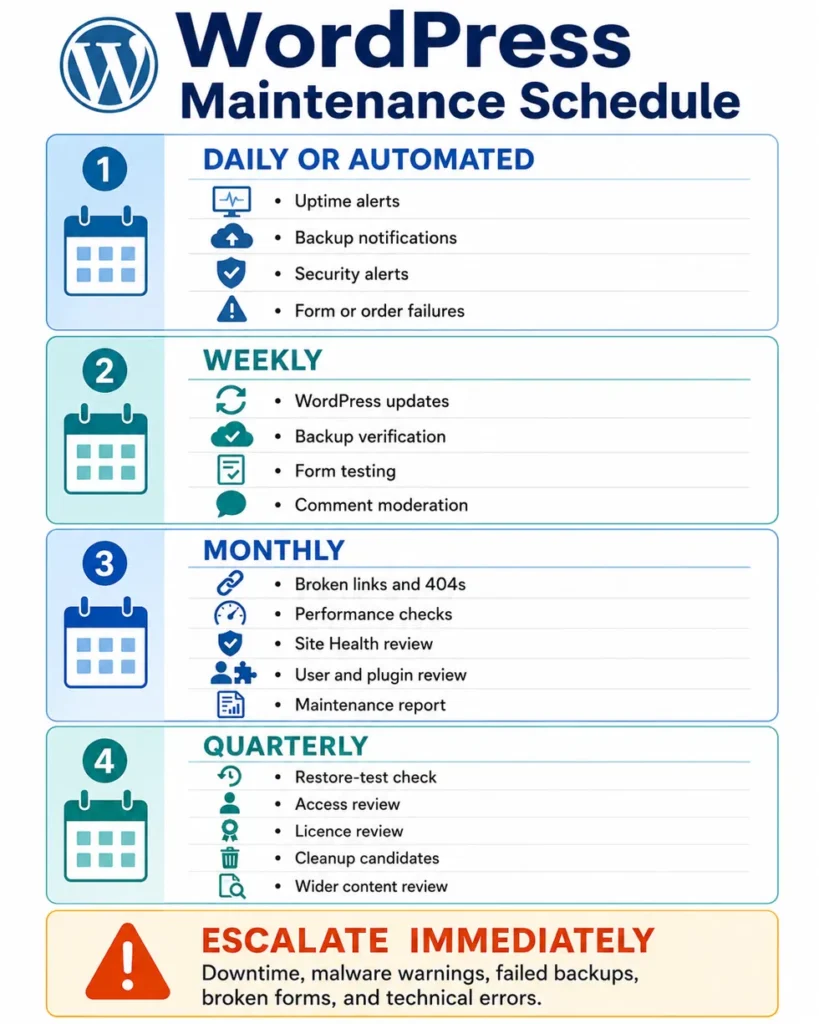
| Frequency | Suggested VA checks | Escalate or request approval for |
|---|---|---|
| Daily or automated | Uptime alerts, backup notifications, security alerts, failed form or order notifications | Downtime, malware warnings, failed backups, missing transactions |
| Weekly | Available updates, backup status, form tests, comment moderation, recent page checks | Update conflicts, broken forms, unexpected visual changes |
| Monthly | Broken links, 404 reports, performance tests, Site Health, licences, user and plugin review, maintenance report | Redirect decisions, access removal, plugin replacement, technical errors |
| Quarterly | Restore-test confirmation, full access review, inactive plugin and theme review, media cleanup candidates, wider content and link review | Live restoration, database work, server changes, large cleanup projects |
Sites with frequent transactions or daily content changes may need more frequent checks. A small information-only website may need a lighter schedule.
WordPress Tasks That Should Usually Stay With a Developer
A virtual assistant can manage repeatable WordPress administration, but that does not make every website problem an admin task.
| VA can prepare or monitor | Developer or specialist should handle |
|---|---|
| Record an error and the steps that caused it | Diagnose and repair custom PHP or JavaScript |
| Run an approved security scan | Remove malware and investigate a compromise |
| List plugins that need attention | Replace or modify a plugin affecting custom functionality |
| Test forms and report failures | Repair code, APIs, mail servers, or complex integrations |
| Record speed-test results | Change hosting, server, database, PHP, CDN, or caching architecture |
| Identify URLs that may need redirects | Design a redirect strategy or repair widespread URL problems |
| Prepare backup and update records | Restore a damaged production site |
| Upload approved content and layouts | Build custom themes, plugins, templates, or applications |
Other work that generally needs specialist support includes database repair, complex migrations, DNS changes, SSL troubleshooting, custom checkout work, major theme redesigns, and changes to website architecture.
Make the Handoff Repeatable
Start with one or two tasks that are easy to review. A useful first assignment might be checking backups, testing contact forms, and preparing a short maintenance report.
Once the process works:
Document the trigger and expected result.
Provide the correct WordPress access.
Define which changes require approval.
Show one completed example.
List the pages and functions that must be tested.
Explain which problems must be escalated.
Agree on the reporting format and schedule.
A delegation matrix can help separate routine execution from decisions that should remain with the owner or a specialist.
The goal is not to give someone unrestricted access and hope for the best. It is to create a controlled maintenance process where routine work gets completed and unusual problems reach the right person.
Keep WordPress Maintenance From Becoming an Afterthought
A trained virtual assistant can take responsibility for many recurring WordPress tasks, including updates, backup checks, broken-link scans, form testing, content uploads, image optimization, SEO fields, comment moderation, and maintenance reporting.
The safest arrangement combines clear access limits, current backups, written approval rules, post-change checks, and a reliable escalation process.
At Boost VA, I provide admin-level WordPress support for recurring maintenance, content and site updates, plugin and core workflows, performance checks, and structured issue reporting. Explore WordPress and virtual assistant support when you need these tasks handled on an ongoing or project basis.