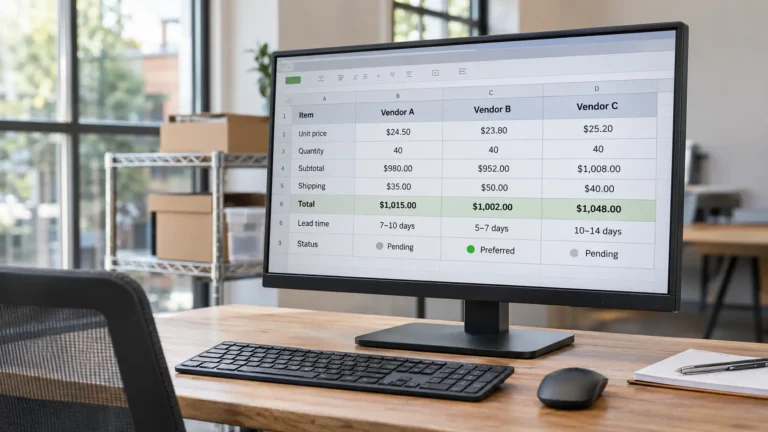
Three vendor quotes arrive in your shared spreadsheet. One is noticeably cheaper, another includes setup and reporting, and the third mentions an annual renewal that nobody has clarified. Your assistant collected the information, but you still can’t tell which offer actually costs less.
The problem isn’t necessarily the research. It’s that the quotes haven’t been put on the same basis.
This vendor comparison sheet template helps you compare offers by recording what each price includes, what it excludes, how costs change over a consistent period, where the information came from, and which questions remain unanswered.
You can build the structure in Google Sheets or Excel. It is designed for founders and small teams receiving vendor quotes gathered by a virtual assistant, researcher, or operations colleague.
The Vendor Comparison Sheet at a Glance
Use five tabs in one workbook. Each tab answers a different question, from what the vendor actually offered to whether you have enough information to make a decision.
| Tab | What it records | Main responsibility |
|---|---|---|
| 1. Quote Record | Vendor details, quote version, evidence sources, dates, renewal and cancellation terms | Collector |
| 2. Scope Matrix | Requirements, inclusions, exclusions, assumptions and unclear items | Collector, using owner-defined requirements |
| 3. Normalized Cost | Original prices, common units, required extras, comparison period and adjusted totals | Collector prepares; owner reviews assumptions |
| 4. Open Questions | Missing information, questions sent, answers received and their effect on the comparison | Collector tracks |
| 5. Decision Notes | Must-have requirements, optional scoring, risks, selected vendor and rationale | Founder or authorized decision-maker |
The sheet separates evidence from judgment. Whoever collects the quotes can populate the first four tabs without needing to decide which vendor the business should hire.
Start by agreeing on the requirements and comparison period. For example, you might compare three providers offering 100 service hours per month over 12 months, including onboarding and monthly reporting.
Without a common requirement, even an accurate spreadsheet can compare the wrong things.
Tab 1: Quote Record
The first tab establishes what was actually offered, when it was offered, and how reliable each entry is.
Use the following columns.
| Column | What to record |
|---|---|
| Vendor | Supplier or service provider name |
| Quote ref/version | Quote number, document version or other identifier |
| Date received | When the quote arrived |
| Valid until | Expiration date for the quoted price |
| Collected by | Person responsible for gathering the information |
| Contact method | Email, call, website, meeting or another method |
| Evidence source | Link or reference to the quote, email, terms page or relevant record |
| Evidence date accessed | When the supporting information was collected or checked |
| Evidence status | Confirmed in writing, Vendor-stated verbally, Assumed or Unknown |
Keep a new version or an identifiable revision when a vendor changes its offer. Otherwise, the total in your cost tab could be based on one quote while the scope information comes from another.
Evidence status is as important as the source
Use four evidence labels consistently:
- Confirmed in writing: The detail appears in a written quote, contract, email or other identifiable written source.
- Vendor-stated verbally: Someone at the vendor communicated the detail verbally, but written confirmation hasn’t been obtained.
- Assumed: The team is using a working assumption that the vendor hasn’t confirmed.
- Unknown: The information isn’t available or hasn’t been clarified.
These labels aren’t interchangeable.
For example, a monthly fee stated on a vendor’s public pricing page can be linked to that page with the date it was checked. An emailed quote may confirm a different price for your requested scope. An assistant’s estimate for a missing service should remain marked as an assumption.
Recording the distinction prevents an estimated number from appearing more certain than it is.
If you’re still deciding what information to ask a VA to collect, the guide to research tasks you can delegate to a virtual assistant covers how to define research deliverables and source requirements.
Tab 2: Scope Matrix
Vendor prices can look comparable while covering different amounts of work.
The scope matrix starts with your requirements, then records whether each vendor’s quote meets them.
Use this structure:
| Requirement | Vendor A | Vendor B | Vendor C | Notes or vendor wording |
|---|---|---|---|---|
| Required service capacity | Included | Included | Included | Confirm the same quantity and measurement period |
| Initial onboarding | Included | Included | Included | Check whether a separate setup fee applies |
| Monthly summary report | Excluded | Included | Unclear | Vendor A offers a separately priced add-on |
| Data export on exit | Included | Included | Unclear | Vendor C needs to confirm its terms |
Illustrative matrix only. The vendors and statuses shown here are invented.
Each vendor’s scope cell should contain one of three answers:
Included: The requirement is explicitly part of the quoted scope.
Excluded: The quote explicitly leaves the requirement out, even if the vendor offers it separately.
Unclear: The quote doesn’t establish whether the requirement is included or excluded.
Avoid leaving an empty cell when the information hasn’t been confirmed.
A blank could mean that the researcher forgot the field, the vendor didn’t answer, or the service isn’t available. Those are different situations.
Most importantly, unknown doesn’t mean zero cost.
Record exclusions and assumptions separately
Below the main scope matrix, add a small exclusion and assumption log using these columns:
| Column | Purpose |
|---|---|
| Item | The requirement, condition or additional service affected |
| Vendor | Which quote the item relates to |
| Type | Exclusion, assumption or prerequisite |
| Cost impact | Known, estimated or unknown, with the amount where available |
Suppose a vendor quotes a monthly management fee but excludes monthly reporting. That exclusion matters because reporting is part of your required scope.
If the vendor offers reporting for an additional fee, record the fee and its evidence source. If the fee is unknown, mark it for follow-up rather than entering zero.
Procurement professionals sometimes call this process bid leveling: aligning differences in scope, exclusions and assumptions before comparing evaluated prices. Your small-business spreadsheet doesn’t need to become a formal procurement system to use the underlying principle.
Tab 3: Normalized Cost
Normalized cost means expressing the offers using the same quantity, scope and time period.
For example, one vendor may quote hourly, another monthly, and a third annually. Comparing their headline prices without converting them to an agreed basis won’t tell you which offer is less expensive for the work you need.
This principle is consistent with Federal Acquisition Regulation 15.404-1, which discusses valid bases for price comparison and adjustments for material differences in terms and quantities. The Federal Acquisition Institute’s price-analysis guidance also describes comparing prices through common units, such as cost per hour.
Those are U.S. government procurement references used here for their comparison principles, not rules that ordinary small businesses are required to follow.
Columns for the cost tab
| Column | What it captures |
|---|---|
| Vendor | Matching vendor from the quote record |
| Pricing basis as quoted | Original amount and period, such as $900/month |
| Unit | Hour, user, project, delivery or another quoted unit |
| Normalized unit | Common quantity or service basis chosen for the comparison |
| One-time costs | Setup, onboarding, migration or other initial charges |
| Recurring costs | Monthly, quarterly, annual or other repeating charges |
| Conditional/usage costs | Charges dependent on volume, activity or an event |
| Comparison period | The time span being evaluated, such as 12 months |
| Normalized total | Calculated cost for the agreed scope and period |
| Total status | Complete, Estimated or Incomplete |
Record the currency and any exchange-rate basis if vendors quote in different currencies.
How to calculate the normalized total
For a straightforward service comparison:
Normalized total = one-time charges + recurring charges over the comparison period + required extras + estimated usage charges.
Only include the same requirements and assumptions across vendors.
If your comparison period is 12 months, a recurring monthly charge normally contributes 12 months of cost, provided the rate and relevant contract conditions support that calculation.
Include mandatory setup, onboarding and reporting fees. If usage charges depend on volume, use the same stated usage assumption for every vendor and label the result as an estimate.
Use these total statuses:
- Complete: All costs required for the agreed comparison scope and period have been accounted for using confirmed terms, with no material pricing gaps.
- Estimated: One or more amounts depend on disclosed assumptions or estimates.
- Incomplete: Missing scope or pricing information prevents a meaningful total.
Don’t let a spreadsheet formula convert an unknown into a blank that is silently treated as zero.
Also separate quoted facts from your own adjustments. When someone needs to verify the total, they should be able to work backward from the normalized figure to the original quote and supporting assumptions.
Normalized cost isn’t automatically the best value
Two providers can have equal totals and still differ in service standards, turnaround times, contract flexibility or capabilities.
Normalization makes the price comparison more meaningful. It doesn’t replace the business judgment needed to choose between offers.
Renewal and Exit Terms Belong in the Comparison
The initial price isn’t the only financial commitment a vendor may create.
An annual subscription, maintenance agreement or service contract can have renewal and cancellation conditions that affect what happens after the first comparison period.
Add these fields to the Quote Record tab:
| Column | What to capture |
|---|---|
| Initial term | Length of the original agreement |
| Auto-renews? | Yes, No or Unknown |
| Renewal length | Length of each renewal period |
| Notice window/deadline | When cancellation or non-renewal notice must be provided |
| Cancellation method | Required method for submitting notice |
| Price-change clause | Whether and how the vendor may change its price |
| Source of terms | Contract clause, linked terms page or written vendor confirmation |
Keep the exact notice requirement where available instead of reducing it to a vague entry such as “cancel anytime.”
Why recording the terms matters
Renewal rules depend on the jurisdiction, contract type and circumstances.
For example, the U.S. Federal Trade Commission’s 2024 Click-to-Cancel amendments were vacated by a federal appeals court in July 2025. The FTC subsequently reopened consideration of possible changes through an advance notice of proposed rulemaking in March 2026.
As of November 2, 2026, the FTC’s Negative Option Rule page continued to describe that rulemaking stage. The FTC’s March 2026 explanation also describes other existing enforcement authorities. The vacated amendments shouldn’t be presented as a currently effective, general Click-to-Cancel rule.
State laws may impose additional requirements. For instance, New York General Obligations Law § 5-903 addresses certain automatically renewing service, maintenance and repair contracts involving real or personal property. Its scope and exceptions matter; it shouldn’t be treated as a universal rule for software subscriptions or every business contract.
This is general operational information, not legal advice.
For your comparison, the practical task is simpler: record the original terms accurately, flag unclear provisions, and obtain appropriate advice when the contract creates material legal or financial exposure.
The person collecting terms can document them. Accepting an agreement or authorizing a recurring commitment is a separate decision, which is why clear virtual assistant approval rules are useful when research and purchasing responsibilities are split.
Tab 4: Open Questions Log
Unanswered questions shouldn’t disappear into email threads or be buried in the notes column of the first tab.
Give them a dedicated place where the founder can see what remains unresolved and who is following up.
| Column | What it records |
|---|---|
| Question | Exact clarification requested |
| Vendor | Provider being asked |
| Raised by | Person who identified the issue |
| Follow-up owner | Person responsible for obtaining the answer |
| Sent on | Date the question was submitted |
| Answer | Vendor’s response, with source reference |
| Answered on | Date the response was received |
| Changes comparison? | Yes or No, with a brief explanation |
For example:
| Vendor | Question | Follow-up owner | Answer | Changes comparison? |
|---|---|---|---|---|
| Vendor A | Is monthly reporting available, and at what fee? | Collector | Written add-on quote received | Yes, increases normalized cost |
| Vendor B | Is the quoted rate fixed for the full comparison period? | Collector | Confirmed in writing | Yes, confirms pricing basis |
| Vendor C | Is reporting included, and what is the cancellation notice period? | Collector | Pending | Yes, cost and terms remain uncertain |
Illustrative questions and responses, not real vendor communications.
An unanswered question doesn’t always need to delay every part of the comparison.
If the missing information concerns an optional feature you don’t need, it may have little effect. If it concerns a mandatory service or a major cancellation obligation, the comparison may remain incomplete until the vendor answers.
Before outreach begins, agree on who can send routine clarification questions and when approval is required. The guide to giving clear instructions to a virtual assistant can help define those boundaries.
Tab 5: Decision Notes
The final tab is where the collected evidence becomes a business decision.
Keep these columns separate from the researcher’s input fields:
| Column | Purpose |
|---|---|
| Vendor | Provider under consideration |
| Must-haves met? | Yes, No or Pending |
| Optional weighted score | Score assigned after scope and cost have been normalized |
| Risks noted | Material concerns or unresolved conditions |
| Decision | Selected, Rejected, Deferred or another owner-defined outcome |
| Rationale | Why the choice was made |
| Decided on | Date the decision was approved |
The collector may help prepare the evidence behind these fields, but the founder or another authorized decision-maker should own the final selection.
Use weighted scoring only after the quotes are comparable
Scoring can help when several providers meet the requirements and meaningful differences remain.
For example, you might assign weights to service capability, response time, flexibility and cost.
But giving a high cost score to an offer with missing charges can make the result look more objective than it really is.
First resolve essential scope differences, convert the prices to a common basis, and identify unknowns. Then use scoring if the decision genuinely benefits from it.
Illustrative Example: Three Invented Vendors, One Misleading Headline Price
Suppose a small agency needs 100 support hours per month, initial onboarding and monthly summary reporting.
An assistant collects three quotes for a 12-month comparison.
The vendors below are invented. All figures, terms and evidence descriptions are illustrative, not real offers or market benchmarks.
| Invented vendor | Headline monthly price | Setup | Reporting | Headline price rank |
|---|---|---|---|---|
| Willow | $850 | $300 | Excluded from base quote | 1 |
| Birch | $980 | $0 | Included | 3 |
| Alder | $900 | $200 | Unclear | 2 |
Willow initially looks cheapest. But the required monthly report costs another $150 per month, according to its illustrative written add-on quote.
Birch includes the report, doesn’t charge setup, and confirms the quoted monthly rate for the full 12-month period.
Alder hasn’t confirmed its reporting charge. For planning purposes, the founder uses a clearly labeled estimate of $100 per month, pending clarification.
Recalculate on the same basis
| Invented vendor | Calculation over 12 months | Normalized total | Status |
|---|---|---|---|
| Willow | ($850 × 12) + $300 + ($150 × 12) | $12,300 | Complete |
| Birch | $980 × 12 | $11,760 | Complete |
| Alder | ($900 × 12) + $200 + ($100 × 12) | $12,200 | Estimated |
On the agreed scope and 12-month pricing basis, Birch is $540 less expensive than Willow, even though Birch’s headline monthly price is higher.
The ranking has changed because the comparison now includes the required reporting service and setup charges.
Alder’s $12,200 is only provisional. The estimated reporting fee hasn’t been confirmed, so that figure shouldn’t receive the same status as the two complete totals.
What the evidence record would show
| Vendor | Evidence source | Evidence status | Renewal or exit note |
|---|---|---|---|
| Willow | Illustrative written quote and follow-up email | Confirmed in writing | Annual auto-renewal; illustrative 30-day notice condition |
| Birch | Illustrative written quote and terms | Confirmed in writing | No automatic renewal; illustrative fixed initial price |
| Alder | Illustrative verbal discussion and internal estimate | Vendor-stated verbally for base price; Assumed for reporting | Renewal and notice requirements Unknown |
These fields reveal what the price ranking alone cannot.
For Willow and Birch, the quoted costs for the required scope can be compared using the assumptions stated above. Their renewal differences still deserve review before a contract is accepted.
For Alder, the open questions concern both cost and contract terms. The founder can request clarification before including Alder in a final ranked selection.
The cheapest headline quote wasn’t the cheapest comparable offer. The sheet makes that difference visible without pretending that every uncertain number has been resolved.
When a Comparison Sheet Isn’t Enough
The workbook is useful for routine vendor-sourcing decisions, but it doesn’t replace every type of assessment.
More specialist review may be needed for:
- Contracts with significant liability, termination penalties or unusual legal conditions.
- Software vendors handling sensitive business or customer data, where security and privacy assessments matter.
- Regulated products or services with licensing, compliance or safety requirements.
- Large purchases requiring technical, financial or formal procurement review.
The spreadsheet can still organize quotes and highlight gaps in those situations. It simply shouldn’t be treated as a legal review, technical evaluation or risk assessment.
For broader guidance on responsibilities that need an owner’s judgment or qualified specialist, see tasks not to delegate to a virtual assistant alone.
Before You Choose a Vendor
Review the completed sheet and ask whether the quotes now cover the same requirements, units and period.
Check that exclusions have been priced or clearly flagged, each important figure has an identifiable source and evidence status, renewal terms are recorded, and unanswered questions have an owner.
You don’t need to eliminate every minor uncertainty. You do need to know which uncertainties could change the decision.
For founders receiving quotes collected by someone else, that is the real value of the comparison sheet: a decision can be made from the documented offer rather than reconstructed from scattered emails, assumptions and conversations.
If you want help gathering vendor information, checking sources and organizing comparisons, take a look at my Research & Lead Generation support. The scope can be agreed around the information your business needs before you make the final choice.